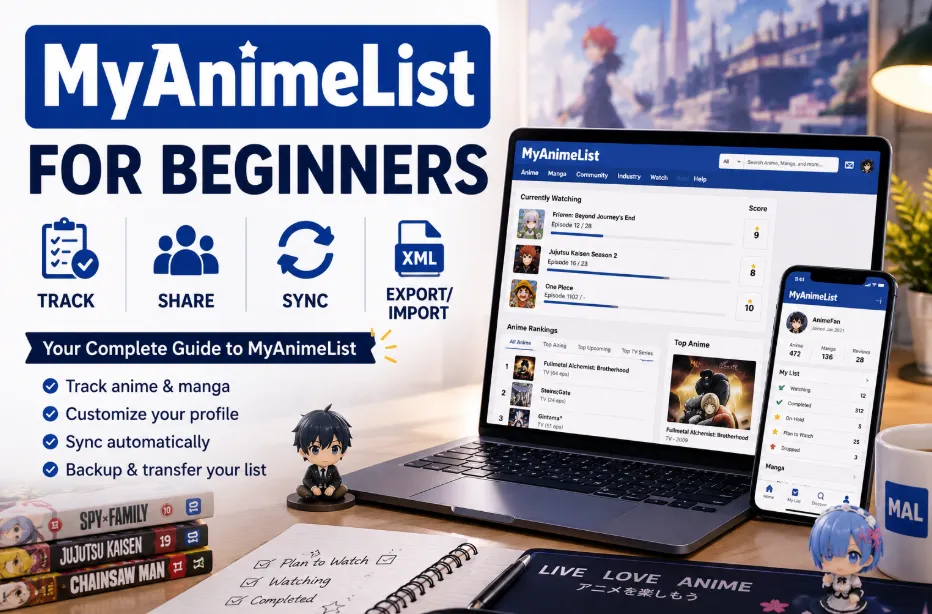
If you watch anime regularly, chances are you've already heard of MyAnimeList — often called MAL by anime fans around the world. As one of the largest anime and manga databases online, MyAnimeList has become a central hub for tracking anime, rating series, discovering recommendations, and interacting with the global anime community.
For beginners, however, the platform can feel overwhelming at first due to its massive database, scoring system, profile features, and community tools. Once you understand the basics, MyAnimeList becomes one of the most useful tools for organizing your anime journey and discovering new series efficiently.
In this beginner guide, you'll learn step by step how to use MyAnimeList, including managing your anime list, tracking progress, customizing your profile, understanding rankings, and using its key features effectively in 2026.
What Is MyAnimeList?
MyAnimeList is one of the largest anime and manga databases in the world, widely used to track watched anime, organize reading progress, rate series, and discover new recommendations. Over time, it has evolved from a simple tracking website into a full community platform that combines anime listings, seasonal charts, rankings, reviews, forums, and personalized user profiles. One of its main strengths is convenience. Instead of manually keeping track of episodes or using multiple apps, users can manage everything in one place — from watching progress and completed series to favorites and seasonal anime.
Beyond tracking, MyAnimeList also functions as a discovery platform. Features like Top Anime rankings, seasonal charts, user reviews, and Interest Stacks help users explore new shows based on their preferences. Interest Stacks, in particular, allow users to create curated themed lists similar to playlists. Even with newer platforms like AniList and Kitsu gaining popularity, MyAnimeList remains one of the most widely used anime tracking communities in 2026.
| Feature | What It Does |
|---|---|
| Anime & Manga Lists | Track watching and reading progress |
| Ratings & Reviews | Score anime and share opinions |
| Top Anime Rankings | Discover highly rated anime and manga |
| Seasonal Charts | Follow currently airing anime |
| Interest Stacks | Browse themed anime and manga collections created by users |
| Clubs & Forums | Join anime discussions and fan communities |
| Profile Statistics | View personal anime and manga stats |
| XML Export | Back up anime and manga lists for migration or storage |
| Mobile App | Update your list and track anime on the go |
How to Create a MyAnimeList Account
Creating a MyAnimeList account is the first step toward building your personal anime and manga library online. Once your account is set up, you can track watched anime, organize manga lists, rate series, and participate in the wider anime community.
Step 1: Choose How You Want to Use MyAnimeList
Most users access MyAnimeList through one of the following methods:
-
Official Website (Web Version): Best for profile customization, forums, reviews, and advanced list management.
-
Official Mobile App (iOS/Android): More convenient for quickly updating episode progress and checking seasonal anime.
- MAL-Sync: A popular browser extension that can automatically sync your anime progress while watching on supported streaming websites.
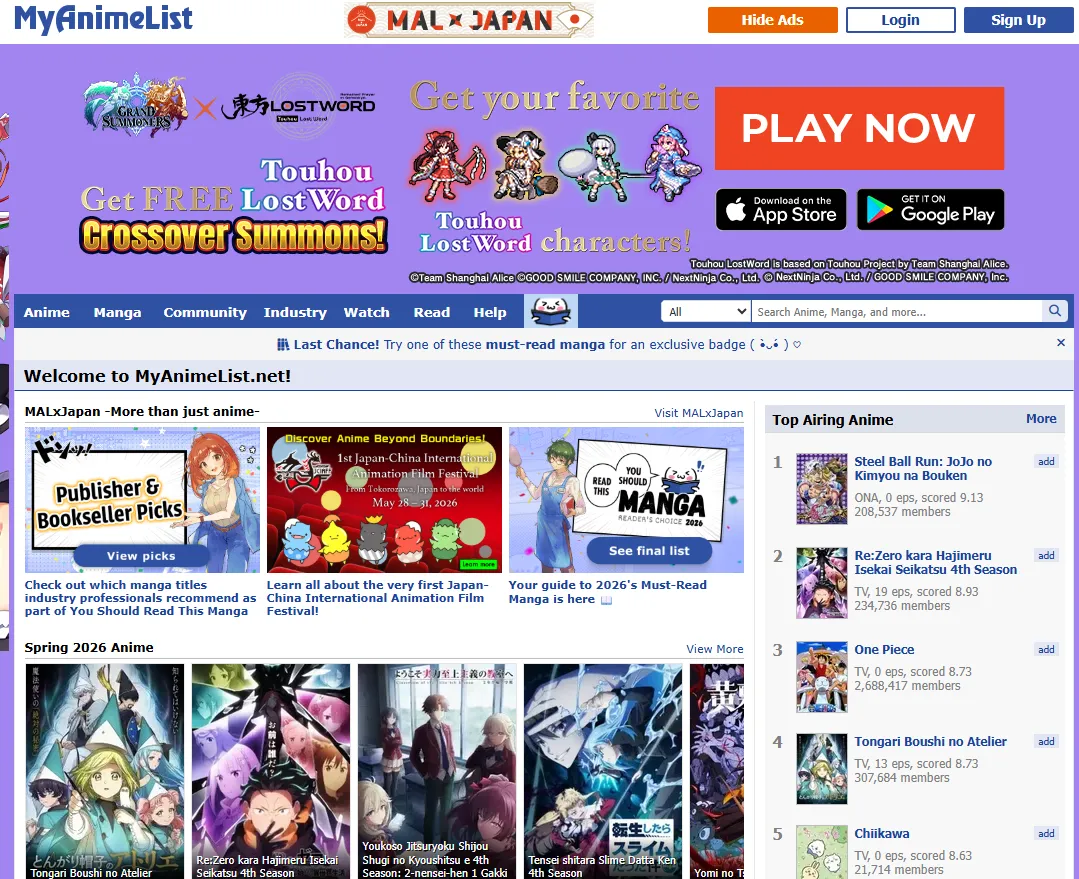
Many longtime MAL users use both the desktop site and the mobile app together depending on what they are doing.
Step 2: Register Your Account
Visit the MyAnimeList homepage and click the “Sign Up” button. You'll need to provide an email address, choose a username, and set a password.
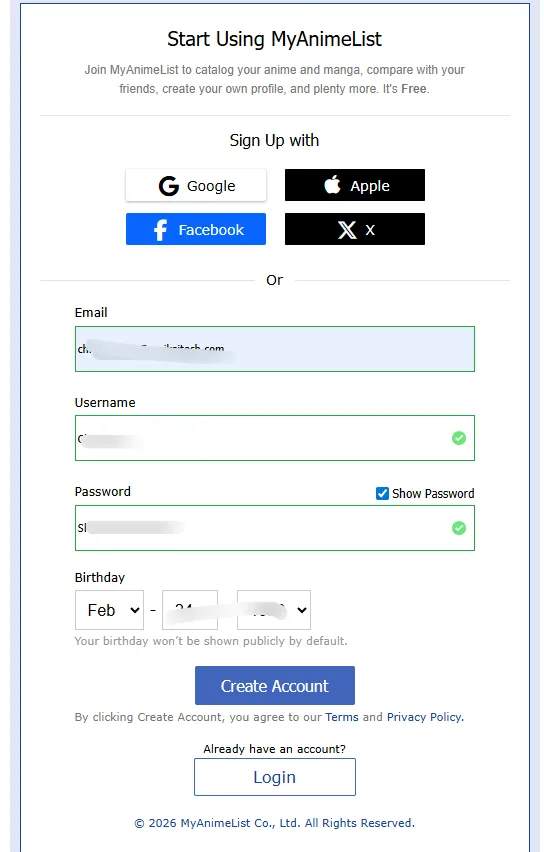
Choose your username carefully, since it becomes part of your public profile URL and anime identity within the community. While usernames can be changed later through premium features, most users keep the same profile for years. Some regions may also support faster sign-in methods such as Google or Apple accounts.
Step 3: Verify Your Email Address
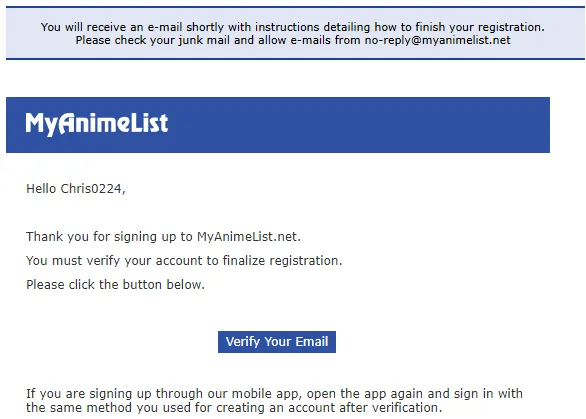
After registering, MyAnimeList will send a verification email to your inbox. Verifying your account helps protect against spam and unlocks additional community features such as reviews, forum participation, and profile interactions.
Step 4: Customize Your Profile
Once your account is active, you can personalize your profile by uploading a profile picture, adding your favorite anime and characters, adjusting privacy settings, and customizing how your anime and manga lists are displayed.
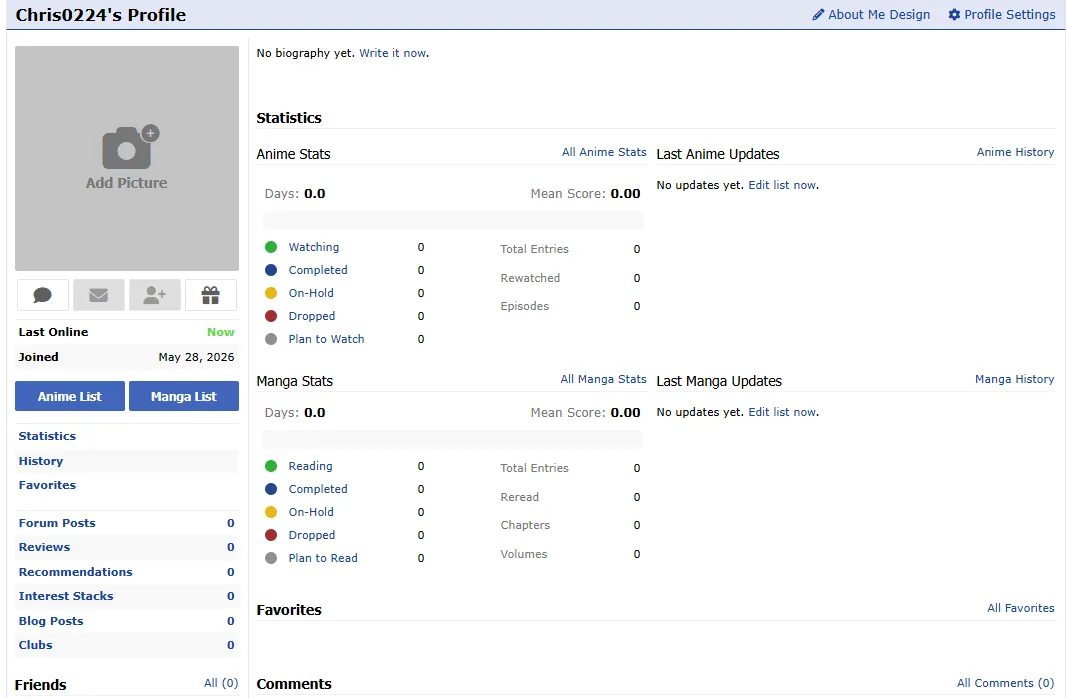
Although optional, setting up your profile early makes the platform feel more personal and helps other users understand your anime tastes.
Step 5: Start Building Your Anime List
Once your account is set up, you can begin exploring MyAnimeList by adding a few anime you've already watched and gradually building your list over time. From here, you'll be able to track your progress, rate series, and organize your anime history as you continue using the platform. In the next section, we’ll take a closer look at how tracking actually works.
How to Track Anime & Manga on MyAnimeList
Once your account is set up on MyAnimeList, the next step is learning how to properly track anime. This is the core feature of MAL, allowing you to record what you are watching, what you've completed, and what you plan to watch in the future.
Step 1: Search for an Anime/ Manga
Start by using the search bar at the top of the website or in the mobile app. Type the name of the anime you want to track, such as “One Piece” or “Frieren: Beyond Journey's End.”
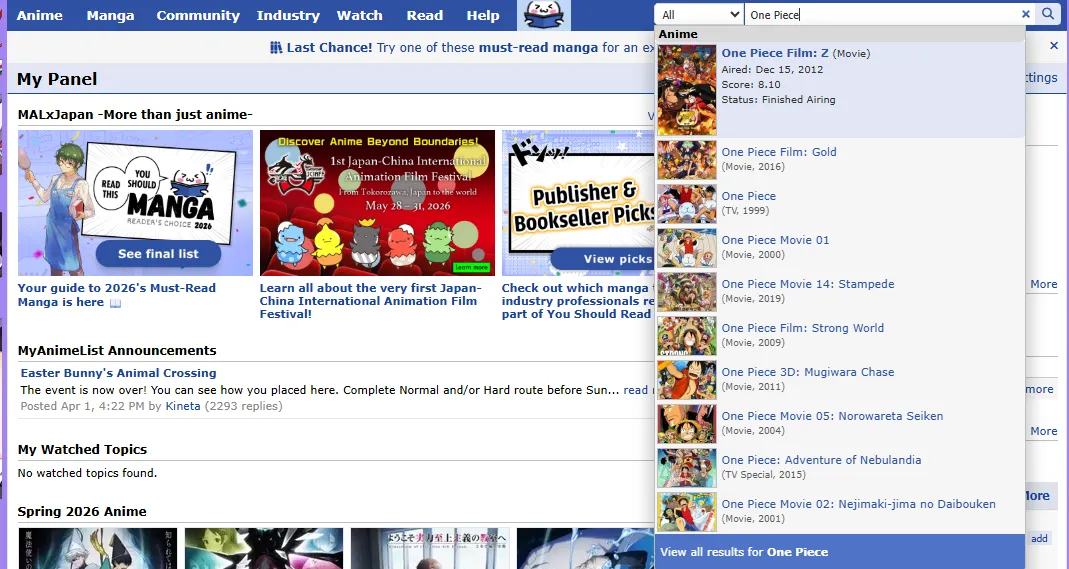
MyAnimeList will show multiple results if the series has different seasons, movies, or spin-offs, so make sure you select the correct entry before proceeding.
Step 2: Add the Anime/Manga to Your List
Once you're on the anime page, click the “Add to List” button. This will add the title to your personal tracking list.
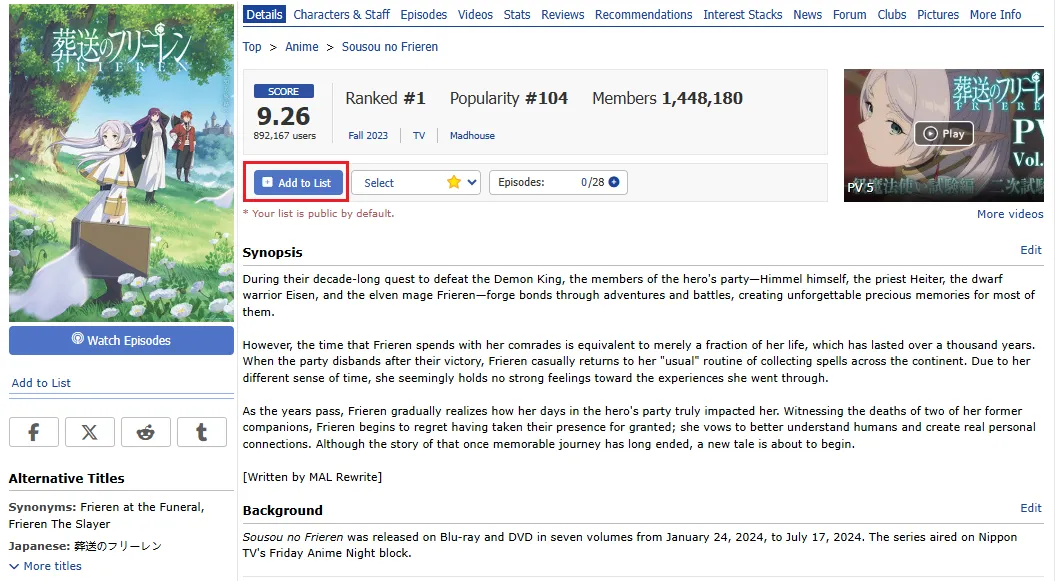
You will then be able to assign a status:
-
Watching — Currently watching the series;
-
Completed — Finished the anime;
-
Plan to Watch — Saved for later;
- On-Hold — Temporarily paused;
- Dropped — Stopped watching.
This step is the foundation of your entire MyAnimeList profile, as everything you track builds from here.
Step 3: Update Your Episode Progress
After adding an anime to your list, you can track your viewing progress using the Episodes field. On each anime entry, you'll see a counter such as “2 / 28,” which shows how many episodes you've watched out of the total available episodes. You can manually update this number as you continue watching.
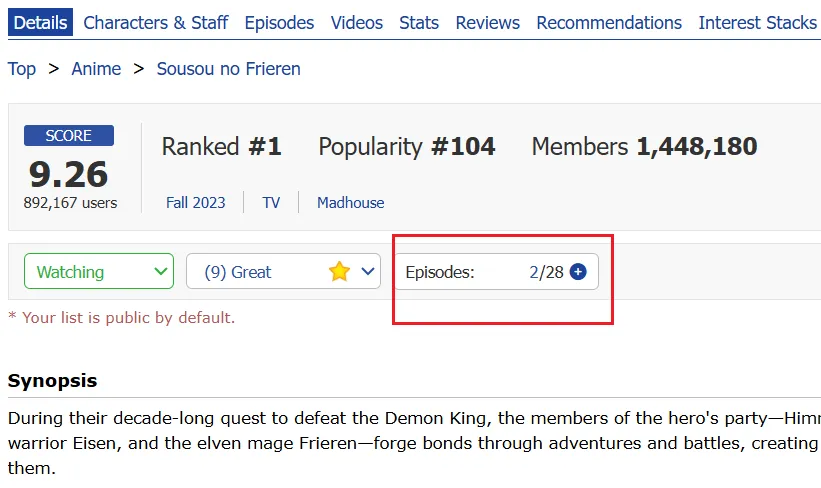
For example, if you're on episode 5 of a 12-episode series, simply set the value to “5 / 12.”This is the most important part of MyAnimeList tracking, as it keeps your watch history accurate and up to date.
Step 4: Rate the Anime Using the Score System
Once you've completed a series, you can assign a score using MyAnimeList’s 1–10 rating system:
| Score | Meaning |
|---|---|
| 10 | Masterpiece |
| 9 | Great |
| 8 | Very Good |
| 7 | Good |
| 6 | Fine |
| 5 | Average |
| 4 | Bad |
| 3 | Very Bad |
| 2 | Horrible |
| 1 | Appalling |
You can set your score from the anime page or update it in your list view. This rating helps organize your personal preferences and contributes to the overall community score.
Step 5: Build and Organize Your List Over Time
As you continue using MyAnimeList, your list will naturally grow. You can sort and filter anime by status, score, or title to keep everything organized. Over time, your MAL profile becomes more than a tracking tool — it becomes a personal archive of your anime journey.
Note: MyAnimeList also supports manga tracking, and the process works in almost the same way as anime.
How MyAnimeList Rankings & Scoring System Work
MyAnimeList’s ranking and scoring system is one of the platform’s core features. It helps users discover popular anime and understand how titles are evaluated by the global community. For beginners, the key distinction is understanding the difference between a “popular” anime and a “high-rated” anime.
What Are MyAnimeList Rankings?
Rankings on MyAnimeList are public lists generated from user data and community activity. The main ranking categories include:
-
Top Anime: Ranked by average user scores (quality-based ranking).
-
Most Popular Anime: Ranked by number of users who added the title (engagement-based ranking).
-
Seasonal Rankings: Track the performance of currently airing anime.
-
Top Manga: Separate rankings for manga titles.
Note: These rankings are continuously updated as new users join, add titles, and submit ratings.
How Anime Rankings Are Calculated
MyAnimeList rankings are not based on a single factor, but on a combination of rating data and user engagement.
-
Mean Score (User Ratings): The primary factor in the “Top Anime” ranking is the average user score, calculated from all submitted ratings.
-
Number of Ratings: The volume of votes also matters. Anime with more ratings tend to have more stable positions, while titles with fewer votes can fluctuate more easily.
-
Popularity vs Quality: MyAnimeList separates Popularity (how many users added the anime) from Quality (the actual score). This is why a widely watched series is not always the highest-rated one.
How Your Score Affects Rankings
When you rate an anime, your score becomes part of the overall average. However, its influence should be understood in context:
-
Individual impact is minimal: Rankings are based on thousands to millions of votes.
-
Long-term contribution: Your score helps shape the overall dataset over time.
-
Statistical balance: Each rating is one data point in a much larger system.
Note: MyAnimeList uses internal systems to reduce the impact of abnormal or biased ratings.
Why Rankings Change Over Time
Anime rankings are dynamic and can change even years after release due to:
-
New users joining and submitting ratings.
-
Older anime accumulating additional votes.
-
Seasonal anime stabilizing after their final episodes air.
-
Re-evaluation by new audiences over time.
Understanding Score Bias (Important Insight)
While rankings are useful for discovery, they are not perfect indicators of quality. Some common biases include:
-
New Releases: Often have unstable or polarized ratings during the first few weeks.
-
Popular Franchises: Tend to receive extreme scores (either very high or very low) due to fan hype.
-
Older Classics: Usually stabilize with more consistent averages as they find their permanent audience.
Ranking Cheat Sheet for Beginners
| You want... | Look at... | Why? |
|---|---|---|
| The all-time best anime | Top Anime (Score) | Strong community consensus on quality |
| What’s trending | Most Popular Anime | Shows what everyone is watching |
| Latest hits | Seasonal Rankings | Real-time performance of ongoing shows |
Summary: MyAnimeList rankings combine user scores, popularity, and engagement to create a constantly evolving system. While individual ratings contribute to the overall data, final rankings are shaped by the global community as a whole, making them a useful but imperfect guide for discovering anime.
How to Share Your Anime List & Connect with the Community
MyAnimeList is not just a personal database; it is also a global social platform. Sharing your profile allows you to showcase your anime identity and connect with users who share similar tastes.
Step 1: Manage Your Interaction Settings
In your account settings, you can control how other users interact with your profile and activity.
-
Friend Requests & Messages — Choose whether everyone or only friends can contact you
-
Comments — Enable or disable comments on your profile page
-
Profile Details — Add personal information such as gender, birthday, or location
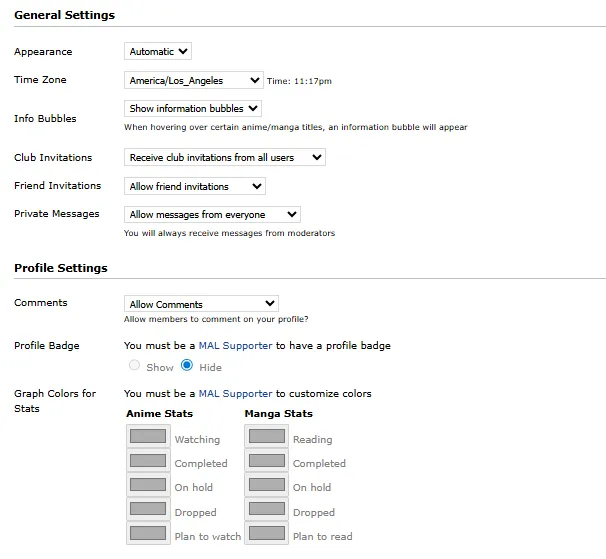
You can also set your birthday to private if you prefer not to display it publicly.
Step 2: Customize Your Profile Appearance
MyAnimeList allows you to personalize your profile so it better represents your anime identity.
-
Privacy Settings — Control whether your anime and manga lists are public or private
-
Favorites Section — Select your top anime, manga, and characters to display on your profile
-
List Style Design — Customize your list layout or apply CSS themes (desktop version)

These settings help you create a profile that reflects your personal taste and viewing style.
Step 3: Share Your Public Profile URL
MyAnimeList does not have a dedicated “Share” button. Instead, your profile is accessed through a permanent URL: https://myanimelist.net/profile/YOUR_USERNAME
When others visit your profile, they can view your anime list, favorites, ratings, and activity statistics (depending on your privacy settings). You can share this link on Discord, Reddit, X (Twitter), YouTube descriptions, or anime forums to connect with other users.
Step 4: Compare Taste & Explore Community Features
Sharing your profile allows you to use MyAnimeList’s compatibility system. When visiting another user’s profile, MAL compares shared anime and rating patterns to estimate your compatibility level (low, medium, or high).
You can also explore Interest Stacks, which are curated themed lists such as “Emotional Anime for Beginners” or “Anime to Watch After Frieren.” These are commonly used for discovering new recommendations within the community.
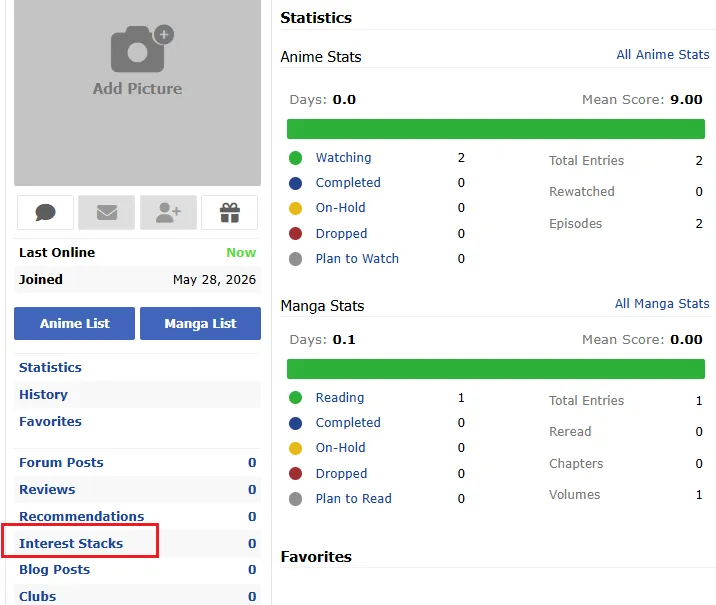
Summary: Your MyAnimeList profile is more than just a tracking tool — it is a long-term record of your anime journey. It reflects your evolving taste, favorite genres, and viewing history over time. Sharing your profile is not about showing off statistics, but about connecting with a global anime community through shared interests.
How to Sync Automatically & Export/Import Your List
One of the most powerful ways to improve your MyAnimeList experience is to combine automatic syncing with data backup tools. This ensures your anime list is always up to date while keeping your viewing history safe over time.
Step 1: Enable Automatic Tracking with MAL-Sync
MAL-Sync is an industry-standard browser extension (Chrome, Firefox, Edge) used for automating anime tracking on MyAnimeList. Once installed, it connects your video player with your MAL profile.
-
Auto-Detection — Identifies anime titles on supported streaming sites
-
Real-Time Tracking — Updates your progress (e.g., from 2/12 to 3/12) after you finish an episode
-
Manual Correction — Lets you fix incorrect detections directly from a dropdown menu
Step 2: Connect MAL-Sync with Streaming Platforms
After installation, MAL-Sync integrates directly into supported streaming websites.
-
Authorization — Log in and authorize your MyAnimeList account through the extension settings
-
Background Syncing — Your progress is updated automatically while you watch
-
Cross-Platform Updates — Changes will be reflected across your MyAnimeList account after syncing
This allows you to track anime without manually updating episode counts.
Step 3: Sync with AniList for Cross-Platform Use
Many anime fans in 2026 use both MyAnimeList and AniList. To avoid duplicate tracking, you can keep both platforms aligned using third-party tools or extension features.
-
Dual Login Support — Connect both MAL and AniList accounts in supported tools
-
List Synchronization — Perform a full synchronization to align watch history and ratings
-
Cross-Platform Consistency — Keep your anime data updated across services
This is especially useful if you switch between platforms or maintain multiple anime tracking profiles.
Step 4: Export & Import Your List (Backup System)
Automation is for convenience, while exporting is for security. MyAnimeList allows you to back up your anime data manually in XML format.
-
Export (XML Format) — Download your entire anime history as a backup file
-
Import / Restore — Upload the XML file to recover or transfer your list
-
Data Portability — Use your exported file to move your list between supported platforms
This ensures your anime history is never permanently tied to a single account.
Frequently Asked Questions (FAQ) for Beginners
1. Is MyAnimeList free to use?
Yes. MyAnimeList is completely free to use for most features, including:
-
Tracking anime and manga
-
Rating series and creating lists
-
Browsing rankings and seasonal charts
-
Reading reviews and participating in forums
There is also a premium option, but it is optional and not required for normal use.
2. Can I also track manga, share, sync, and export/import it on MyAnimeList?
Yes. MyAnimeList supports both anime and manga within the same account, and most features work across both. This makes MyAnimeList a unified tracking system for both watchi
3. Can I watch anime on MyAnimeList?
No. MyAnimeList does not host or stream anime. Instead, it functions as:
-
A tracking platform
-
A database for anime and manga information
-
A community and recommendation hub
It links to external streaming platforms rather than providing video content directly.
4. What is the difference between MyAnimeList and AniList?
Both platforms are anime tracking services, but they differ in style:
-
MyAnimeList (MAL): Larger community, more traditional interface, extensive database.
-
AniList: Modern UI, more detailed statistics, better customization features.
Many users actually use both platforms together.
5. Can I sync MyAnimeList with AniList?
Yes, but not officially through MyAnimeList itself. Users typically rely on third-party tools or browser extensions to:
-
Transfer lists between platforms.
-
Keep watch history and ratings aligned.
-
Maintain both accounts simultaneously.
6. Is MyAnimeList good for beginners in 2026?
Yes. MyAnimeList remains one of the most beginner-friendly platforms due to:
-
Simple list-based tracking system.
-
Large community and database.
-
Easy access to rankings and recommendations.
-
Strong support for seasonal anime tracking.
Note: The interface may feel slightly outdated compared to newer platforms.
7. Can I make my anime list private?
Yes. MyAnimeList allows users to control privacy settings. You can choose:
-
Public lists (visible to everyone).
-
Private lists (visible only to you).
Most users keep their lists public to engage with the community.
8. Why isn't my score showing up in rankings?
This is usually not an error. MyAnimeList updates rankings continuously based on user data. Possible reasons include:
-
Processing delay in updating statistics.
-
Low activity or limited data for new accounts.
-
Internal filtering to reduce spam or abnormal ratings.
9. Why is MAL-Sync not updating my progress?
If MAL-Sync stops working, it is usually due to:
-
A logged-out session on MyAnimeList.
-
An unsupported or partially supported streaming site.
-
Anime title mismatch between the site and the MAL database.
-
The browser extension being disabled or restricted.
Re-logging or manually selecting the correct title usually resolves the issue.
10. Why can't I find certain anime in search?
MyAnimeList focuses mainly on officially recognized anime entries. A title may be missing because:
-
It has not been added yet or is still under database moderation.
-
It does not meet MAL’s inclusion criteria.
New entries are usually added shortly after release or announcement.
11. What is the difference between Recommendations and Interest Stacks?
-
Recommendations: Personalized suggestions based on a specific anime you watched.
-
Interest Stacks: Community-created themed lists (e.g., “Cyberpunk Anime Essentials” or “Emotional Anime Picks”).
12. What should I do if I lose my anime list?
If you previously exported your list as an XML file, you can restore it through the import feature in settings. Without a backup file, recovery may be difficult, so regular exports are recommended.
Conclusion: Your Anime Journey Starts Here
In 2026, MyAnimeList remains more than just an anime database—it is a complete tracking system for your watching and reading history. Whether you are a casual viewer or a long-time fan, it provides a centralized way to organize your progress, explore new series, and engage with the global anime community.By following this guide, you have now understood the four core elements of the MyAnimeList experience:
-
Tracking & Accuracy — How ratings, lists, and rankings work within the system
-
Community & Sharing — How to set up your profile and interact with other users
-
Automation & Syncing — How tools like MAL-Sync reduce manual tracking
-
Backup & Portability — How export/import protects your viewing history
As you continue watching new series and revisiting older favorites, your MyAnimeList profile naturally becomes a structured record of your anime journey. Instead of manually managing every update, you can now focus on what matters most—discovering and enjoying the stories that define your taste. Keep your list updated, explore new recommendations, and let your profile evolve alongside your viewing experience.