Keeping up with anime in 2026 is not as simple as it used to be. With new seasonal titles, long-running series, and content spread across multiple streaming platforms, it’s easy to lose track of what you’re watching or forget your progress.
To stay organized, many viewers use dedicated tracking tools. One of the most popular is AniList, a platform that helps users manage their anime and manga lists in a structured and interactive way.
Instead of relying on memory, you can log episodes, organize shows into custom lists, track progress, and explore community rankings based on ratings and user activity. It also adds a social layer, allowing users to follow others, share activity, and discover new series through community trends.
In this guide, we’ll go through how to set up AniList, track your progress efficiently, use its sharing features, and manage data import and export so you can keep full control of your watch history.
What is AniList?
AniList is a web-based anime and manga tracking platform that helps users organize what they are watching, discover new series, and engage with a global community. It combines personal tracking tools with social and discovery features in one ecosystem.
📋Tracking System
AniList’s core function is its tracking system, where users organize titles into lists such as Watching, Completed, Planning, and Dropped. This allows viewers to keep clear progress records across multiple ongoing series.
⭐Scoring & Ranking System
Users can rate anime on a 10-point scale, and these scores contribute to overall community rankings and popularity charts. This system helps highlight trending and highly rated series across the platform.
🌐Social Features
AniList includes a social layer where users can follow others, view activity feeds, and share their watching progress. This makes anime tracking more interactive and community-driven.
🔍Discovery & Recommendations
The platform helps users discover new anime through trending lists, seasonal charts, and community-driven recommendations, making it easier to find what to watch next.
🔌Data & Integration
AniList supports data portability through import/export functions and offers API access for third-party applications, allowing users to sync or transfer their anime data across platforms.
Overall: AniList brings together tracking, scoring, social interaction, discovery, and data management into a single platform designed for anime fans who want both organization and community engagement.
Getting Started with AniList (Account & First Setup)
Before you can start tracking anime or organizing your lists, you first need to set up your AniList account and get familiar with the basic interface. The process is quick and only takes a few minutes.
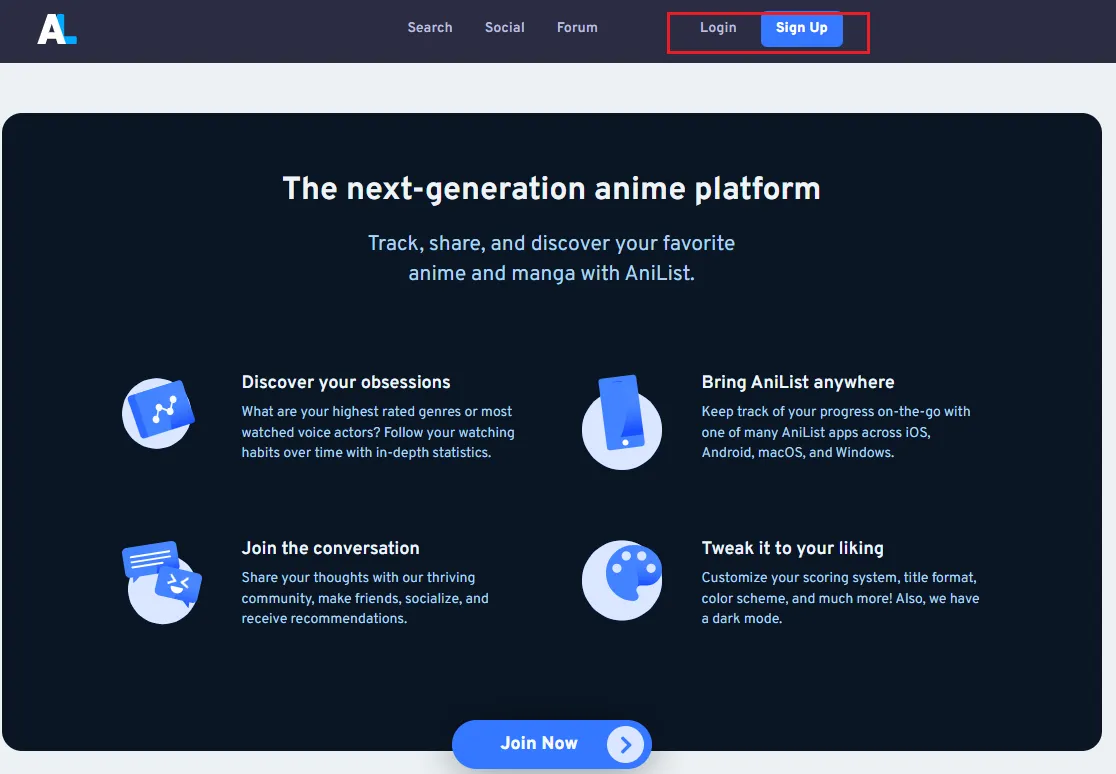
Step 1: Open the AniList Website
Open the official AniList website, you will see options to log in or Sign up.
Step 2: Create Your Account
Click on the sign-up option. You'll see a registration form. Fill in the basic information such as: username, email, password. Once completed, confirm your account if email verification is required.
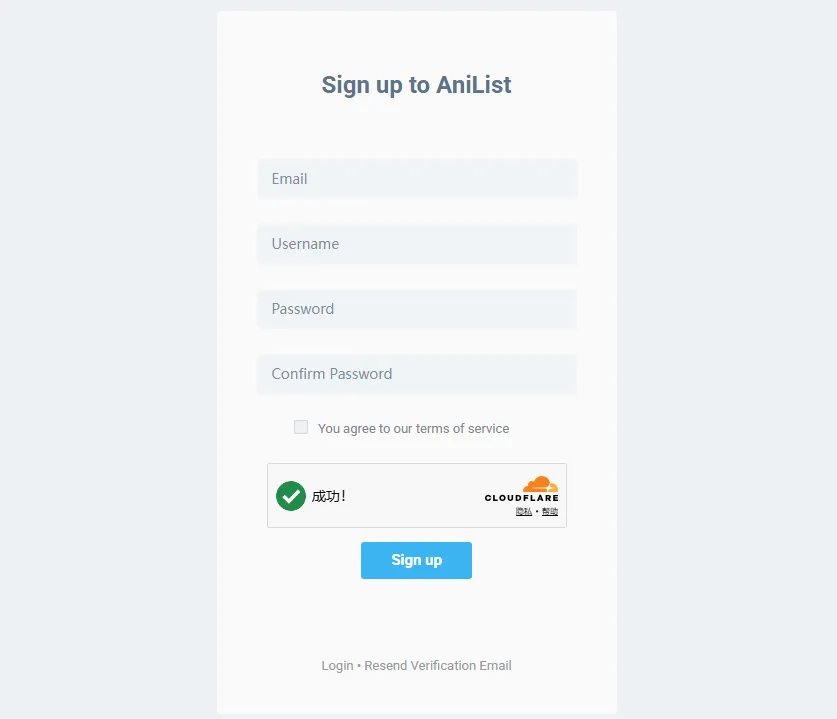
If you already have an account, click Login instead.
Step 3: Set Up Your Profile
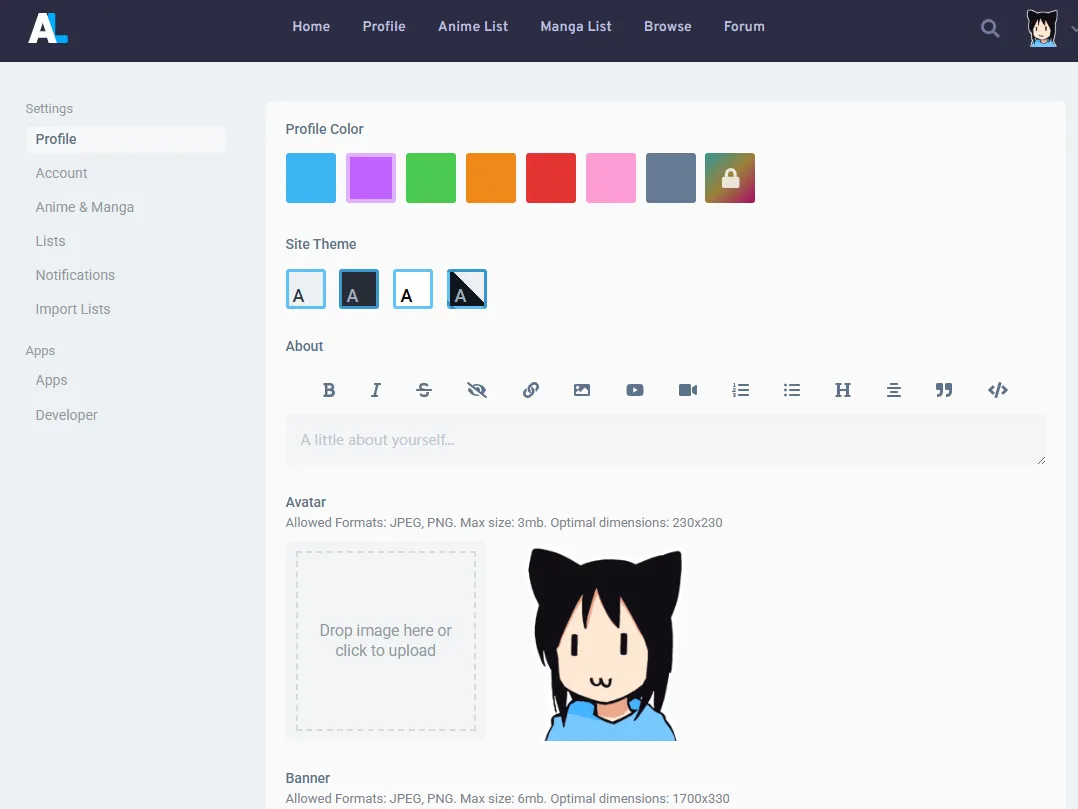
After logging in, you’ll be taken to your profile page. Here you can personalize your account. You can upload an avatar, add a short bio, select favorite genres or interests. This step is optional, but it helps tailor your experience and makes your profile more engaging if you choose to interact with the community.
Step 4: Familiarize Yourself with the Dashboard
Before adding any anime, take a moment to explore the main interface. You will usually find:
-
Search bar (to find anime or manga)
-
Your activity history
-
Navigation tabs (Anime List, Manga List, Stats, Social)
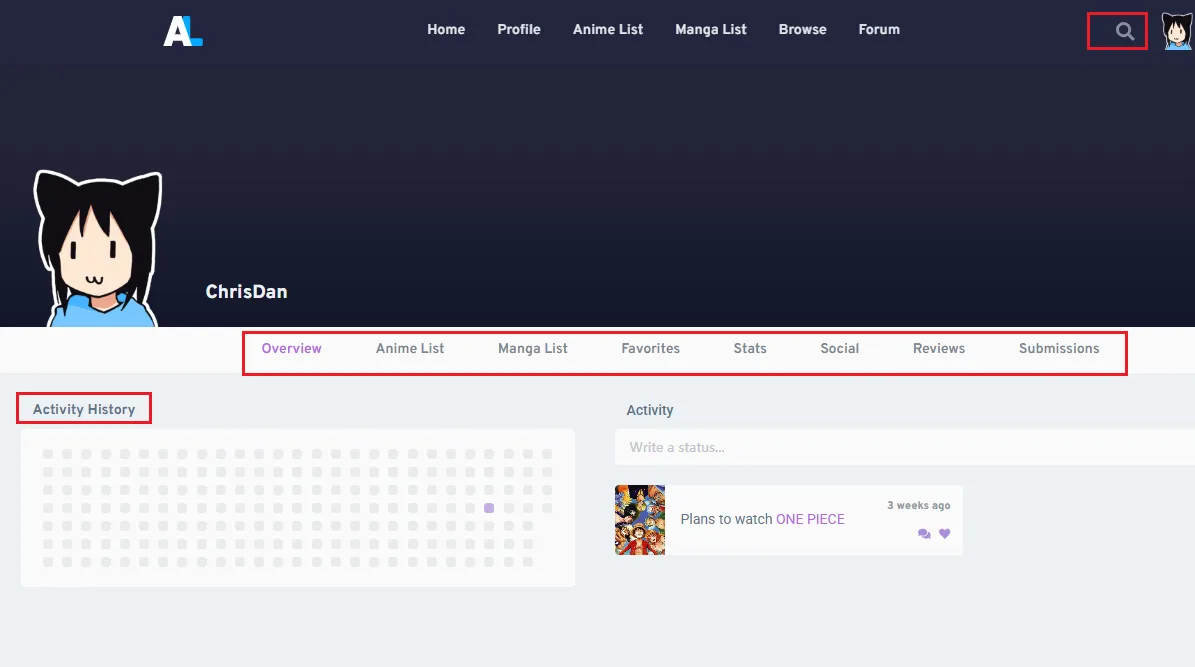
This helps you understand where everything is before you start tracking.
Step 5: Add Your First Anime (Quick Start)
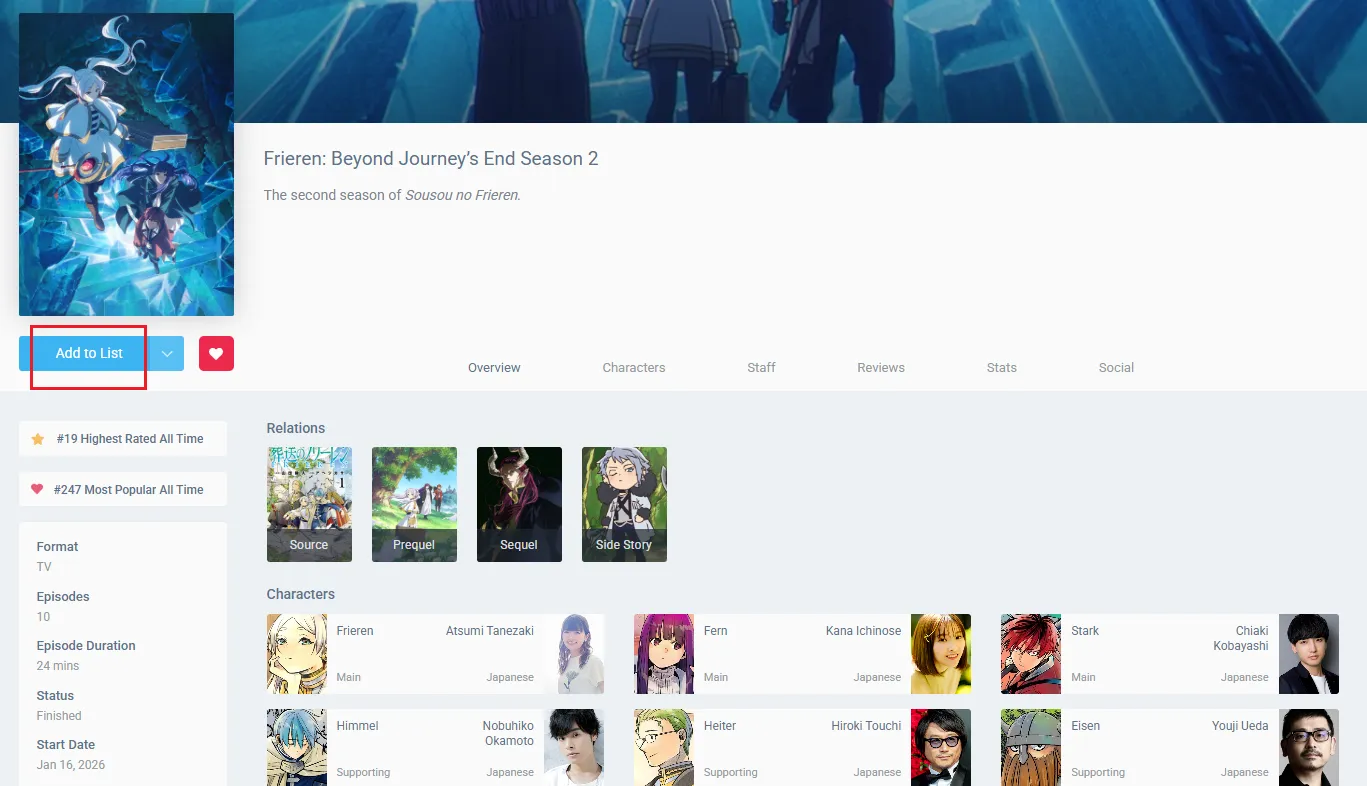
Now you’re ready for your first action. Search for any anime you are currently watching and open its page. Then click “Add to List” and choose a status such as Watching or Planning. This is the first step that activates your personal tracking system.
How to Track Anime & Manga on AniList?
Tracking anime and manga on AniList uses the same system, with only slight differences in how progress is measured. Once you understand the basic workflow, you can easily manage both.
Step 1: Add a Title to Your List
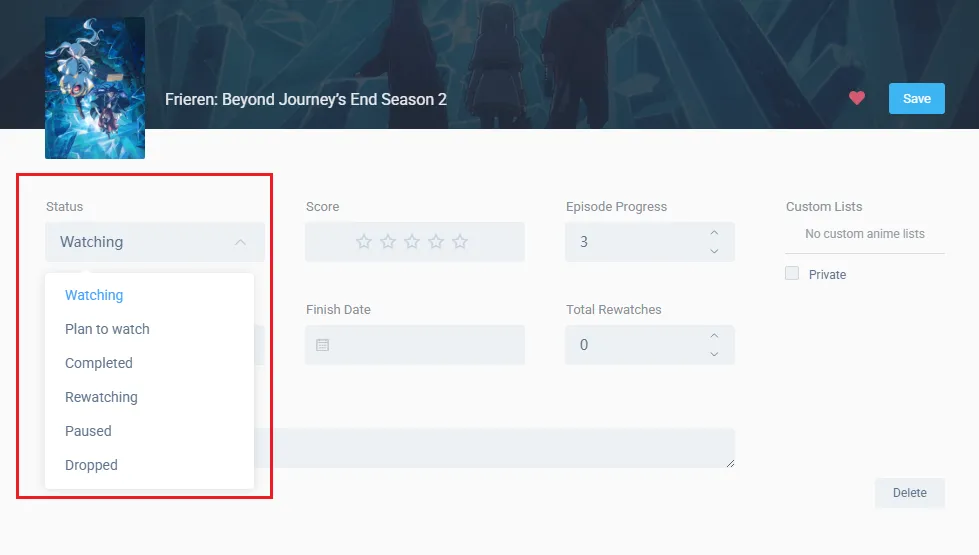
Search for an anime or manga and open its page. Click “Add to List”, then choose a status:
-
Watching / Reading — Currently following the series
- Plan to Watch / Plan to Read — Saved for later;
-
Completed — Finished the series;
- Rewatching / Rereading — Experiencing it again;
- Paused — On hold temporarily;
- Dropped — No longer following the series.
Step 2: Update Your Progress
Once added, you can track your progress:
-
Anime → episode number
-
Manga → chapter or volume number
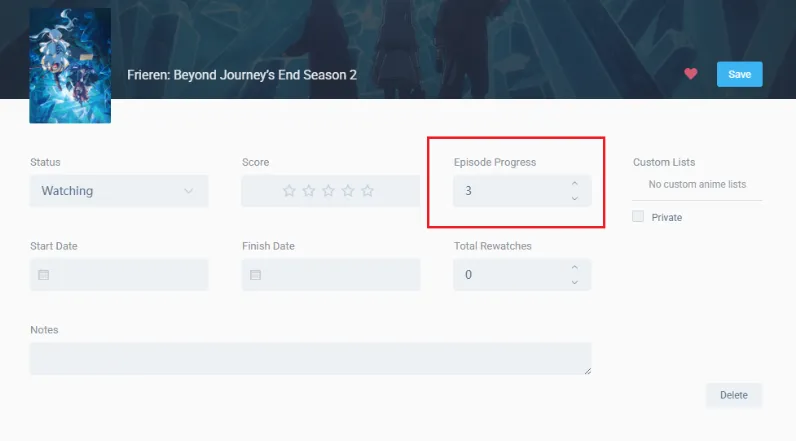
You can update this directly from the anime/manga page.
Step 3: Rate Your Experience
After marking something as completed (or even while you're still watching), you can add a score. AniList supports multiple scoring formats, and the rating options you see may vary depending on your account settings.
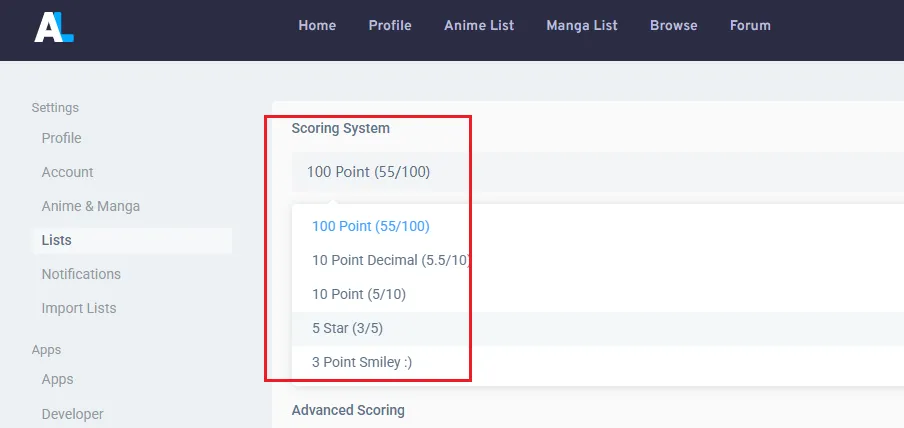
Tip: You can change your scoring system anytime in Settings → Lists → Scoring System.
Step 4: Organize Your Lists
AniList automatically organizes entries into categories such as Watching/Reading, Completed, Planning, and Dropped. You can also create custom lists and filters to organize your collection in a way that fits your preferences.
Step 5: Keep Everything Updated
You can return to any anime or manga entry at any time to update progress, change statuses, adjust scores, or add personal notes. This flexibility makes it easy to keep your library accurate as your watching and reading habits change.
Once you get into the habit of updating your progress regularly, AniList becomes a powerful hub for tracking everything you're watching and reading in one place.
Understanding AniList Ratings & Rankings
AniList is more than just a tracking tool. In addition to monitoring your anime and manga progress, it also allows users to rate titles, compare community opinions, and analyze their own viewing habits through detailed statistics. Understanding how these systems work can help you discover new series, evaluate community reception, and gain deeper insights into your personal preferences.
1. Personal Scores vs Community Scores
When you rate an anime or manga, that score reflects your personal opinion. These ratings are private to your account and help you organize your favorites and compare titles you've experienced. At the same time, AniList combines ratings from thousands of users to generate an overall community score for each title. As a result, every series can have multiple metrics:
| Metric | What It Means |
|---|---|
| Your personal rating | Your individual score |
| Average Score (Community) | The mean of all user ratings |
| Popularity | Total users who added the title to their list |
| Favorites | Users who marked the title as a favorite |
| Score Rank | Ranking based on Average Score (e.g., #19 Highest Rated) |
| Popularity Rank | Ranking based on total adds (e.g., #247 Most Popular) |
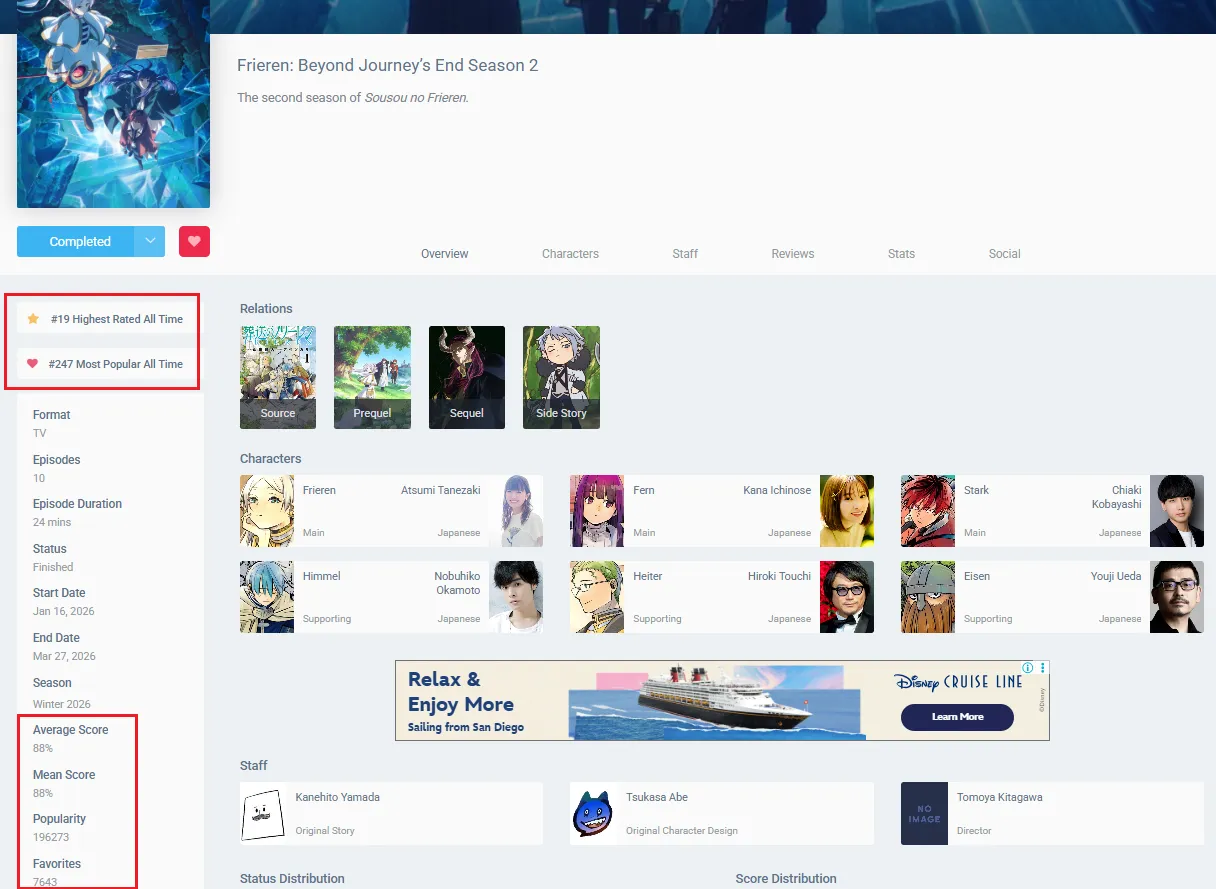
This allows you to compare your own impressions with the broader AniList community. If a title is very new or has very few user ratings, AniList will not display an Average Score. This prevents misleading averages from a tiny sample size. Once enough users have rated the title, the Average Score appears automatically in the info card.
2. How AniList Scoring Systems Work
AniList offers 5 different scoring formats. You can change yours anytime in Settings → Lists → Scoring System..
| Format | Range | How It Looks |
|---|---|---|
| 100 Point | 0–100 | Enter 85 |
| 10 Point Decimal | 0–10 (with .5 increments) | Enter 7.5 |
| 10 Point | 1–10 (integers only) | Select 7 |
| 5 Star | 1–5 stars | Click ★★★★☆ |
| 3 Point Smiley | 3 options | 😭 / 🙂 / 😍 |
If you use the 5-star system, your ratings are converted internally to a 100-point scale (scoreRaw) for community calculations:
| Your Stars | Converted to |
|---|---|
| ★★★★★ (5) | 90% |
| ★★★★☆ (4) | 70% |
| ★★★☆☆ (3) | 50% |
| ★★☆☆☆ (2) | 30% |
| ★☆☆☆☆ (1) | 10% |
Why not 100% for 5 stars? AniList does this intentionally. Users who rate with stars tend to give 5 stars more easily. Converting 5 stars to 90% keeps community averages comparable across different scoring systems.
3. How AniList Rankings Work
AniList uses several ranking systems to help users evaluate anime and manga.
Score Rank
Score Rank is based on the average ratings submitted by users. Titles with higher community scores generally rank higher in this category. For example, critically acclaimed series often maintain strong score rankings because a large number of users rate them highly.On the page, this appears as "#XX Highest Rated All Time" above the Average Score.
Popularity Rank
Popularity Rank measures how many users have added a title to their lists (regardless of whether they completed it). A show may be extremely popular even if it doesn't have the highest score. Long-running franchises and mainstream hits often perform well in popularity rankings. On the page, this appears as "#XX Most Popular All Time" above the Average Score.
Quick Comparison
| Rank Type | What It Measures | Where to Find It | Changes |
|---|---|---|---|
| Score Rank | Average user rating | On anime page (above Avg Score) | Slowly |
| Popularity Rank | Total users who added to list | On anime page (above Avg Score) | Slowly |
⚠️ Common confusion: A show can be highly popular (many people added it) but not highly rated. Conversely, a critically acclaimed show may have a high Score Rank but only a moderate Popularity Rank if it's niche.
4. Understanding Popularity vs Favorites
These two numbers appear on the anime page and are often confused:
| Popularity | Favorites | |
|---|---|---|
| What it reflects | How many people have watched or plan to watch | How many people genuinely love the title |
| How it's counted | Automatically when you add to your list | You must click the ⭐ button manually |
| Typical size | Larger | Smaller |
| Changes | When users add/remove from list | When users favorite/unfavorite |
5. What Is Considered a Good AniList Score?
Although personal preferences always matter more than numbers, community scores can provide a useful reference point. As a general guideline:
| Score Range | General Interpretation |
|---|---|
| 90+ | Exceptional and highly acclaimed |
| 80–89 | Strongly recommended by most viewers |
| 70–79 | Generally well received |
| 60–69 | Mixed reception |
| Below 60 | Often divisive or poorly rated |
📌 Keep in mind: Niche genres and experimental series sometimes receive lower average scores despite having dedicated fanbases. A low community score doesn't mean you won't love it.
How to Share Your AniList & Connect with the Community
AniList isn't just a tracking tool — it's also a small social network for anime and manga fans. Once you've built your lists, you can share them with friends, follow other users, and engage in discussions. This section covers everything from basic sharing to community interaction.
1. Share Your Profile Link
This is the simplest way to show off your collection. Your profile page displays your complete anime/manga lists, statistics, favorites, and activity feed.
How to get your profile link:
-
Go to your Profile page
-
Copy the URL from your browser's address bar
-
Your profile link looks like: https://anilist.co/user/YourUsername
Where to share it:
-
Paste it on Discord, Twitter (X), Reddit, or send directly to friends
-
Anyone with the link can view your lists, stats, and recent activity
2. Social Features on AniList
Beyond sharing, AniList lets you interact with other anime fans directly on the platform.
Follow Friends & Other Users
-
Go to any user's profile and click the Follow button
-
Their activity will appear in your Home feed
-
To find friends, search by their username in the global search bar
Activity Feed (Your "Home" Page)
Your Home page shows a chronological feed of activities from users you follow. You'll see:
-
When friends start or complete an anime/manga
-
Their ratings and reviews
-
Text posts they share (AniList allows users to create text-only activity posts)
-
Comments and likes from the community
💡 Power user tip: If you follow many people, there's a browser extension called "Anilist User Groups" that lets you filter your feed by custom groups of friends. This helps you organize the noise if you're following hundreds of users.
Comment & Interact
-
Each anime/manga page has a comments section at the bottom
-
You can reply to others or leave your own thoughts about the show
-
Each activity post (on the Home feed) can be liked and commented on
-
You can mention other users using @username in comments or activity posts
Like Activities
-
Click the ❤️ (heart) icon on any activity or comment to show appreciation
-
When someone likes your activity, you'll receive a notification
Create Your Own Activity Posts
-
On your Home page, there's a text box at the top
-
You can write text-only posts to share your thoughts, ask questions, or talk about anime
-
These posts appear in your followers' feeds
3. Forums & Community Discussions
AniList includes a Forum section where users can create and participate in longer discussions.
How to access:
-
Click Forum in the top navigation bar
What you can do there:
-
Create new discussion threads on any anime/manga topic
-
Reply to existing threads
-
Like forum posts and comments
-
Get mentioned in threads using @username
The forum is a great place to ask questions, share recommendations, or participate in seasonal anime discussions.
4. Privacy Controls
Not everyone wants a fully public profile. AniList gives you three privacy options.
To adjust your privacy settings:
-
Go to Settings → Account
-
Under Privacy, choose one of the following:
| Setting | What It Does |
|---|---|
| Public | Everyone can view my profile, lists, and activity. |
| Semi-Public | Everyone can view my profile, lists, and activity but my activity won't appear on the global public feeds. |
| Private | Nobody except me can view my profile, lists, and activity. |
💡 Below privacy options, you can also enable Login Location Security – AniList will check your location on each login to verify it's really you.
How to Sync & Export/Import Your List
Once you've built your AniList, you might want to import an existing list from another platform, export your data for backup, or auto-sync your progress while watching. This section covers the essentials.
1. Import from MyAnimeList (MAL)
If you're switching from MyAnimeList to AniList, you can import your existing list instead of starting over.
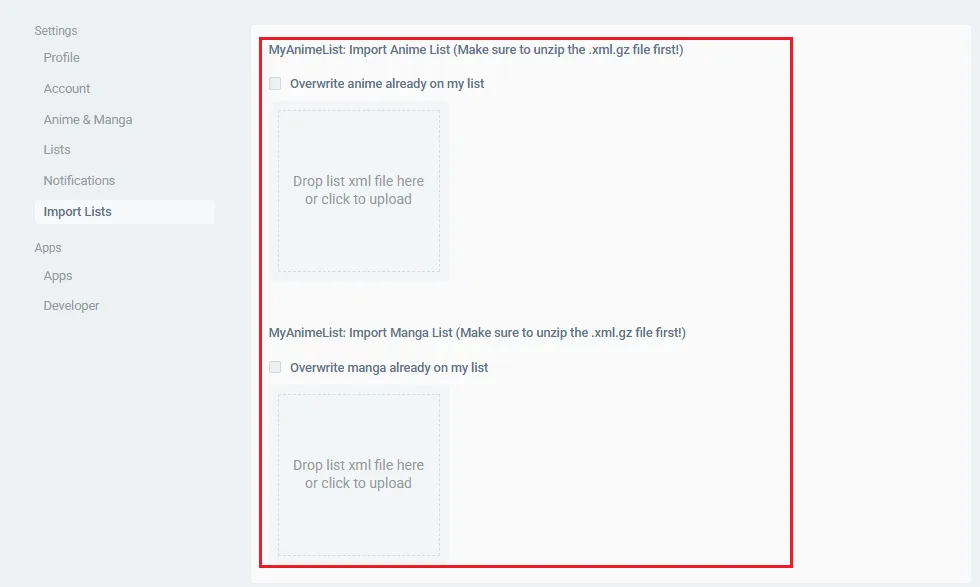
Step 1: Export from MyAnimeList
-
Log into your MyAnimeList account
-
Go to Account Settings → Import/Export
-
Click Export to download your anime or manga list as an XML file
Step 2: Import to AniList
-
Log into your AniList account
-
Go to Settings → Import Lists
-
Upload the XML file you exported from MAL
-
Wait for AniList to process the file
💡 You can import anime and manga lists separately. AniList will match titles automatically.
2. Export from AniList (GDPR Data Download)
AniList allows you to download all your data for backup purposes.
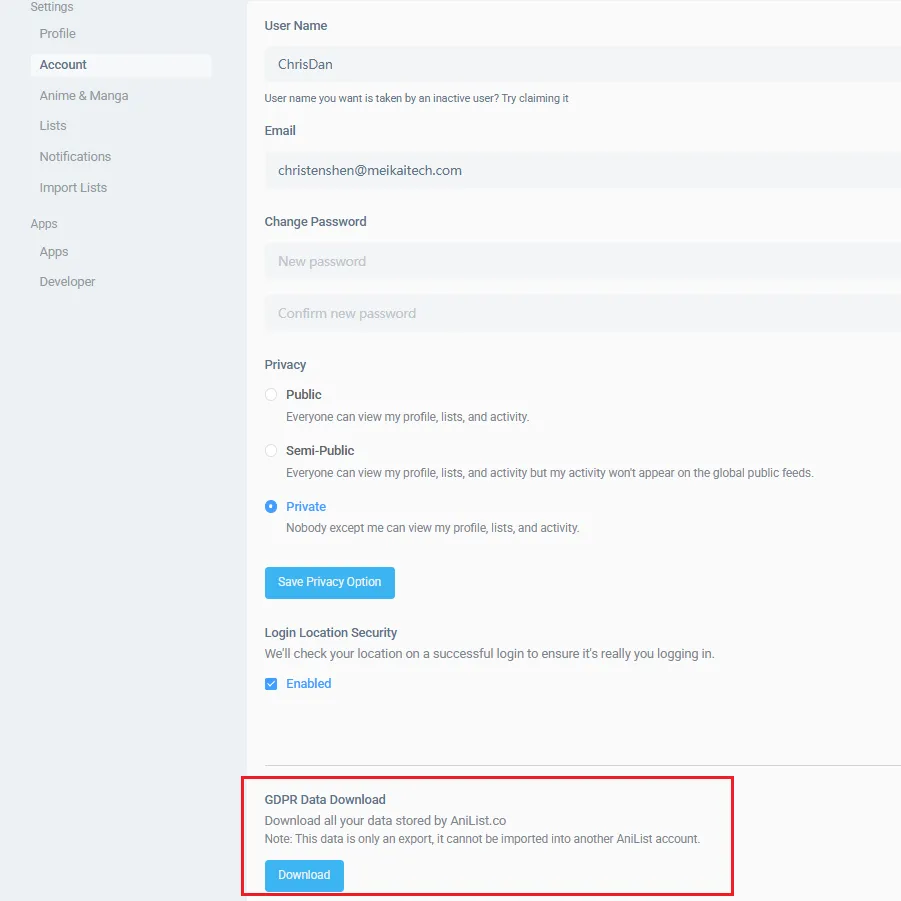
How to export:
-
Go to Settings → Account
-
Scroll to the bottom of the page
-
Look for GDPR Data Download
-
Click the Download button
💡 This exports all your AniList data as a JSON file. Note that this file cannot be imported into another AniList account — it's only for personal backup.
3. Auto-Sync with MAL-Sync (Browser Extension)
If you watch anime on streaming sites like Crunchyroll, Netflix, or Bilibili, you can use MAL-Sync to automatically track your progress. MAL-Sync is a free browser extension that detects what you're watching and updates your AniList automatically — no manual episode counting needed. It works with 100+ anime and manga sites, and supports two-way sync between AniList, MyAnimeList, Kitsu, and Simkl.
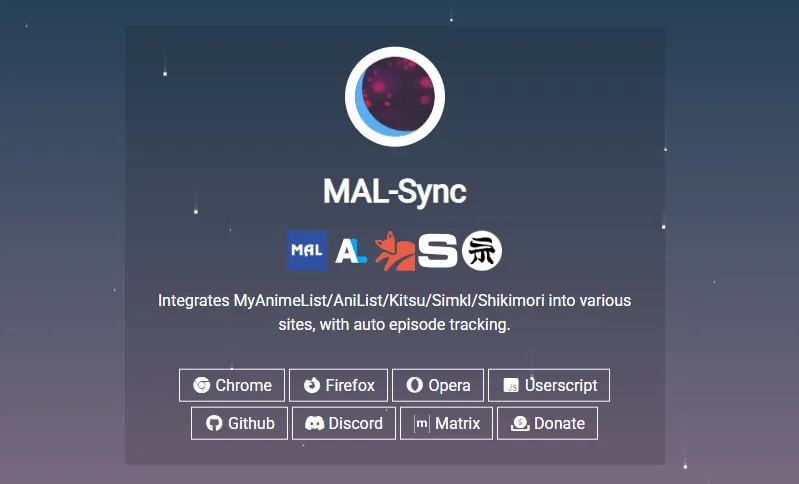
How to set it up:
-
Install MAL-Sync from Chrome Web Store or Firefox Add-ons
-
Click the extension icon, go to Settings, and change sync mode to AniList
-
Log in to your AniList account
-
Start watching — the extension will update your progress automatically
Frequently Asked Questions (FAQ)
1. Is AniList free to use?
Yes. AniList is completely free to use. You can track anime and manga, rate titles, create lists, and use social features without paying any subscription fees.
2. Is AniList better than MyAnimeList (MAL)?
AniList and MyAnimeList both offer anime tracking, but AniList is often considered more modern, with a cleaner interface, better customization options, and more advanced list management and API integration.
3. Can I import my MyAnimeList (MAL) list into AniList?
Yes. AniList supports importing lists from MyAnimeList using an XML export file. This allows you to transfer your anime and manga progress easily without starting from scratch.
4. Does AniList have a mobile app?
AniList does not have an official mobile app, but the website is fully mobile-optimized. Many users also use third-party apps or browser-based PWA versions for a mobile-like experience.
5. Can I track both anime and manga on AniList?
Yes. AniList supports both anime and manga tracking using the same system, including progress tracking, scoring, and custom lists.
6. Is there a way to auto-track anime while streaming?
Yes. Install the MAL-Sync browser extension. It detects what you're watching on Crunchyroll, Netflix, etc., and updates your AniList automatically.
7. Is there an AniList Discord bot?
Yes, multiple Discord bots integrate with AniList. Popular options include:
| Bot | Features |
|---|---|
| Aeri | Open-source. Find anime/manga, track progress, compare taste with server members |
| Anilist Discord Bot | User profiles, anime lookup, top rankings, weekly anime notifications |
You can invite these bots to your Discord server and connect your AniList account to share what you're watching with friends.
8. Does AniList have dark mode?
Yes, AniList supports dark mode natively. You can switch themes by clicking your profile icon → Settings → look for Site Theme or display options. Dark mode is built into the website — no extensions needed. If you want the theme to switch automatically based on your system settings, there's also a community userscript called "Auto Dark Mode for AniList".
9. How do I see my AniList Wrapped / Year in Review?
AniList does not offer an official “Wrapped” or Year in Review feature. However, many community-made tools and third-party projects can generate yearly anime statistics based on your AniList data. These tools typically create a Spotify Wrapped-style summary, showing your total episodes watched, most active genres, favorite shows of the year, and overall viewing trends. Unlike official features, these tools are maintained by independent developers and may change or update each year. To find the latest version, search for “AniList wrapped” or “AniList year in review tool”, as different community projects are released annually.
Conclusion
AniList has grown to become the premier tracking platform for modern anime and manga fans. By combining clean, ad-free list management with an active social community and powerful automation tools like MAL-Sync, it takes the chore out of logging your hobby. Whether you are migrating years of history from MyAnimeList or starting your tracking journey fresh, setting up your AniList profile ensures your watch history is organized, backed up, and entirely under your control. Sign up, set your preferences, automate your sync, and never lose track of a seasonal masterpiece again!