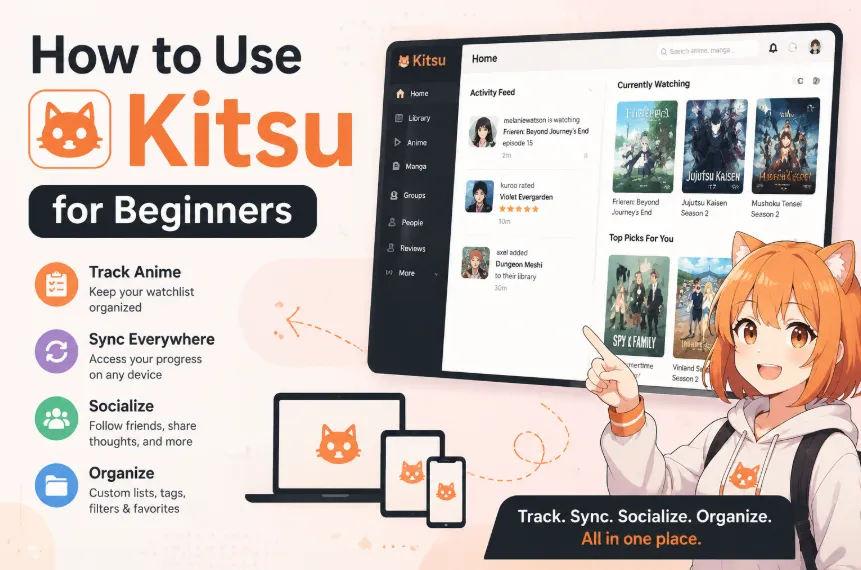
Anime fans today often watch shows across multiple platforms, switch between devices, and juggle dozens of ongoing series at once. Without a proper system, it becomes easy to lose track of episodes, forget what you were watching, or end up with an unorganized watchlist that feels overwhelming.
That’s where Kitsu comes in. It is a modern anime and manga tracking platform designed to help users stay organized while also connecting with a wider anime community. Instead of just acting as a simple watchlist tool, Kitsu combines tracking, syncing, social interaction, and library management into one streamlined experience.
In this guide, you will learn exactly how to use Kitsu in 2026—from creating your account and tracking your anime progress to syncing your library across devices, interacting with other users, and organizing your personal watchlist efficiently. Whether you are a complete beginner or switching from another tracker, this step-by-step guide will help you get started quickly and make the most out of Kitsu.
What is Kitsu?
At its core, Kitsu is a content discovery and tracking platform designed specifically for anime and manga enthusiasts. Think of it as Goodreads for books or Letterboxd for movies, but built with features tailored for the modern anime community.
Unlike traditional tracking websites that mainly focus on databases and statistics, Kitsu combines tracking, discovery, and social interaction into one unified platform. This allows users not only to manage what they watch, but also to engage with a broader anime community in real time.
Why Choose Kitsu?
If you are new to anime tracking—or considering switching from platforms like MyAnimeList or AniList—Kitsu offers several advantages that make it stand out in 2026.
🎨 Modern & Intuitive Interface
Compared to the more text-heavy and outdated layout of MyAnimeList, Kitsu provides a clean, modern, and visually focused interface. It feels closer to a social media app than a traditional database, making it easier to browse anime, update progress, and interact with content naturally.
🤝 Social-First Experience
One of Kitsu’s biggest strengths is its social-first design philosophy. Instead of treating tracking as a private activity, Kitsu turns it into a community experience.
On Kitsu, you can:
-
Share what you are currently watching in real time.
-
Post thoughts and reactions as you watch individual episodes.
-
Like, comment, and interact with other users’ posts.
-
Follow friends and see what the broader community is watching.
This transforms anime tracking into an active social feed, where discussions happen alongside your watch history rather than separately.
🧠 Smarter Discovery & Recommendations
Kitsu doesn’t just rely on basic, rigid genre filters. Its recommendation system analyzes your watch history and ratings to suggest anime that better match your personal taste, helping you uncover hidden gems and newer titles you might otherwise miss.
🌍 Global & Accessible Platform
Kitsu is designed for an international audience, offering a smooth and automatically localized experience across different regions. Its massive global community makes it easy for anime fans worldwide to connect, share opinions, and discover new shows without language barriers.
🔗 API & Third-Party Integration
Kitsu provides a robust API and supports excellent third-party tools and extensions. This allows users to automate their tracking, sync data across various streaming platforms, and integrate their watch activity with external media services efficiently.
In Short: Kitsu is more than just an anime tracker. It is a social-first anime ecosystem that combines tracking, discovery, and community interaction into one streamlined and modern experience.
Section 1: Registration & Profile Setup
Getting started with Kitsu is incredibly straightforward. Kitsu is primarily a web-based platform with a beautifully optimized, mobile-responsive layout, the community has also built fantastic open-source mobile apps to manage your library on the go.
1. Creating Your Account: Step-by-Step
Before you can start tracking, you need to establish your identity on the platform.
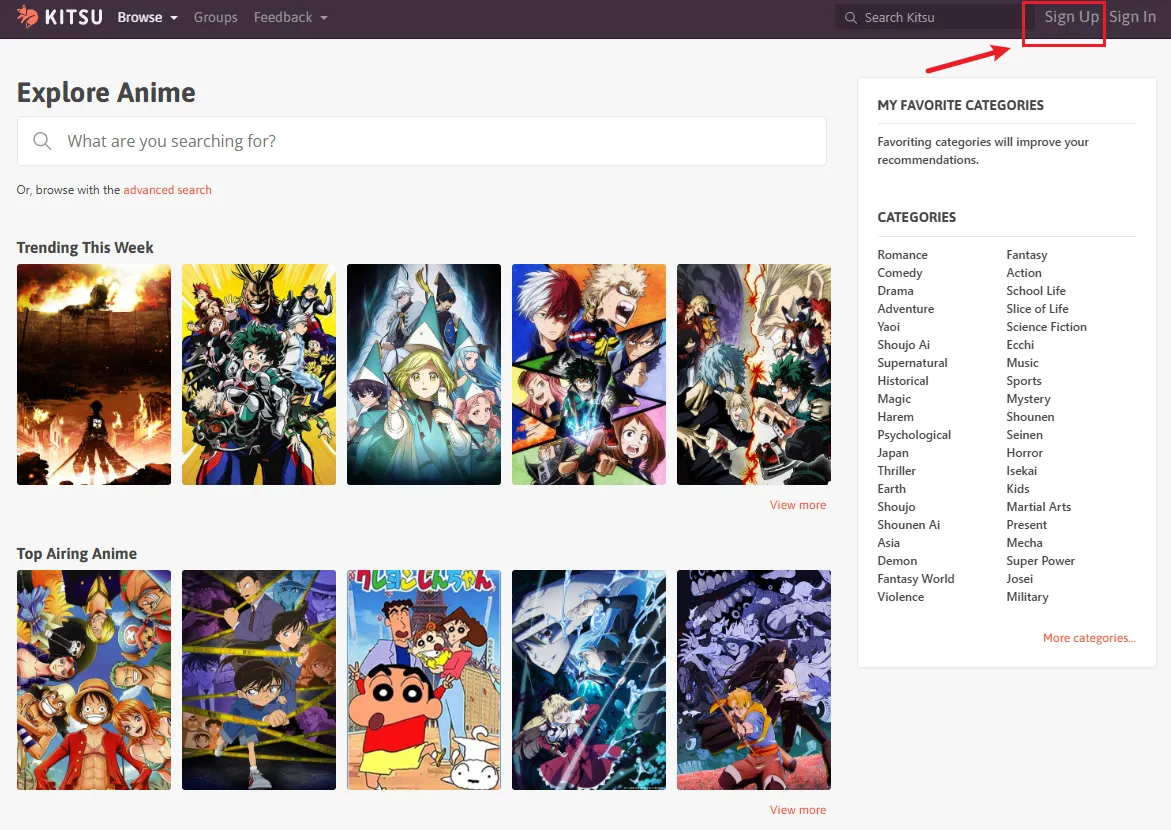
Visit the Platform: Head over to the Kitsu homepage at kitsu.app using your desktop or mobile browser.
Initiate Sign-Up: Click the Sign Up button located in the top right corner of the screen.
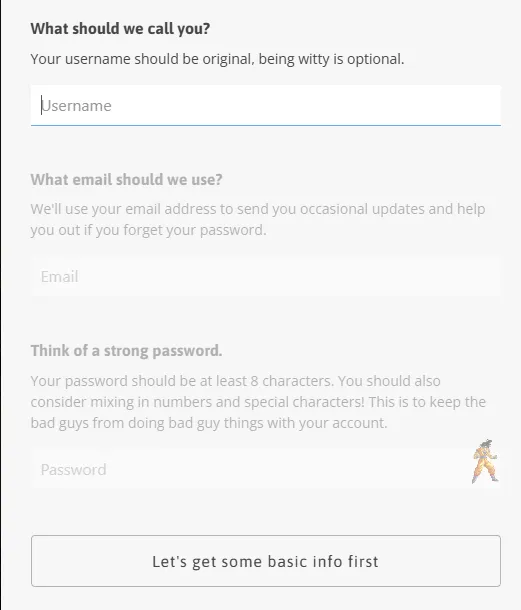
Choose Your Method: Kitsu gives you multiple ways to register:
-
Email Registration: Enter your email address and create a strong password.
-
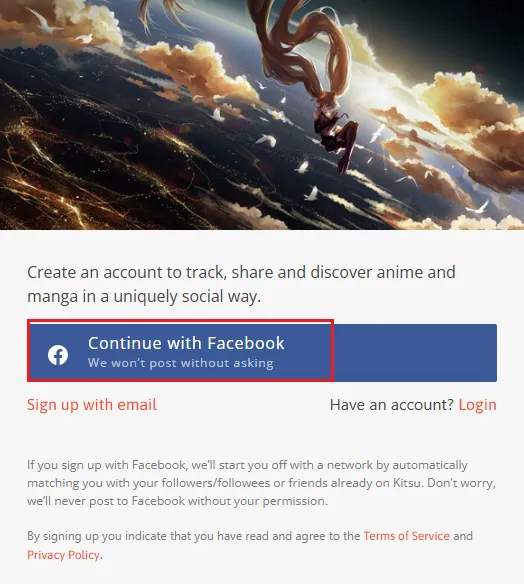
Social Sign-On: For a faster experience, you can opt for quick registration via third-party accounts, including Google or Apple.
2. Navigating the Onboarding Wizard
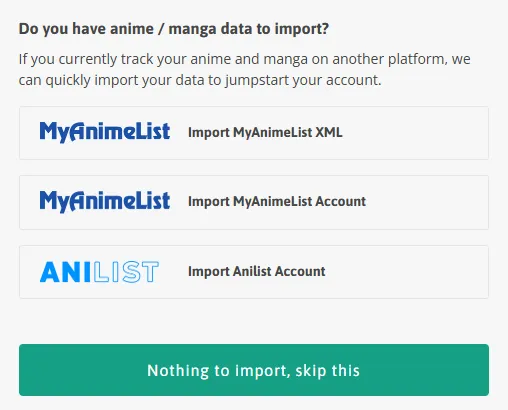
Once you successfully sign up, Kitsu will guide you through three quick onboarding steps to jumpstart your personalized experience:
Import Previous Data (Optional): If you currently track your anime and manga on another platform, Kitsu provides an option right at the beginning to upload your data. This allows you to quickly import your existing history so you don't have to start from scratch.
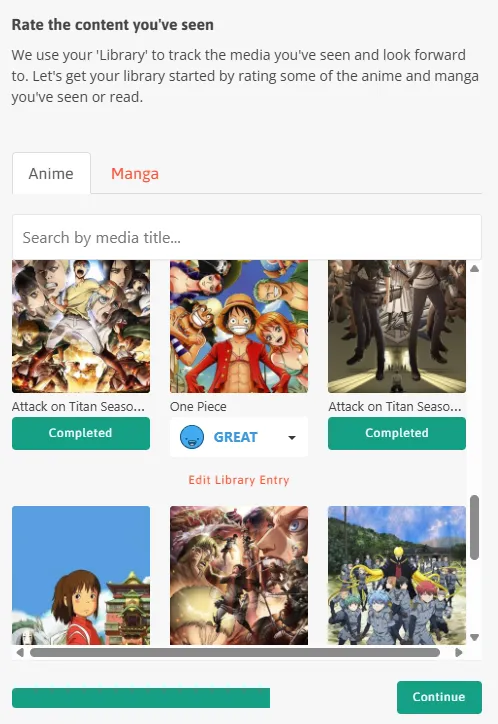
Rate Content You’ve Seen: Next, Kitsu will prompt you to build your foundational database with the message: "We use your 'Library' to track the media you've seen and look forward to. Let's get your library started by rating some of the anime and manga you've seen or read." You will be shown a grid of popular anime and manga. Go ahead and rate the content you've seen. This immediately populates your library and helps Kitsu's recommendation algorithm understand your personal taste from day one.
Find Your Friends: Because Kitsu is a social-first platform, the final onboarding step is all about community:
-
"Kitsu becomes more interesting as you follow others. Connect your social accounts so you and your friends can find each other."
-
By clicking Connect to Facebook, friends you have on Facebook who are also on Kitsu will automatically become part of your network.
3. Personalizing Your Profile (Your Digital Shrine)
Once you finish the onboarding wizard, you can finalize your custom look by clicking on your default avatar icon in the top right corner and selecting Profile.
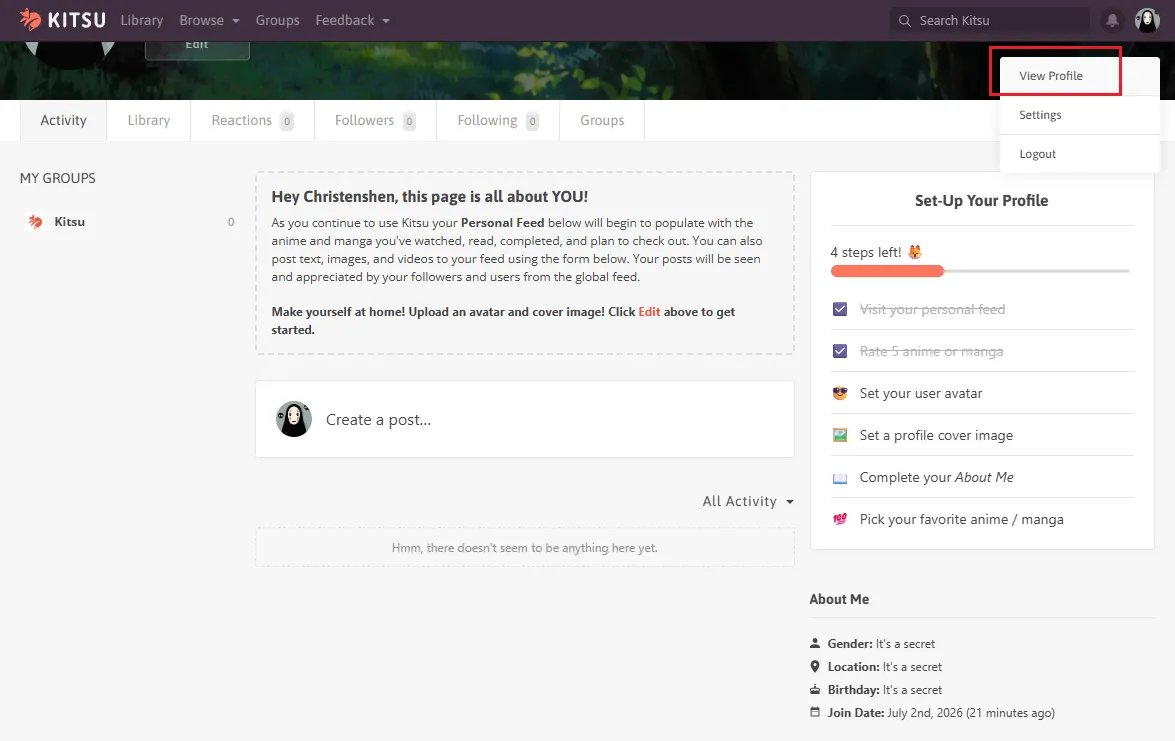
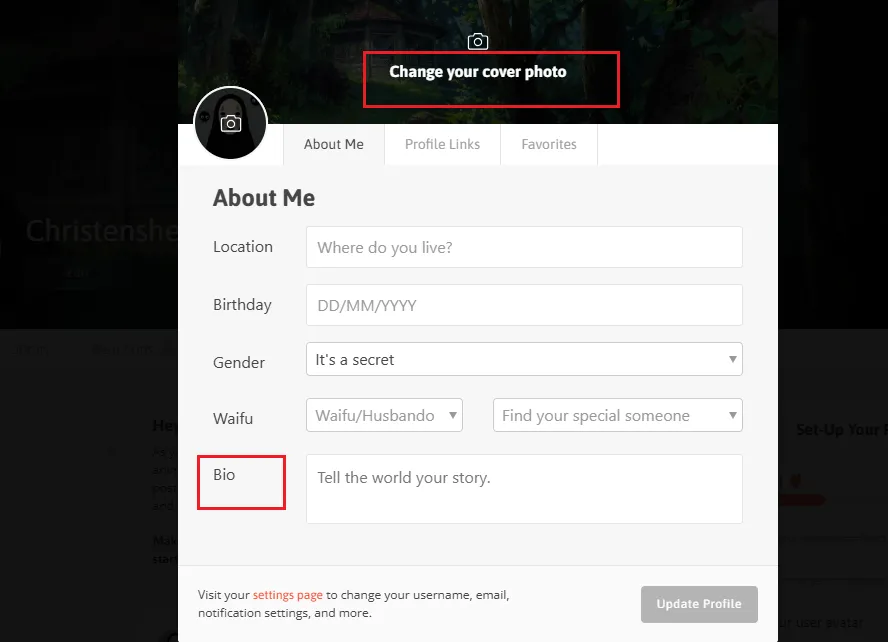
Change your cover photo: Upload a high-quality avatar and a wide cover photo that matches your favorite anime aesthetic.
Bio: Write a short introduction about yourself. Mention your favorite genres, your all-time favorite animation studios, or what specific shows you are currently binging.
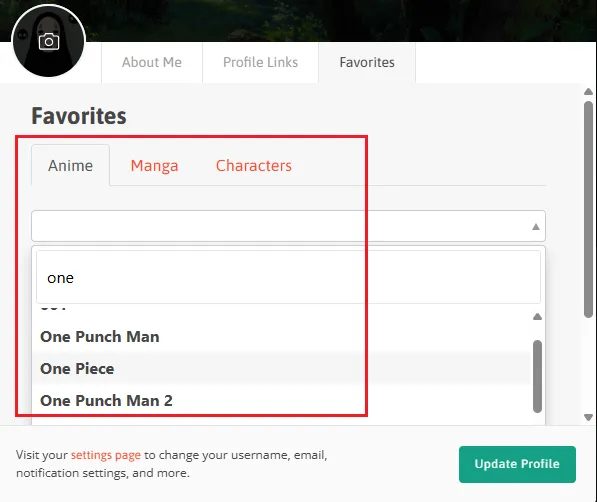
Favorite Anime & Manga: Click the "Favorites" button on your profile page to select up to five of your absolute "masterpiece" shows or manga. These will be prominently displayed as large visual cards at the top of your page, serving as an instant icebreaker for visitors.
Section 2: Track Your Anime & Manga Progress (Managing Your Library)
The true heart of the Kitsu experience lies in its tracking system. Whether you are trying to remember where you left off in a massive 500-episode series or keeping up with a brand-new seasonal simulcast, Kitsu makes updating your library incredibly fast and visually satisfying.
1. Finding Titles: The Discovery Engine
Before you can track a show, you need to find it using Kitsu’s flexible search tools:
-
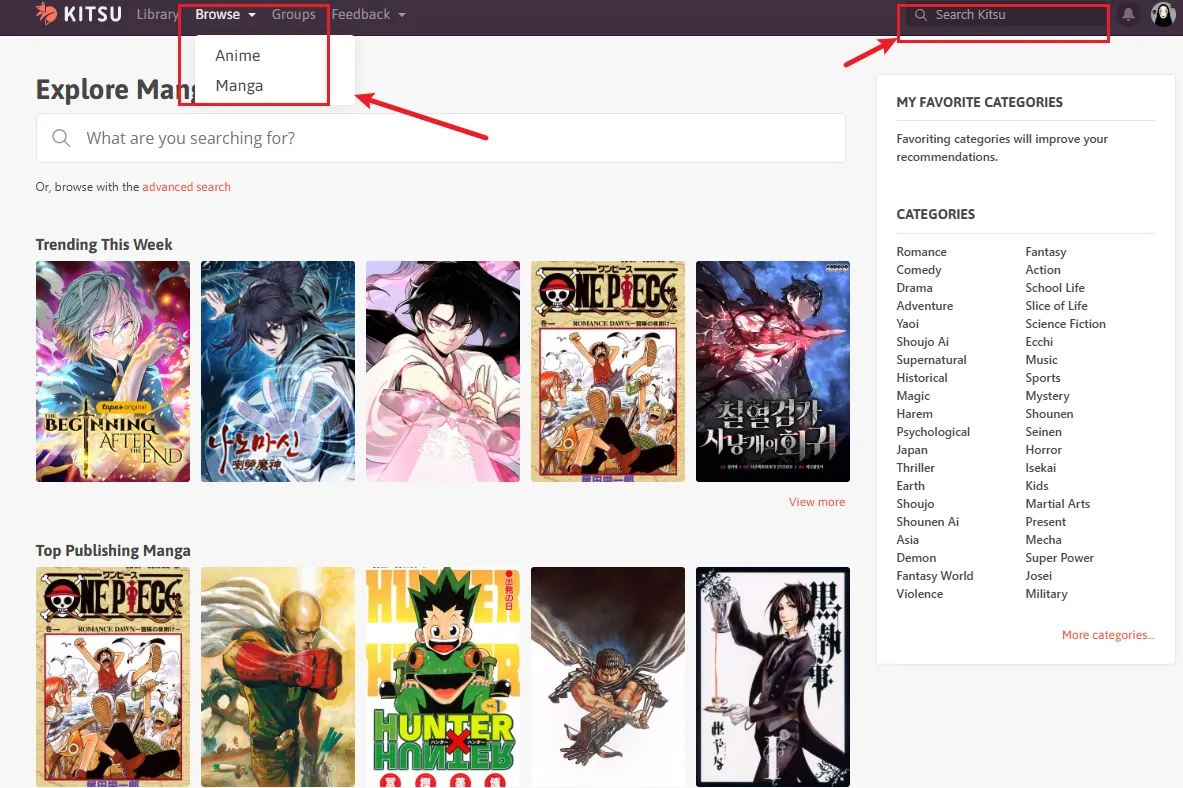
Smart Search: Simply type the English title, Romaji name, or Japanese kanji into the top search bar. The system automatically finds the correct entry.
-
The "Browse" Hub & Organization: Click Browse on the top navigation bar and select Anime or Manga to open the exploration hub. Here, you can instantly see weekly trends or check top airing shows. On the right sidebar, Kitsu provides a comprehensive Categories list (e.g., Action, Romance, Slice of Life, Sci-Fi). Clicking these tags allows you to effectively organize and filter the massive database down to the exact genres you are in the mood for.
2. Managing Your Watchlist Statuses
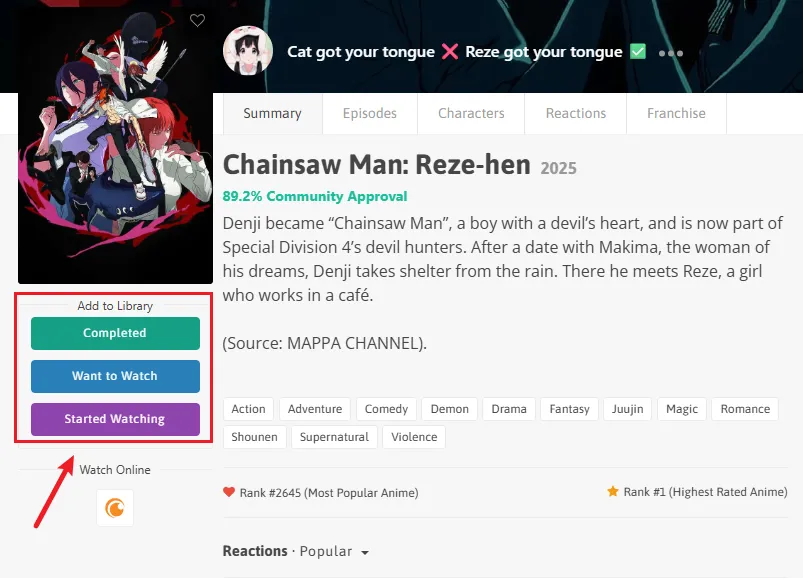
When you open a specific anime or manga page, look at the left sidebar directly beneath the main poster image. Kitsu provides three quick, color-coded buttons to instantly catalog the title into your library:
-
🟢 Completed: Click this green button to instantly mark a show or manga as finished.
-
🔵 Want to Watch: Click this blue button to add the title to your backlog for future viewing.
-
🟣 Started Watching: Click this purple button to move the title into your active watchlist so you can begin tracking individual episodes.
3. Updating Your Progress
To log your episodes and update your watch history, follow these two simple steps based on the interface:
-
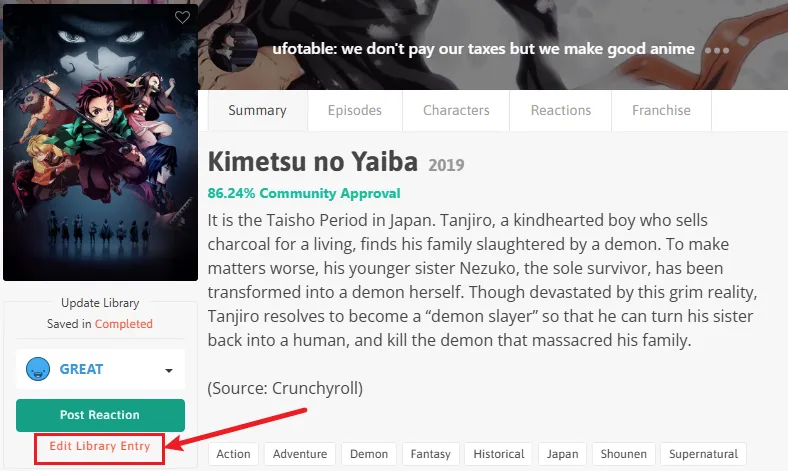
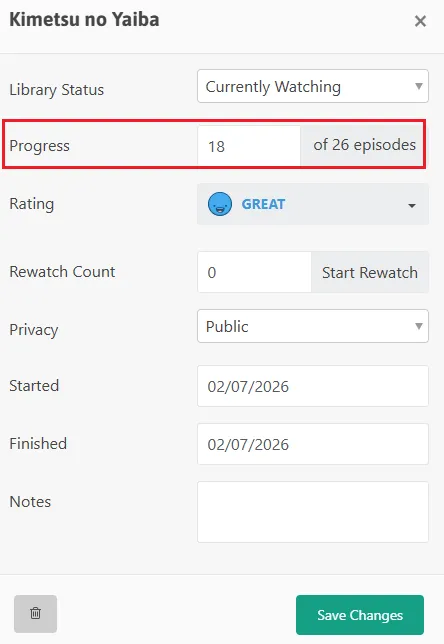
Open the Editor: Once a title is added to your watchlist, click the "Edit Library Entry" link under the update library section on the left sidebar.
-
Log Your Episodes: In the pop-up window, look for the "Progress" field. Type in your current episode number (e.g., 26 of 26 episodes), rate the show, and click "Save Changes" at the bottom to instantly update your library.
4. Rating Your Media
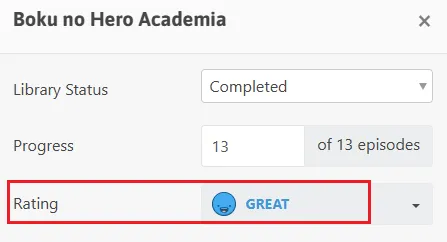
Inside the same Edit Library Entry window, you will find the "Rating" field to grade what you've watched.
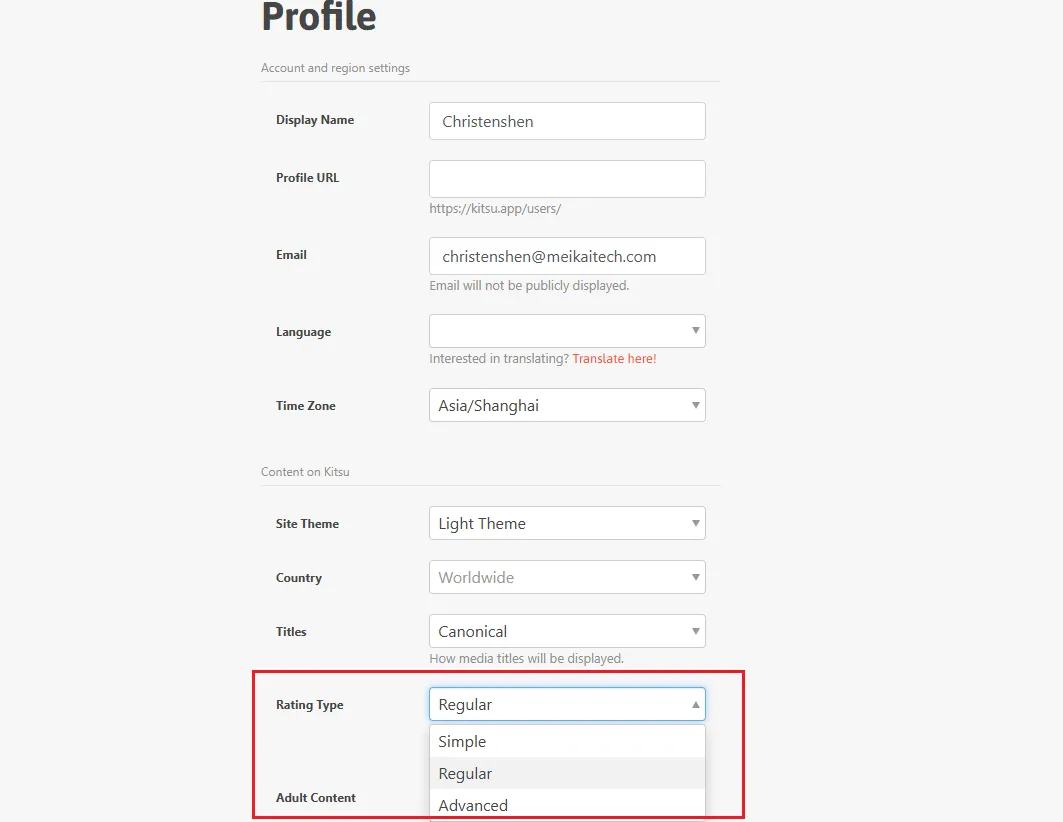
Kitsu allows you to choose from three unique rating scales in your general account settings to fit your style:
-
Simple (Expression): Uses four distinct, colorful emoji faces (as seen below) to log a quick vibe-check:
-
🔴 Red Face (Awful): For titles you couldn't stand.
-
🟡 Yellow Face (Meh): For average, uninspiring shows.
-
🟢 Green Face (Good): For solid, enjoyable series.
-
🔵 Blue Face (Great): For absolute masterpieces that you loved.
-
-
Regular (5-Star): The traditional movie-style rating allowing half-star increments (e.g., 3.5 / 5 stars).
-
Advanced (10-Point): A precision scale from 1 to 10 for analytical reviewers who love detailed ranking.
Section 3: How to Organize Your Anime List
Once your library begins to grow, keeping everything in one giant view can become overwhelming. Kitsu provides simple, native organization tools to help you structure, partition, and search your collection effectively.
1. Partitioning by Tracking Status
The primary way Kitsu organizes your list is by splitting your library into distinct, manageable sub-lists based on your watch status. You can navigate these anytime using the library sidebar:
-
Go to your personal library dashboard page.
-
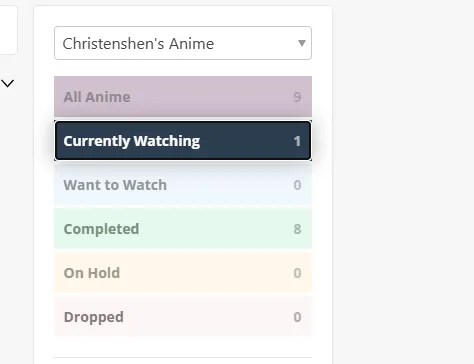
Locate the sidebar module titled "[Your Username]'s Anime" (or Manga).
-
Use the vertical menu block to instantly filter your list by your tracking categories. The system automatically tallies and displays the total number of titles next to each status:
-
All Anime / All Manga: Shows your entire database history.
-
Currently Watching: Your active rotation.
-
Want to Watch: Your backlog/to-watch list.
-
Completed: Shows you have fully finished.
-
On Hold / Dropped: Titles you are taking a break from or have abandoned.
-
2. Searching & Sorting Within Your Library
Instead of scrolling endlessly through large grids, use Kitsu's native internal search and database sorting dropdowns to find titles instantly:
-
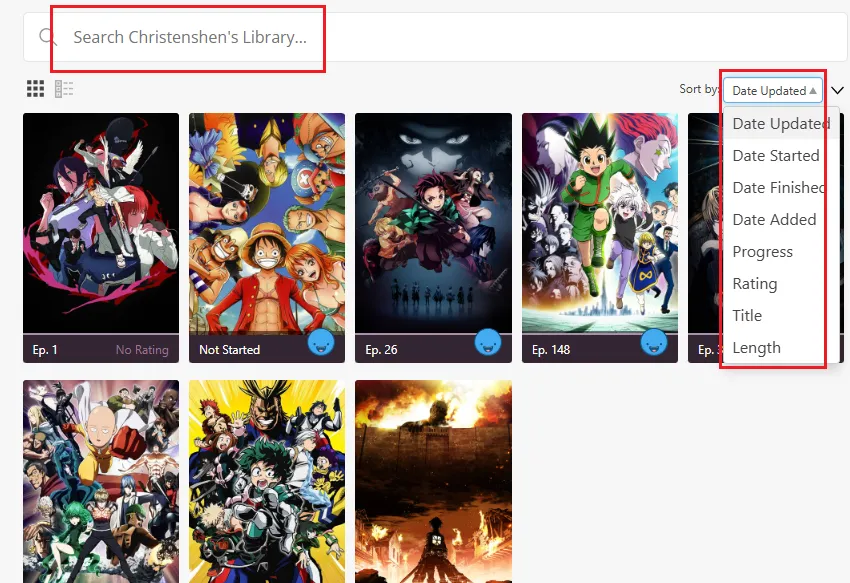
The Native Library Search Bar: Type a title directly into the "Search [Your Username]'s Library..." input bar located above your poster grid. This queries Kitsu's backend database, instantly bringing up the target entry even if it hasn't fully loaded on your screen yet.
-
Advanced Sorting Dropdown: Click the "Sort by:" dropdown menu on the top right of your grid to rearrange your entire collection based on specific conditions:
-
Time Filters: Date Updated (recently touched), Date Started, Date Finished, or Date Added.
-
Analytical Filters: Progress (number of episodes logged), Rating (your highest-graded scores), Title (Alphabetical order), or Length (total episodes/runtime).
-
Section 4: Sync: Automating Your Watch History
While logging manually is quick, automation is even faster. Kitsu allows you to link your account with browser extensions and import data from other platforms to make tracking effortless.
1. Browser Automation via MAL-Sync
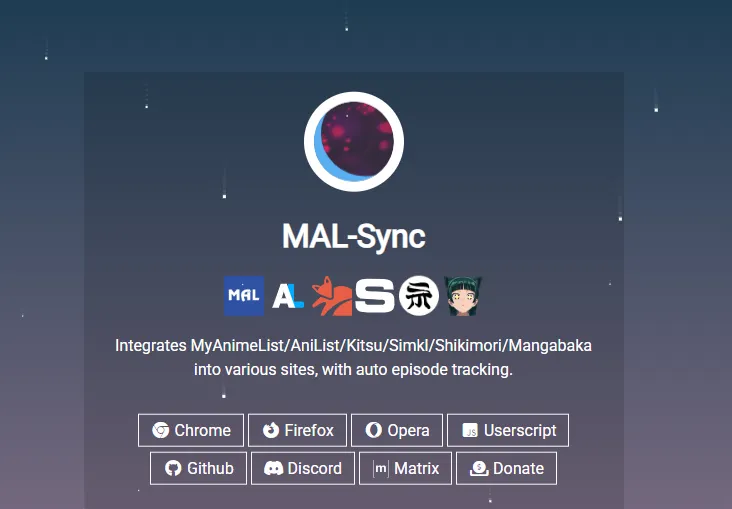
If you watch anime on your computer, you can use the popular browser extension MAL-Sync (available on Chrome, Firefox, and Edge) to log your progress completely in the background.
-
Step 1: Install MAL-Sync from your browser's extension store.
-
Step 2: Open the extension settings, select Kitsu as your primary database, and sign in to authorize the link.
-
Step 3: Watch your anime! Whenever you finish an episode on official platforms like Crunchyroll, Netflix, Hulu, or Bilibili, MAL-Sync will automatically update your episode count on Kitsu without you needing to open the app.
2. One-Click Library Migration
If you already have a tracking history on MyAnimeList or AniList, you don't have to rebuild your library card by card. Kitsu offers a seamless import tool:
-
Export your list: Log into your previous platform (e.g., MyAnimeList), go to your profile settings, and export your anime/manga list as an XML or JSON file.
-
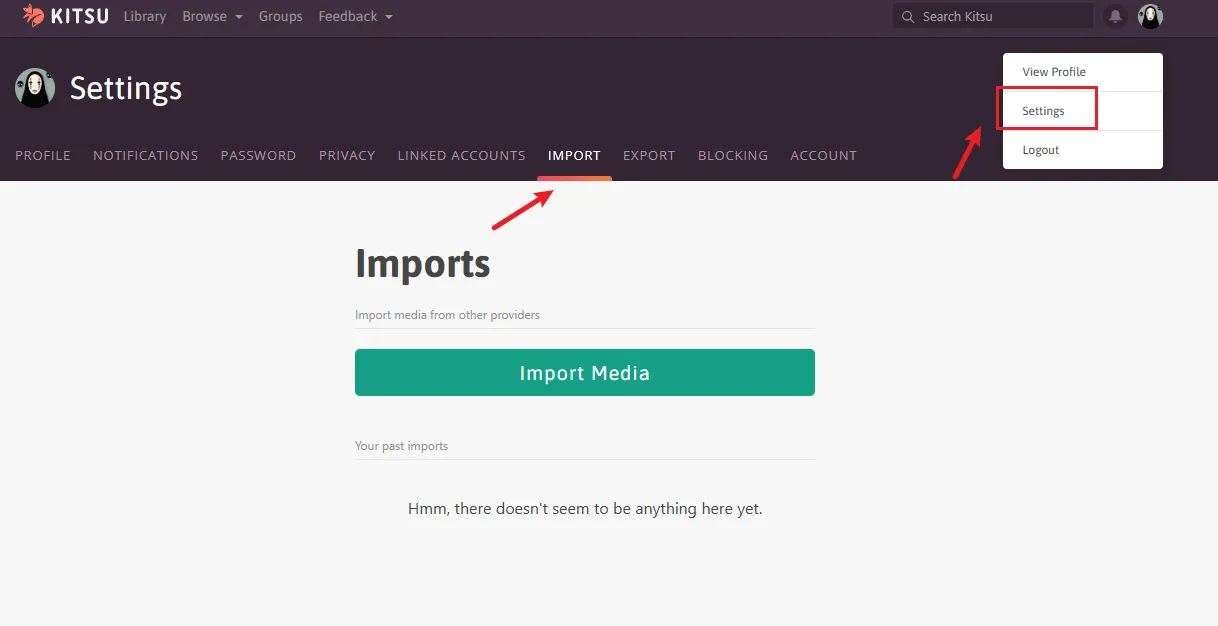
Access the Importer: In Kitsu, click your avatar icon in the top right corner, select Settings, and head to the Import tab.
-
Upload & Sync: Upload the file you downloaded. Kitsu’s server will parse the data and instantly populate your library with all your completed, current, and planned titles in seconds.
Section 5: Socialize with the Community
Kitsu functions like a specialized social media network. Here is how to actually find and use the social features on your dashboard and profiles.
1. How to Follow Users & Compare Tastes
To build your network and find friends on the platform:
-
Search for Users: Type a username into the top global search bar and filter the results by Users.
-
The Follow Button: Click on their avatar to open their profile. Right next to their name, click the blue "Follow" button.
-
Compare Taste: On their profile page, Kitsu will automatically display a "Taste Compatibility" percentage meter, showing you exactly how much your anime ratings align with theirs based on shared titles.
2. Navigating the Activity Feed
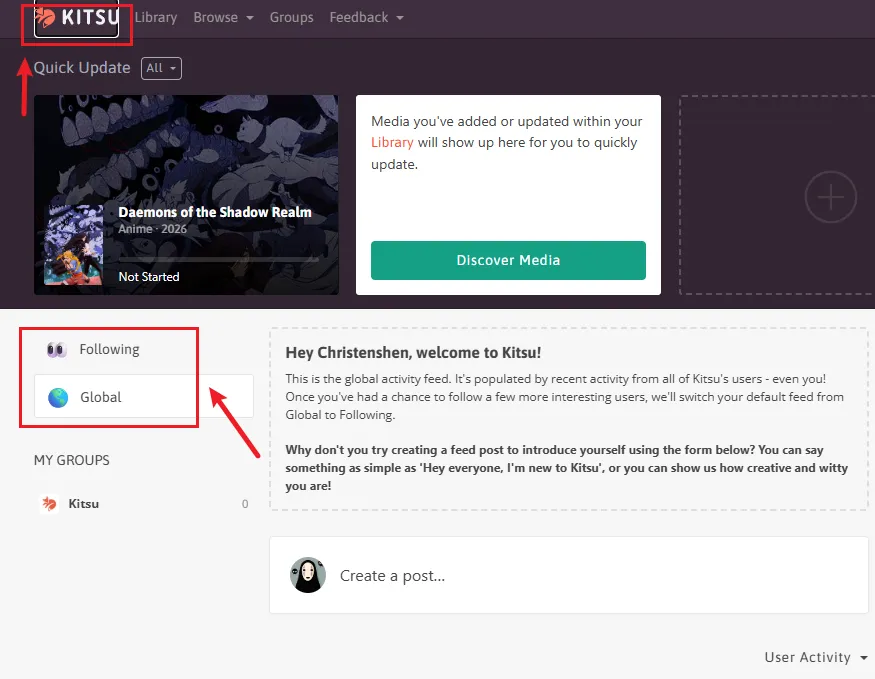
When you click the Kitsu Logo (or Home icon) in the top-left corner, you enter your social dashboard.The central column is your Activity Feed:
-
Toggle Filters: At the top of the feed, you can toggle between "Following" (to see only posts from people you follow) and "Global" (to see trending posts from the entire worldwide Kitsu community).
-
The Update Stream: As you scroll, you will see real-time updates from other users, including their newly uploaded text posts, custom reviews, or image attachments.
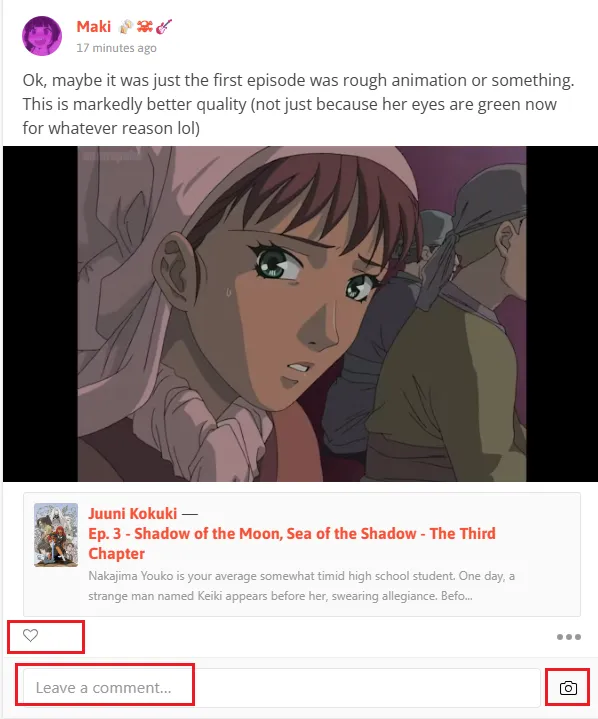
3. Liking, Commenting, and Interacting
Every post and automated status update on your feed features instant engagement tools directly beneath it:
-
The Heart Icon (Like): Tap the outline heart icon on the bottom left of a post to instantly leave a like.
-
Quick Comment Box: Type directly into the box that says "Leave a comment..." at the very bottom of the post.
-
Add Image to Comment: Click the small Camera icon inside the comment bar if you want to reply with a meme, screenshot, or reaction image. Press Enter to publish your reply to the thread.
4. Publishing Your Own Status Updates & Thoughts
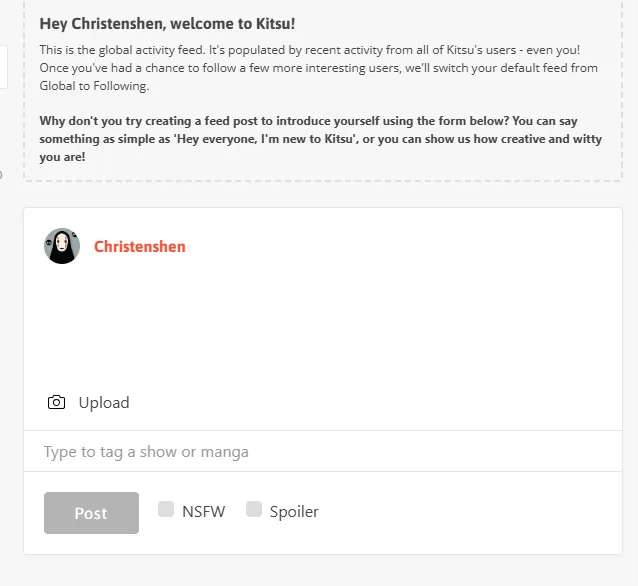
To share your thoughts or reviews with your followers and the community, use the post box on your feed dashboard:
-
Write Your Content: Click inside the main white text box under your username and draft your post.
-
Add Media (Optional): Click the 📷 "Upload" button to attach an image or a meme to your post.
-
Tag Content (Crucial): Click inside the "Type to tag a show or manga" bar at the bottom. Type the name of the anime/manga you are talking about so your post automatically links to that title's public community hub.
-
Set Content Warnings (Optional): Before publishing, you can check two important boxes if necessary:
-
NSFW: Check this if your post contains mature themes.
-
Spoiler: Check this if your post discusses critical plot points, which automatically hides the text to protect other users from spoilers.
-
-
Publish: Click the gray "Post" button to send it live to the feed.
Frequently Asked Questions (FAQ)
1. Is Kitsu free to use?
Yes. Kitsu is 100% free to use. You can track anime, build your library, export your data, and use all social features without paying any subscription fees.
2. Can I track both anime and manga on Kitsu?
Yes. Kitsu fully supports both media types. You can manage your reading and watching history under the same account, keeping your entire otaku collection organized in one centralized hub.
3. Is Kitsu good for beginners compared to MyAnimeList or AniList?
Kitsu is incredibly beginner-friendly thanks to its modern, clean UI. Here is a quick comparison to help you choose:
-
Kitsu: Best for users wanting a social-first, modern experience with a built-in timeline feed.
-
MyAnimeList (MAL): Stronger for legacy database coverage and old forum discussions, but has an outdated interface.
-
AniList: Better for users who love complex, advanced data analytics and scoring charts.
4. Can I import my existing anime list from other platforms?
Yes! Kitsu allows you to migrate seamlessly without losing your history. You can import your data by uploading list files (such as .xml or .json) exported directly from MyAnimeList or AniList through your Kitsu account settings.
5. I accidentally added an anime to my library. How do I completely delete it?
Go to the show's database page and click "Edit Library Entry" on the left sidebar to open the settings panel. Scroll to the bottom-left corner and locate the small Trash Can icon. Click it to permanently wipe the title and progress.
6. Can Kitsu automatically sync my progress with streaming platforms like Crunchyroll or Netflix?
Kitsu doesn't feature built-in sync buttons for premium streaming services out of the box. However, you can achieve 100% automated background tracking by using popular, open-source browser extensions such as MalSync. Once configured, watching an episode on Crunchyroll, Netflix, or select anime streaming sites will instantly update your Kitsu library progress automatically.
7. What happens when I check the "Spoiler" box on my community post?
Checking the Spoiler box automatically blurs your text body and obscures any attached images or memes on the public Activity Feed. Other community members will see a protective warning overlay and must intentionally click it to reveal your post, saving your friends from accidental plot ruins.
Conclusion: Start Your Journey!
Congratulations! You are now fully equipped with everything you need to master Kitsu. From setting up your very first tracking list and customizing your entry details, to filtering large collections and engaging with a global community of anime fans—you know exactly how to navigate the platform like a pro.
Remember, an anime tracker is only as good as you make it. Don’t let your "Want to Watch" list become an overwhelming chore; instead, treat it as your personal diary of stories, memories, and masterpieces.
So, what are you waiting for? Head over to your profile, click that search bar, log your very first episode, and start building your ultimate anime legacy today. Happy tracking, and see you out there in the activity feed! 🌸