
Keeping track of anime and manga has become more challenging than ever. With hundreds of seasonal releases, ongoing long-running series, and content spread across multiple streaming platforms, it’s easy to lose track of what you’ve watched—or what you meant to start next. For many fans, relying on memory or scattered notes simply isn’t enough anymore.
That’s where Anime-Planet comes in. As a free and beginner-friendly platform, it helps you track your anime and manga progress, organize personalized watchlists, and discover new series based on your interests. Whether you’re just starting your anime journey or trying to clean up an existing list from other platforms, it offers a simple and structured way to stay on top of everything you’re watching and reading.
In this step-by-step beginner’s guide to Anime-Planet in 2026, you’ll learn everything you need to get started—from setting up your account and tracking episodes or chapters, to organizing your lists and making the most of its recommendation features. By the end, you’ll be able to manage your anime and manga library with ease and confidence. Let’s dive in.
What is Anime-Planet?
Anime-Planet is a free anime and manga tracking and discovery platform that allows users to organize their watchlists, track reading progress, and explore new series through personalized recommendations.
Unlike streaming platforms, Anime-Planet does not host or stream full anime episodes or manga chapters. Instead, it functions as a structured tracking system and community-driven database designed to help users manage and discover content more efficiently.
🧭 Anime & Manga Tracking System
At its core, Anime-Planet provides a detailed tracking system that lets users manage both anime and manga through clear status categories. For anime, users can organize titles as:
-
Unwatched – you have not started the series
-
Watching – currently in progress
-
Watched – fully completed
-
Want to Watch – saved for later
-
Stalled – temporarily paused
-
Dropped – stopped watching
-
Won’t Watch – not interested in watching
For manga, Anime-Planet uses a similar but slightly adjusted tracking system:
-
Unread – you have not started the manga
-
Reading – currently in progress
-
Read – fully completed manga series
-
Want to Read – saved for later
-
Stalled – temporarily paused
-
Dropped – stopped reading
-
Won’t Read – not interested
This structured system makes it easy to manage both active series and long-term watchlists without losing track of progress.
🗂️Community-Driven Anime & Manga Database
Anime-Planet also functions as a large database covering thousands of anime and manga titles. Each entry typically includes:
-
Detailed metadata such as release year, studios, and staff
-
Genre tags and thematic categories
-
Character information and related works (sequels, spin-offs, prequels)
-
User ratings and written reviews
This makes it useful not only for tracking, but also for researching series before watching or reading.
🎯 Recommendation & Discovery Engine
The platform also includes a recommendation system designed to help users find new anime and manga based on:
-
Their watch and reading history
-
Genres, tags, and themes they interact with
-
Community-based preferences and patterns
Instead of manually searching for new shows, users can discover personalized recommendations tailored to their taste.
Note: It is important to understand that Anime-Planet is not a video streaming service. It does not host full episodes or manga content. Some pages may include trailers or promotional YouTube videos.
How to Create an Account and Navigate the Dashboard?
Getting started on Anime-Planet is completely free and takes only a couple of minutes. Once your account is set up, understanding how to read your dashboard will help you navigate the platform like a pro.
Step 1: Account Creation
To create your account, follow these simple steps:
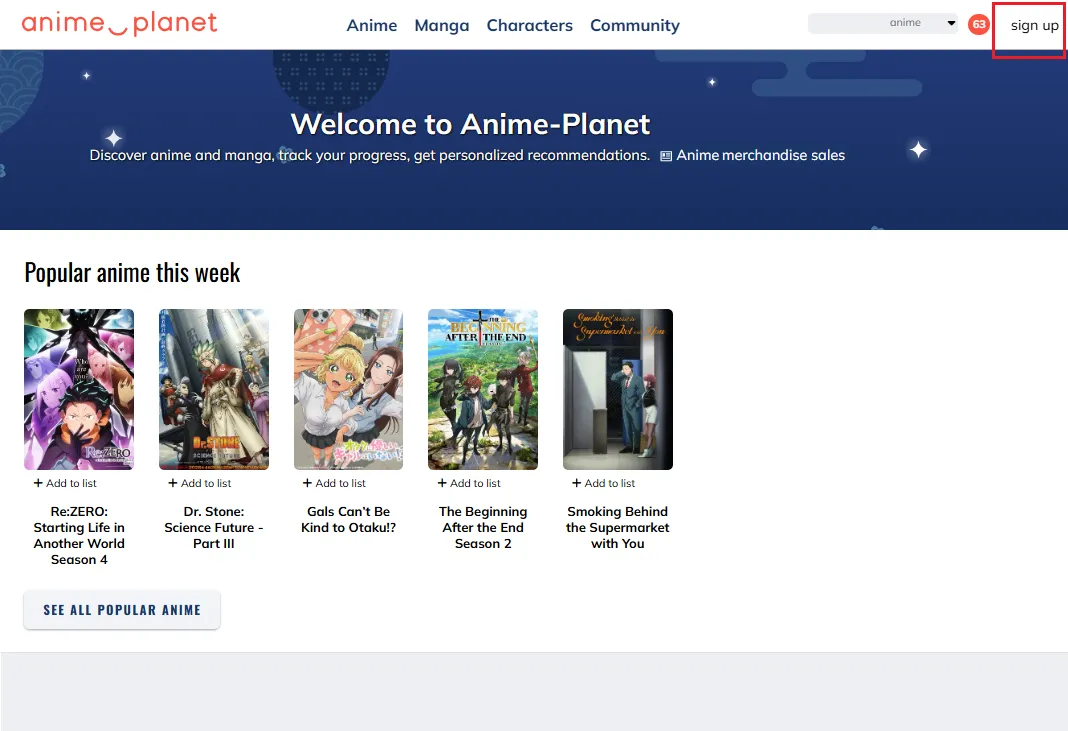
Go to the official website at Anime-Planet.com. Click the Sign Up button located in the top-right corner of the homepage.
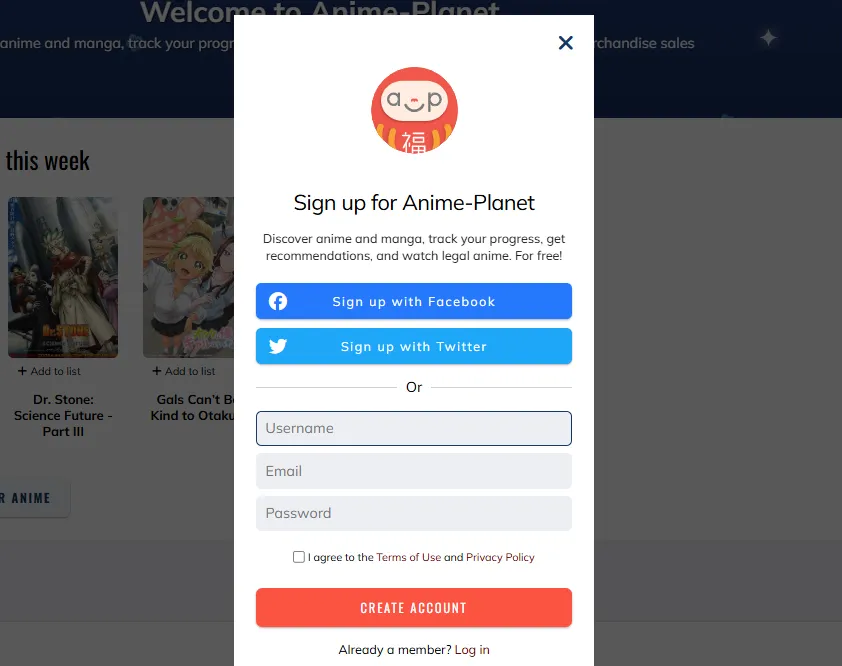
You can register by entering a unique username, your email address, and a secure password. Alternatively, you can use social login options for a faster one-click signup.
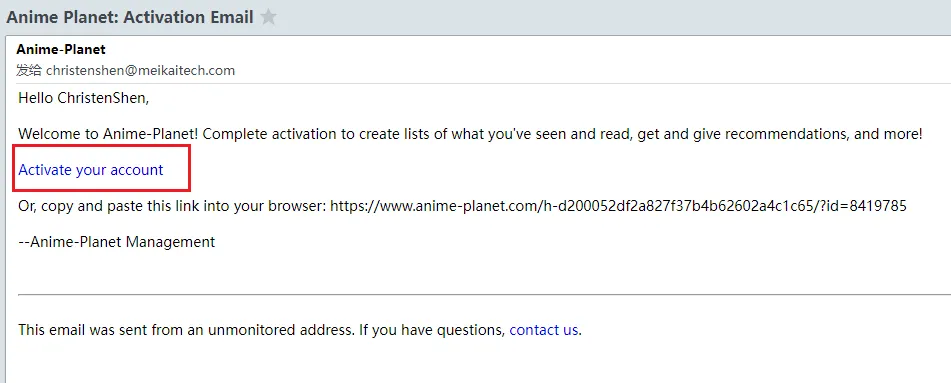
Check your email inbox for a verification link to activate your account.
Step 2: Customizing Your Profile
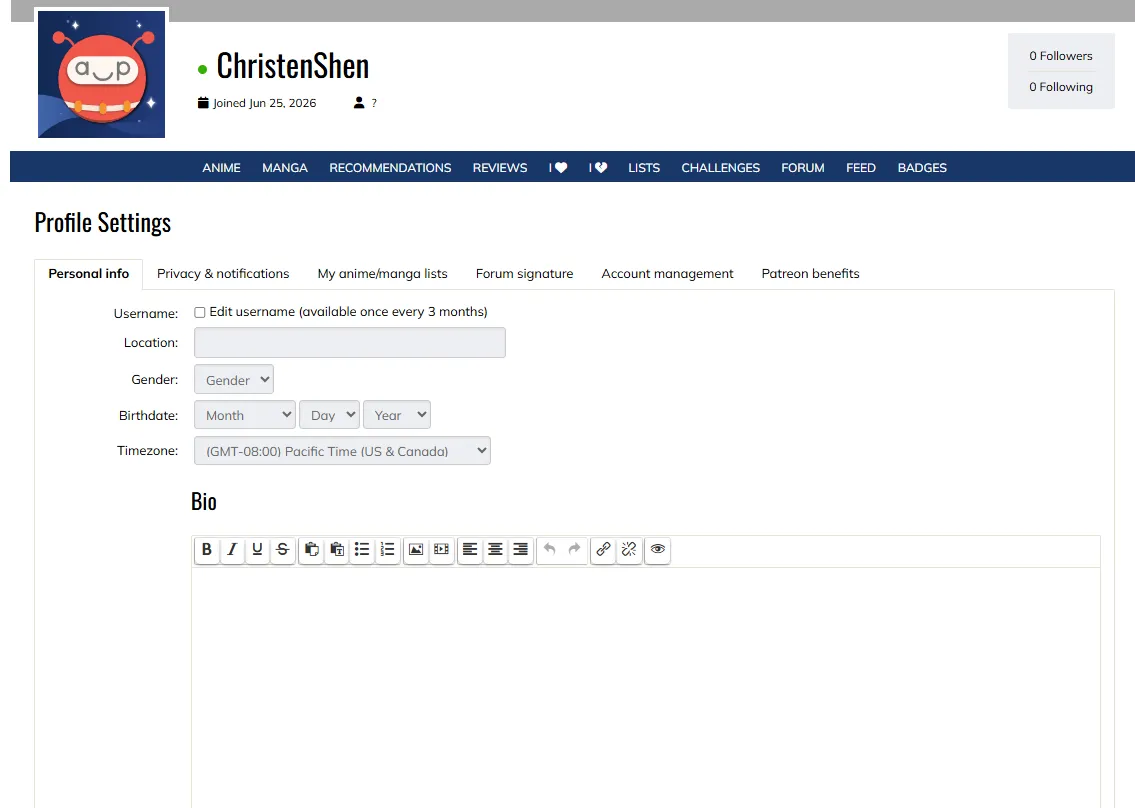
Before diving into tracking, take a moment to personalize your profile settings. This makes your page uniquely yours and helps you connect with the community:
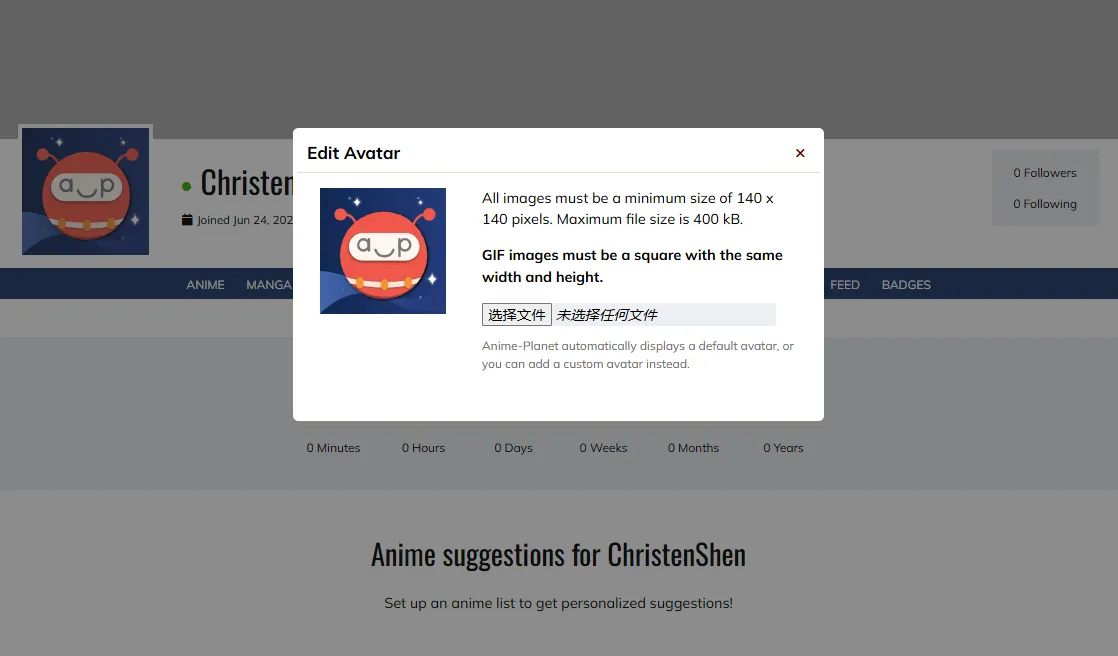
Choose an Avatar: Anime-Planet offers a massive database of pre-loaded anime character images, or you can upload your own custom picture.
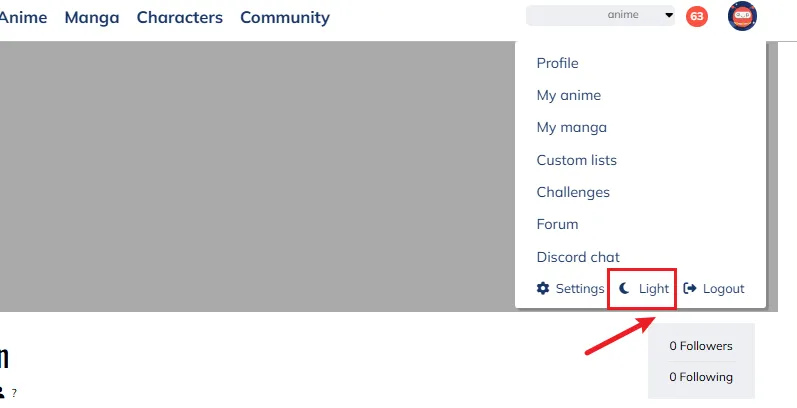
Toggle Interface Settings: Choose between Light Mode and Dark Mode depending on your viewing preference.
Write a Bio: Let other users know your favorite genres, your all-time top 5 anime, or what manga you are currently obsessed with.
Step 3: Quick Tour of Your Profile Dashboard
When you first open your profile, don't let all the text overwhelm you. You only need to know four key areas:
The Search Bar (Top Right): This is your main tool. Type any anime or manga name here to find it instantly.
Life on Anime (The Stat Bar): Your personal anime odometer. As you log shows, this will automatically calculate exactly how many hours or days you’ve spent watching anime.
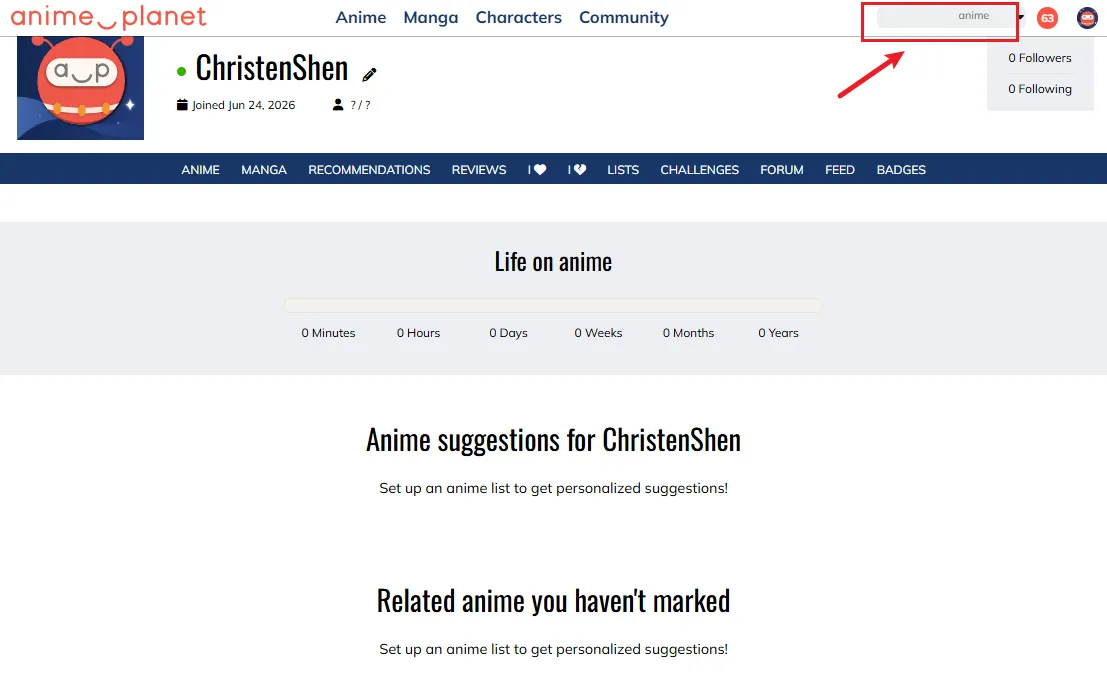
The Dark Blue Menu: This is your personal library. Clicking ANIME or MANGA here will take you straight to your personal tracking lists.
Personalized Suggestions (Bottom): It’s empty right now because your account is brand new! As soon as you add a few shows, this space will automatically fill up with smart recommendations based on your taste.
How to Track and Organize Anime & Manga?
Now that your account is ready, it's time to start building your library. Tracking and organizing on Anime-Planet happens in three simple steps.
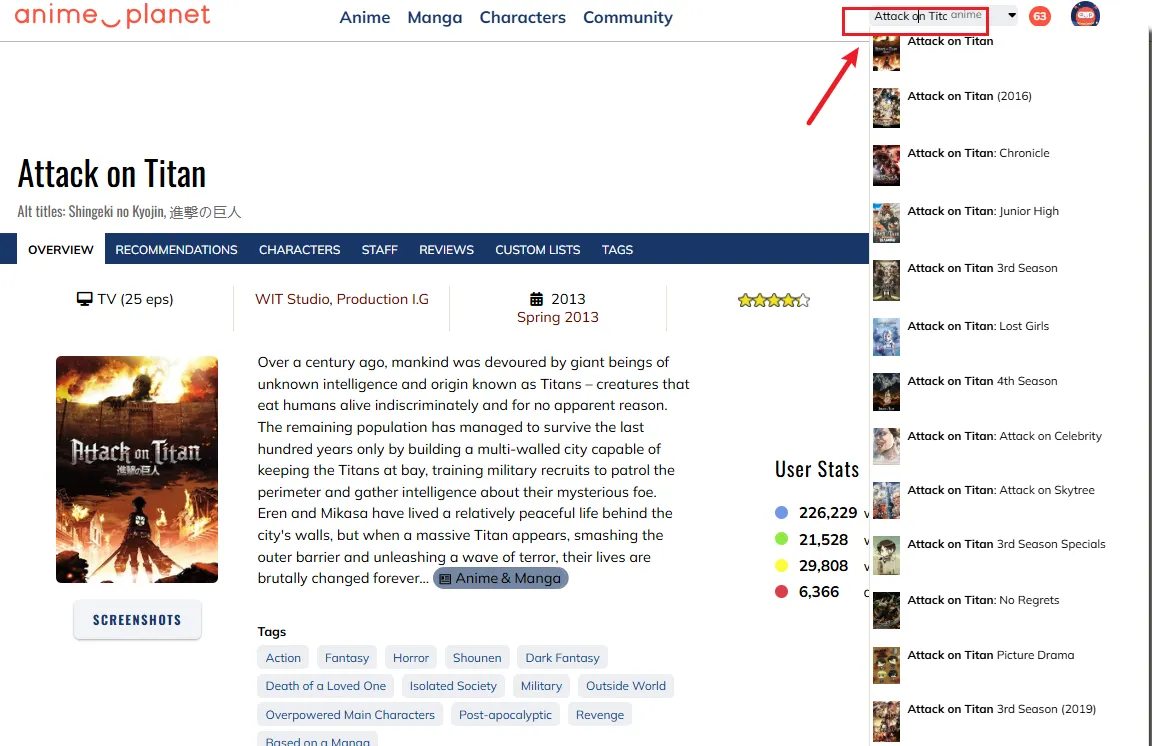
Step 1: Search for a Title
Use the search bar at the top right of your dashboard. Type in the name of the anime or manga you want to log (the platform accepts both English titles like Attack on Titan and Japanese titles like Shingeki no Kyojin).
Step 2: Choose a Status (Organizing)
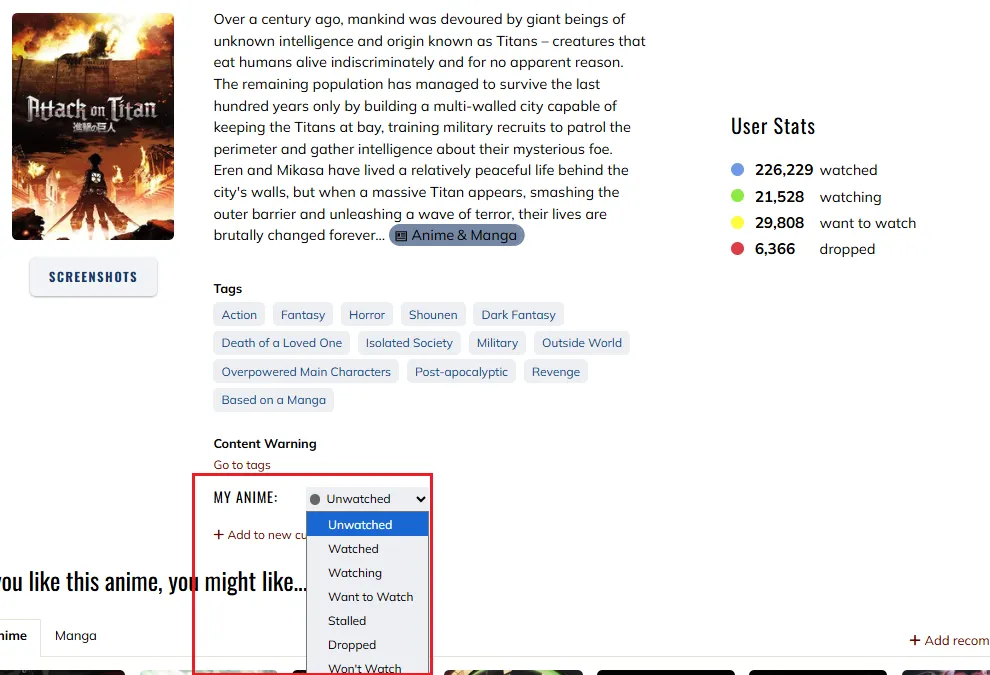
When you are on a title's page, look down to the "MY ANIME" (or "MY MANGA") section. Click the dropdown menu to organize the series into one of these specific lists based on your current status:
-
Unwatched: The default setting for any series you haven't interacted with yet.
-
Watched: Move it here once you have completely finished the entire series.
-
Watching: For shows you are actively tracking and watching episode by episode right now.
-
Want to Watch: Your personal backlog and wishlist for shows you plan to start later.
-
Stalled: For series you’ve put on a temporary break but want to pick back up eventually.
-
Dropped: For shows you couldn't stand and decided to stop watching entirely.
-
Won't Watch: A great custom filter to mark shows you have absolutely zero interest in seeing, which helps clean up your recommendations.
Step 3: Log Your Progress and Rating (Tracking)
Once you’ve set a title to "Watching" or "Reading," keeping your library updated is incredibly simple:
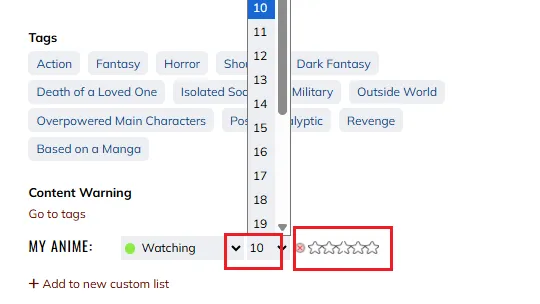
Updating Episodes/Chapters: When you select "Watching," a small text box or button will appear on the title page allowing you to input your current episode. Keep this updated to build your "Life on Anime" watch time!
Rating the Series: You can grade any anime or manga on a scale of 1 to 5 stars (including half-stars, like 4.5). This rating dictates how the platform ranks shows in your personal list.
💡 Quick Tip: When you mark an anime as "Watched" or a manga as "Read", Anime-Planet will automatically calculate the data and update your Life on Anime odometer instantly!
Managing Your Lists: The Truth About Syncing & Importing
Unlike some newer database platforms, Anime-Planet does not feature real-time, cross-platform syncing or a fully automated import dashboard. Instead, it relies on manual list management with full user authority.Here is exactly how list "syncing" and data management function on the platform:
1. Limited Import Options (No Full Automation)
If you are switching to Anime-Planet from another tracking service, you may be looking for a way to carry over your existing anime or manga history. However, you should note the platform's current operational boundaries:
-
There is no native, one-click file upload system available on your user dashboard.
-
Large-scale, automated background migrations are completely unsupported.
-
In practice, importing is a heavily restricted process. If you are migrating a massive backlog from a site like MyAnimeList, you will still need to manually rebuild the vast majority of your library piece by piece.
2. Manual List Migration (The Primary Method)
Because there is no automated bridge, the standard and most reliable way to move your data onto Anime-Planet is through active manual migration:
-
You use the top search bar to look up your titles one by one.
-
You add them to your profile and assign the correct status (such as Watching, Completed, or Want to Watch).
-
You manually adjust the episode or chapter counter using the interface controls.
3. No Sync With External Streaming Platforms
It is a very common mistake for beginners to assume they can link their Anime-Planet account to their media players. Anime-Planet does not support automatic syncing with any mainstream streaming giants, including:
-
Crunchyroll
-
Netflix
-
Hulu / Disney+
Watching an episode on those streaming platforms will not trigger an update on your profile. Every single piece of progress must be updated by you, directly inside the Anime-Planet dashboard.
4. Why This Manual Design Works
While the lack of automation might seem like a missing feature at first, this manual approach comes with distinct advantages that long-time users appreciate:
-
A Lightweight Interface: The site runs incredibly fast because it isn't constantly trying to talk to third-party website servers in the background.
-
No Syncing Errors: You never have to worry about data conflicts, corrupted file overwrites, or accidental list wipes that often plague automated systems.
-
Total Personal Control: Your profile reflects exactly what you choose to put on it, making your statistics a true, intentional badge of your anime journey.
In short, syncing on Anime-Planet is not an automated feature, but rather a deliberate combination of manual list management and full user control. While it lacks modern background cross-platform synchronization, it compensates by offering a highly stable, error-free, and personalized environment to archive your favorite media.
Discovering New Content: Recommendations & Tags in Anime-Planet
Once you’ve added a few anime or manga to your lists on Anime-Planet, the platform’s recommendation system becomes much more useful. Instead of relying on random online lists, you can discover new series directly based on your own viewing history and community-driven suggestions. There are two main ways to explore new content effectively.
“If You Like This…” Recommendations
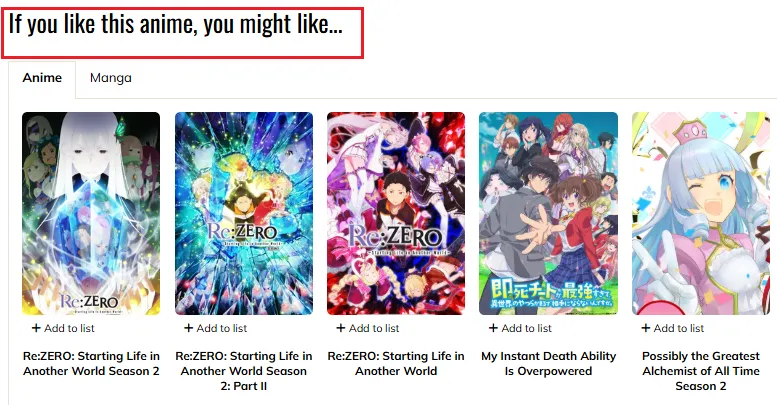
On each anime or manga page, you will find a section labeled “If you like this, you might also like…”This feature is powered by community input rather than purely automated algorithms.
How it works:
-
Recommendations are based on user-submitted similarity connections
-
Fans vote on whether two series feel related
-
Suggestions often include short explanations of why they are similar
For example, users might explain connections through:
-
Similar story themes (e.g. dark fantasy, survival)
-
Character dynamics or relationships
-
Shared emotional tone or atmosphere
This makes recommendations feel more contextual and opinion-driven, rather than purely algorithmic.
Discovering Content Through Tags
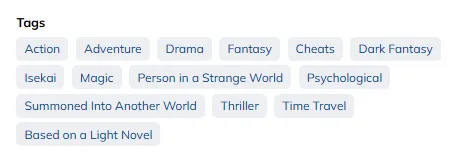
Another powerful discovery tool is the tag system, found directly on each anime or manga page. Tags describe specific elements of a series, such as: Dark Fantasy, Shounen, Post-apocalyptic, or Gore.
How to use tags effectively:
-
Click on any tag to explore related titles
-
Browse ranked lists within that exact category
-
Discover niche or underrated anime within a specific theme
This is one of the fastest ways to find hidden gems that match very specific preferences.
Summary: The discovery system on Anime-Planet combines community-driven recommendations with detailed tag-based browsing. Together, they allow users to move beyond mainstream suggestions and explore anime and manga that closely match their personal taste.
Frequently Asked Questions (FAQ)
1. Is Anime-Planet completely free to use?
Yes! Every core feature—tracking anime and manga, reading community reviews, custom profiling, and getting recommendations—is 100% free. The site is supported by ads. If you want to support the platform and remove ads, they offer an optional paid premium tier.
2. Can I watch anime or read manga directly on Anime-Planet?
No. Anime-Planet is strictly a tracking and database platform; it is not a streaming service. It does not host full anime episodes or manga chapters. Instead, the platform focuses entirely on helping you track your history, manage your lists, and discover new series based on community recommendations. While some pages might feature promotional video trailers or external links to legal streams, you cannot watch full content here.
3. Does Anime-Planet support syncing with MyAnimeList or other platforms?
No, Anime-Planet does not support real-time, cross-platform syncing. There is no automated bridge to link your account to external sites like MyAnimeList or AniList. To keep your lists identical across platforms, you will need to manually update your progress inside Anime-Planet or replicate your history when you first set up your profile. It functions primarily as a standalone, manual tracking system.
4. How do I add my favorite characters to my profile?
When browsing an anime or manga page, click on the Characters tab. When you see a character you love, simply click the Heart (I❤) icon on their character card. They will instantly be pinned to the "Loved" section on your profile dashboard!
5. Why can't I find a specific manga or light novel on the site?
Anime-Planet has strict indexing guidelines. While they have an incredibly massive database, some incredibly obscure indie light novels, webcomics, or brand-new fan translations might not be approved yet. If a title is missing, you can actually submit a database request in their community forums for the moderators to add it.
6. Is Anime-Planet better than MyAnimeList (MAL)?
It completely depends on your personal preferences. Both platforms serve the same core purpose but cater to different styles:
-
Choose Anime-Planet if: You prefer a highly clean, intuitive, and visually simple interface that is easy for beginners to navigate right out of the box. Its fan-voted recommendation and tag systems are also arguably much more user-friendly for discovering new content.
-
Choose MyAnimeList if: You want deeper global community statistics, a massive forum culture, more advanced profile customization (like CSS styling), and a platform that supports widespread automated third-party app integration.
The Bottom Line: If you want streamlined simplicity and hassle-free list logging, Anime-Planet is the easier choice. If you want raw data, complex features, and automated syncing capabilities, MyAnimeList might suit you better.
Conclusion
Anime-Planet is a simple and beginner-friendly platform for tracking, organizing, and discovering anime and manga. It is not a streaming service, but a dedicated tool for managing your watchlists and reading progress.
While it does not support automatic syncing, it offers a clear and easy way to manually track everything in one place. Combined with its recommendation system, it helps users stay organized and find new series based on their interests.
Overall, if you are looking for a straightforward way to manage your anime and manga in 2026, Anime-Planet is a reliable starting point for beginners.