Managing a local anime library in 2026 can quickly become overwhelming, especially when dealing with inconsistent filenames, missing metadata, and unreliable scraping tools. While mainstream trackers like MyAnimeList are great for ratings and community discovery, they are not designed to work directly with your actual video files.
That is where AniDB stands out. Unlike traditional trackers, AniDB is a file-focused anime database that uses advanced hash matching to identify episodes based on the content of the file itself, not its name. This makes it especially useful for organizing large offline collections and building automated media libraries.
With AniDB, you can track your watch progress more precisely, sync data with external tools, and even identify different anime release groups based on file metadata. When combined with tools like Shoko, Plex, or Jellyfin, it becomes a powerful backend for managing a fully automated anime library.
In this beginner-friendly guide, you will learn how to set up AniDB from scratch, use hash matching, and understand why it remains one of the most powerful tools for serious anime collectors in 2026.
What is AniDB? (The Core Differences Explained)
AniDB (Anime DataBase) is a long-running, community-driven metadata database designed to provide highly detailed, structured information about anime series and their individual episodes. Unlike modern tracking platforms that focus on social features or recommendations, AniDB is built entirely around data accuracy, structural precision, and file-level identification.
📊 Core Concept: A Technical Anime Database
At its core, AniDB functions as a technical reference ledger for anime. Each entry contains deeply structured metadata, including:
-
Comprehensive episode lists (including OVAs and specials)
-
Exact air dates and broadcast information
-
Cross-referenced alternative titles (English, Japanese, Romaji, and Synonyms)
-
Voice actors (Seiyuu) and production staff
-
Detailed release group information
However, what truly makes AniDB unique is its ability to link this metadata directly to your actual video files through a system known as Hash Matching.
🔍 How AniDB Differs from Other Trackers
Unlike platforms such as MyAnimeList or AniList—which primarily rely on manual entry or simple episode clicking—AniDB takes a strict file-centric approach.
-
MyAnimeList / AniList → Track what show you watched (Title-Based).
-
AniDB → Identifies the exact file you actually own (File-Based).
This allows AniDB to recognize anime episodes based on the core content of the file itself, completely eliminating the need to rely on filenames or manual user input.
🖥️ Why This Matters in Practice
This file-centric philosophy makes AniDB an invaluable tool for users who manage:
-
Local anime libraries plagued with messy, inconsistent, or chaotic filenames.
-
Automated media servers handling large, multi-terabyte collections.
-
Multi-version releases of the same episode (such as TV broadcasts vs. Uncensored Blu-ray rips).
In these complex environments, traditional trackers fail because they cannot reliably map a random video file to an exact database episode.
⚙️ Who Uses AniDB?
AniDB is not designed to be a casual anime tracking app for your phone. Instead, it is the tool of choice for:
-
Advanced anime collectors and data hoarders.
-
Archivists and long-term digital library builders.
-
Home media server enthusiasts who demand a perfect setup.
Because of its robust API, it integrates flawlessly with modern home media infrastructure, including Plex, Jellyfin, and Shoko Server.
How to Create & Set Up Your AniDB Account
To start using AniDB, you first need to create an account on its official website. Follow these simple steps to get your account configured properly:
Step 1: Head to the Registration Page
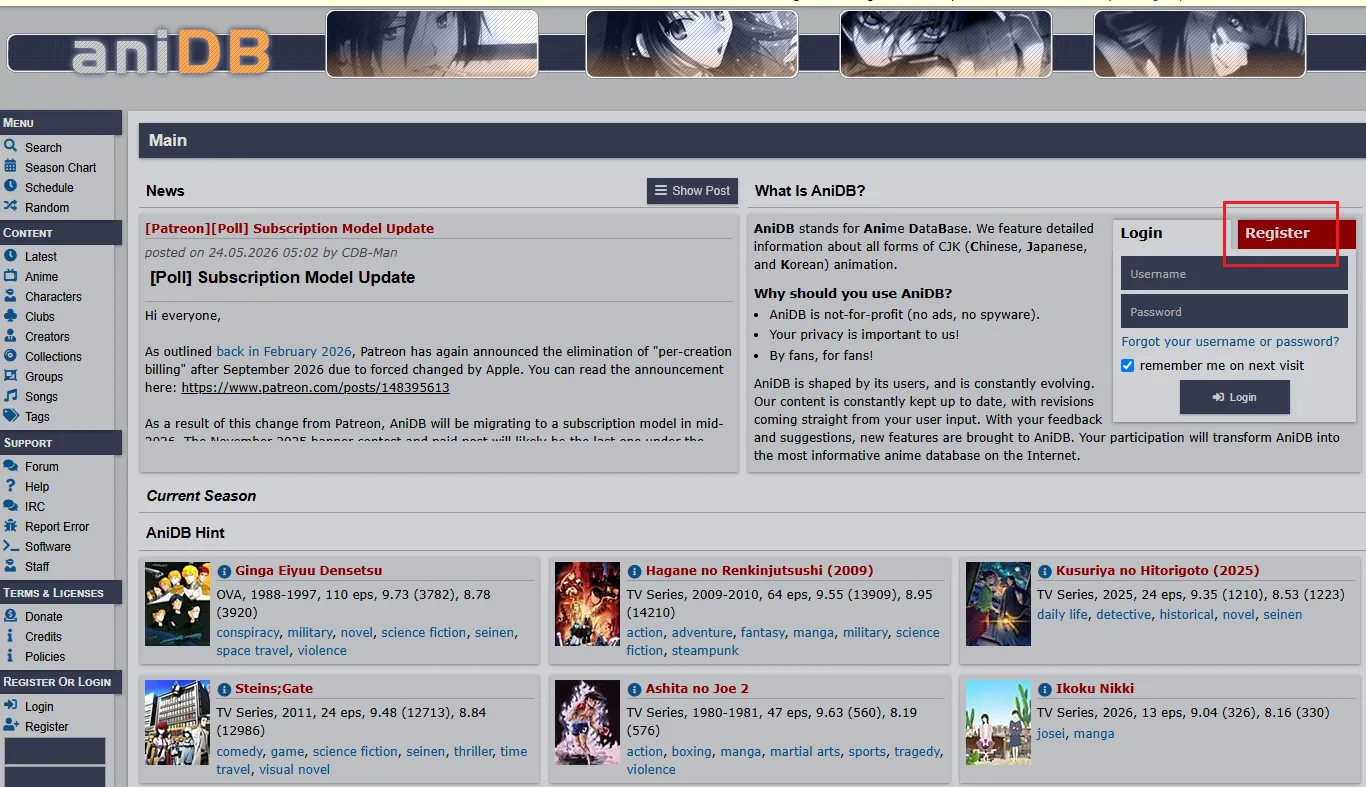
Navigate to the AniDB.net official website and click on the Register button.
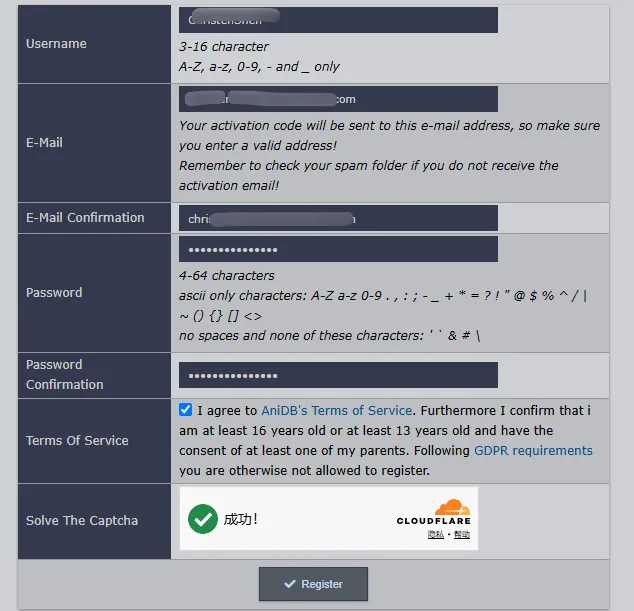
You will be asked to choose a unique username, provide a valid email address, and select a secure password.
Step 2: Active Your Account
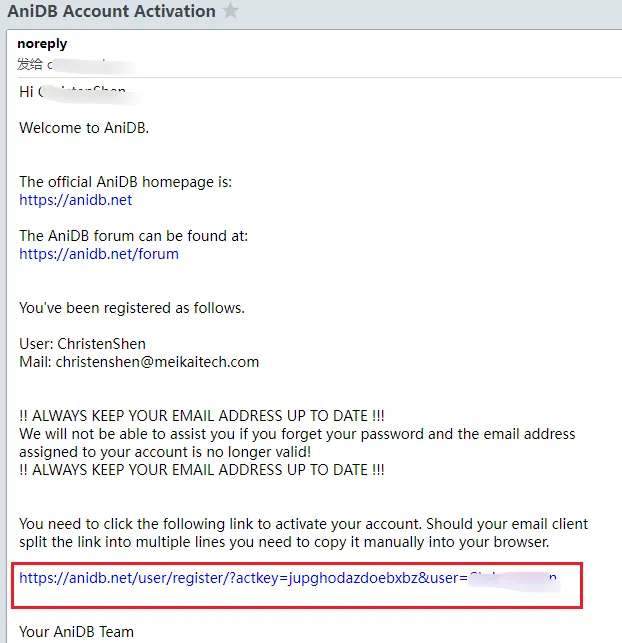
Once you submit the form, AniDB will send an automated activation link to your email.
⚠️ Crucial Warning for Beginners: AniDB’s automated activation emails are notorious for being flagged by modern email providers (like Gmail or Outlook). If you don't see the email within two minutes, check your Spam or Junk folder immediately. You cannot log in or use the API until you click that activation link.
Step 3: Log In and Explore the Dashboard
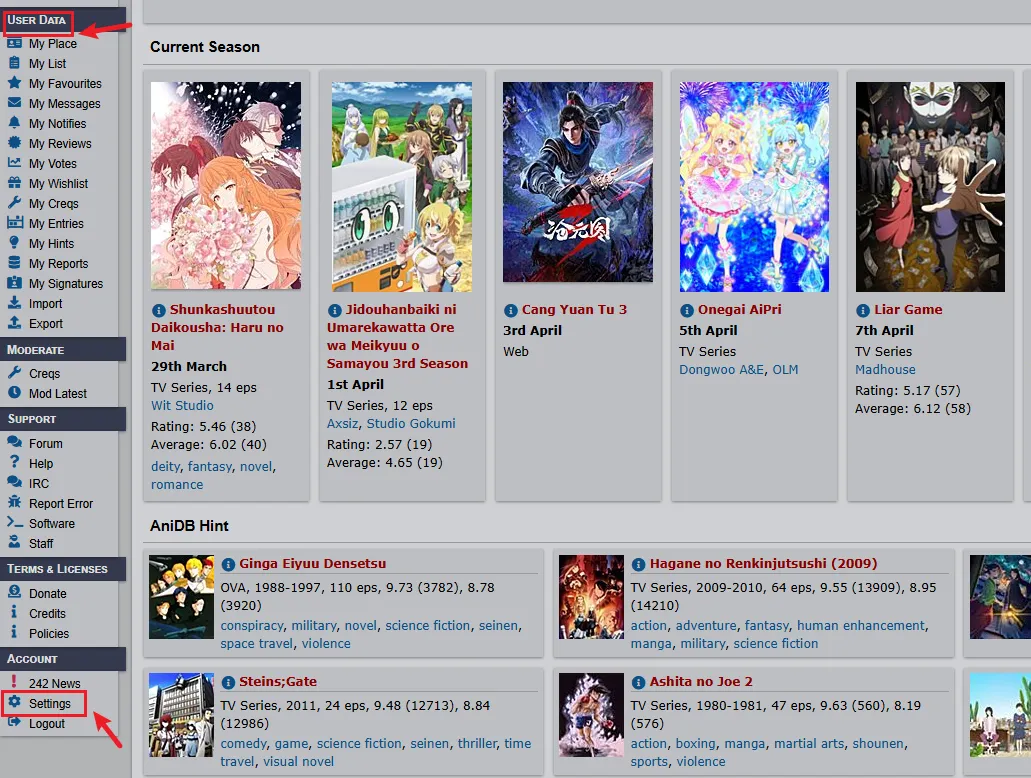
After activating your account, log back into AniDB. Everything you need is hosted entirely within the left sidebar. Look under the USER DATA and ACCOUNT sections to access your personal tracking lists and modify your core system settings.
How to Track Anime on AniDB: The "Mylist" System & Manual Walkthrough
Unlike title-based trackers (MAL/AniList) that only count your watched episodes, AniDB uses a file-centric ledger called "My List" (Mylist).
📊 The Core Concept: What is Mylist?
Think of Mylist as a personal digital inventory, not a simple watchlist:
-
MAL / AniList: Tracks what show you watched (Title-based).
-
AniDB Mylist: Logs what exact file you physically own on your hard drive (File-based).
-
Two-Tier Status: Every entry tracks both Storage State (Is the file on your local HDD, a remote NAS, or deleted?) and Viewed State (Have you watched it or not?).
🛠️ Step-by-Step: How to Track a Series Manually
While automation is the ultimate goal, knowing how to manually log an anime series helps you understand how the backend database database works. Follow this exact process:
Step 1: Search and Select Your Anime
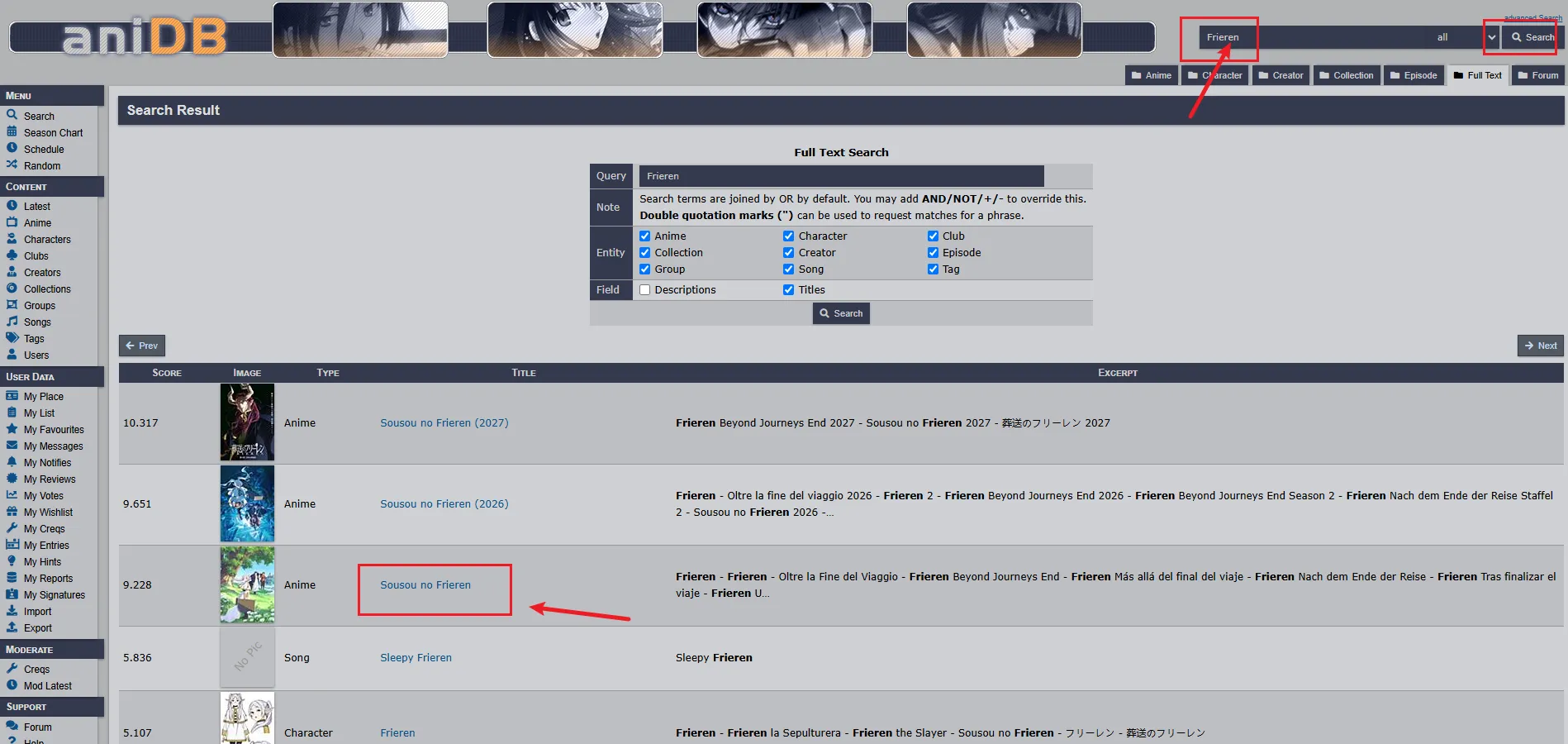
Use the search bar on the top bar to type your anime title (e.g., Frieren), and hit Enter. You will see a list of matched results. Click the exact blue title link under the TITLE column to open the main database page.
Step 2: Switch to the "Add To My List" Tab
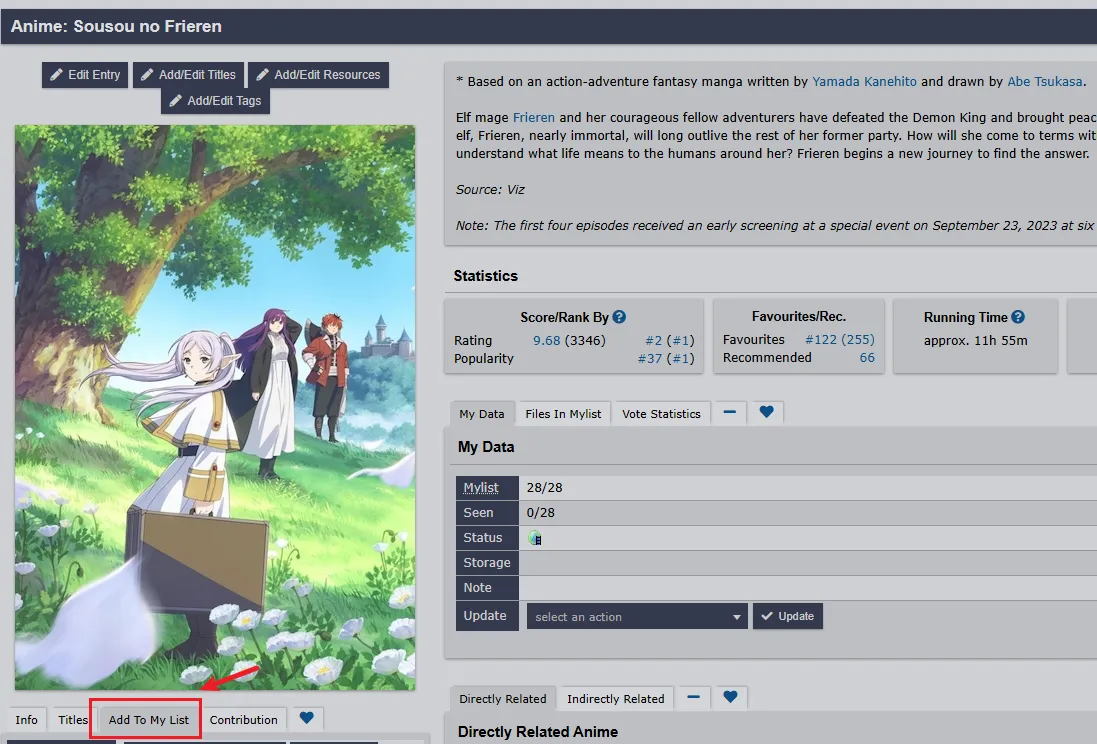
Once inside the anime's main page, and click on the Add To My List tab. This opens the master control panel for tracking the series.
Step 3: Configure Your Master File and Watch Status
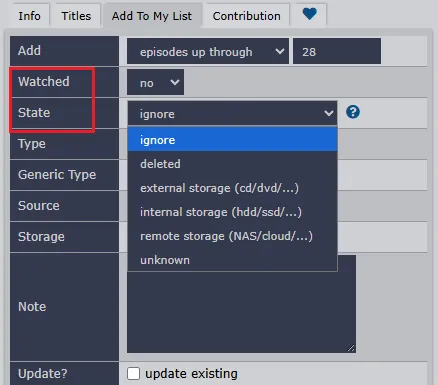
A detailed configuration panel will appear. Modify these key options before saving:
-
Add (Scope): Choose how many episodes you want to batch-add (e.g., episodes up through 28).
-
Watched: Toggle this to yes if you have already viewed them, or no if they are just sitting unread in your collection.
-
State: Open the dropdown menu and select how your files are stored. Choose internal storage (hdd/ssd/...) for local computer drives, or remote storage (NAS/cloud/...) if you run a dedicated home server.
Step 4: Save to Your Profile
Scroll to the bottom of the form and click the dark blue + Add button to commit the data to your profile.
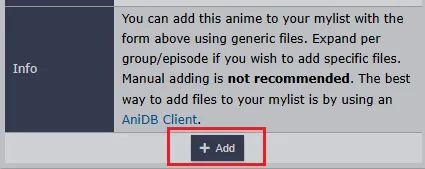
⚠️ The Limit of Manual Tracking (Why We Must Automate): Look closely at the Info section in the screenshot above. Even AniDB’s developers explicitly warn users: "Manual adding is not recommended. The best way to add files to your mylist is by using an AniDB Client."
Manually clicking through these dense spreadsheets for every single seasonal download is tedious and completely defeats the purpose of modern digital convenience. So next I will tell you how automation tools use digital fingerprints to handle all of this tracking for you on complete autopilot!
The Hash Matching System: AniDB’s Digital Fingerprint
If you have ever used Plex, Jellyfin, or another media server to organize anime, you have probably encountered one of the biggest problems in anime library management: filenames are often inconsistent. One file might be named: [SubsPlease] Frieren - 01 [1080p].mkv, while another might be: frieren_ep1_final_v2.mp4.
Traditional media scrapers rely heavily on filenames, which means poorly named files can be matched incorrectly—or not recognized at all. AniDB solves this problem through a system called Hash Matching.
🧬 What Is an Anime File Hash?
A hash is a unique digital signature generated from the actual contents of a file. Instead of looking at a filename, an AniDB-compatible client reads the file's data and calculates identifiers such as ED2K or CRC32 hashes. Think of it like a fingerprint for a video file:
-
Two identical files will generate the same hash.
-
Renaming a file does not change its hash.
-
Modifying or re-encoding a file creates a different hash.
Because the hash is based on the file itself rather than its name, AniDB can identify anime much more accurately than traditional filename-based scrapers.
📊 Why Hash Matching Beats Filename Matching
| Feature | Filename Matching | AniDB Hash Matching |
|---|---|---|
| Depends on filename accuracy | ✔ Yes | ✖ No |
| Works after renaming files | ✖ No | ✔ Yes |
| Identifies specific releases | Limited | ✔ Yes |
| Handles messy libraries well | Poorly | Excellent |
| Supports release group detection | Limited | ✔ Yes |
This is the reason AniDB remains popular among anime collectors and home media server users even in 2026.
🤯 The Magic: Name It Whatever You Want
Because AniDB tracks file hashes rather than filenames, a video can be successfully identified even if its filename is complete gibberish.
For example, if you rename an episode to garbage_file_xyz.mp4, an AniDB-compatible client will simply hash the file, query the database, and—if that file signature has been indexed—instantly identify it. The system will pull up:
-
The verified Anime Title & Episode Number
-
The exact Release Group (e.g., Erai-raws, SubsPlease)
-
The exact Resolution and Source Type (Blu-ray, Web-DL, TV Rip)
🔍 What Information Can AniDB Identify?
When a file is successfully fingerprinted, AniDB unlocks a deep tier of metadata that traditional trackers simply cannot see:
-
Release Specifics: Video resolution, audio formats, and subtitle language tracks.
-
Granular Episode Types: Seamless tracking for OVAs, movies, specials, and multi-version endings.
-
Source History: Tracing whether a file is an official retail Blu-ray rip or an on-the-fly streaming capture.
This deep technical blueprint is why power users use AniDB as the ultimate backend metadata engine to feed into tools like Shoko Server, Plex, or Jellyfin.
🎯 Why Hash Matching Matters
For casual viewers, hash matching may sound like a technical feature. In practice, however, it solves several everyday problems:
-
Eliminates the need for perfect filenames
-
Improves metadata accuracy
-
Reduces manual library organization
-
Helps identify different release versions
-
Makes automated anime libraries more reliable
Whether you are managing a few hundred episodes or a multi-terabyte collection, AniDB's hash matching system provides a level of precision that traditional anime trackers simply were not designed to offer. That is why it remains one of AniDB's most powerful and unique features.
Best Tools That Work With AniDB (Shoko, Taiga & More)
Now that you understand how AniDB's hash matching system works, the next question is simple: How do you actually use it? The good news is that you rarely need to calculate hashes manually. Most users access AniDB's file-identification features through third-party applications that automatically scan, identify, and organize anime files in the background. Here are the two most powerful tools in the ecosystem.
🚀 Shoko Server: The Ultimate Anime Library Manager
For users running a home media server, Shoko Server is widely considered the gold standard of the anime community.
-
What It Does: Shoko runs as a background service that watches your anime folders. It calculates file hashes, communicates with AniDB's API, and retrieves incredibly detailed metadata for every single recognized episode.
-
Media Server Integration: Once configured, it effortlessly pushes perfect anime metadata and structural layouts to major media servers like Plex, Jellyfin, and Kodi.
-
Best For: Massive anime collections, dedicated Plex/Jellyfin users, and long-term media library data hoarders.
-
Why People Use It: Absolute automation. Instead of wasting hours manually matching, renaming, and organizing chaotic folders, Shoko handles the heavy lifting behind the scenes using AniDB's structural database.
💻 Taiga: The Best Companion App for Desktop Viewers
Not everyone wants to manage a 24/7 server. If you primarily watch anime directly on a Windows PC, Taiga offers a highly optimized, incredibly lightweight desktop solution.
-
What It Does: Taiga quietly monitors your active media player (such as VLC, MPC-HC, or MPV) and uses file detection to see exactly what show and episode number you are playing.
-
Seamless Syncing: The moment you open a video file, it can automatically update your watch progress on AniDB without you ever opening a web browser.
-
Best For: Desktop users, casual anime viewers, and anyone who wants instant, automated watch tracking.
-
Why People Use It: Convenience. It acts as a bridge between your local media player and your public profile. Best of all, it can simultaneously synchronize your watch progress across AniDB, MyAnimeList, and AniList all at once.
📊 Quick Tool Comparison
| Feature | Shoko Server | Taiga |
| Primary Use | Anime Library Management | Watch Progress Tracking |
| Best For | Plex / Jellyfin Server Users | Desktop / Windows Viewers |
| Automation Level | Very High (Full Media Scraper) | High (Instant Player Sync) |
| Installation | Dedicated Server / Windows / NAS | Lightweight Windows App |
| Learning Curve | Moderate to High | Beginner Friendly |
| File Organization | Yes | No |
| Watch Progress Sync | Yes | Yes |
💡 Which Tool Should You Choose?
-
Choose Shoko If: You maintain a large local anime archive, run a dedicated home server ecosystem (Plex/Jellyfin/Kodi), and want your library completely sorted and organized on autopilot.
-
Choose Taiga If: You watch anime directly on your PC, want automatic episode tracking that stays out of your way, and prefer a plug-and-play setup without server maintenance.
For many advanced enthusiasts, Shoko and Taiga are actually complementary tools rather than competitors. Shoko manages the structural archive itself, while Taiga focuses on tracking the screen you are currently looking at. Together, they unlock the true, automated power of AniDB.
List Synchronization: Connecting AniDB with MAL and AniList
By now, you may already have tools like Shoko or Taiga automatically tracking your anime files and updating your AniDB profile. At this point, a common question arises: If AniDB tracks my local files, how do I keep MyAnimeList or AniList updated at the same time?
This is where list synchronization comes in, turning AniDB into the core backend engine of a multi-platform anime workflow.
🔄 Why Synchronization Is Necessary
AniDB, MyAnimeList (MAL), and AniList all track anime in fundamentally different ways, which makes direct syncing more complex than a simple data copy:
-
AniDB: Focuses on detailed, file-based tracking and absolute episode numbering (e.g., counting continuously from Episode 1 to 28 across an entire franchise).
-
MAL & AniList: Focus on title-based, seasonal tracking (e.g., separating a show into Season 1 and Season 2) and community social features.
Because of these architectural differences, synchronization requires specialized tools that can "translate" AniDB's absolute IDs into seasonal structures understood by other platforms on the fly.
🧠 The Core Challenge: Data Interpretation
The main difficulty in syncing systems is not the actual data transfer, but data interpretation. Each platform relies on a completely different core database model:
-
AniDB: An episode-centric, metadata-heavy archive.
-
MyAnimeList (MAL): A traditional, strictly season-based database.
-
AniList: A modernized, flexible season + episode hybrid model.
Sync tools act as a translation layer between these distinct formats, ensuring your progress remains mathematically consistent across all platforms without duplicating your manual efforts.
🛠️ How Synchronization Works in Practice
Depending on your library setup, synchronization usually happens automatically through third-party desktop apps or server integrations:
Method A: Desktop-Based Sync (Via Taiga)
If you watch anime directly on your PC, Taiga handles synchronization locally on your machine. Once you link your accounts under Settings -> Services, Taiga bridges the gap perfectly:
-
It detects the anime file you open in your media player (e.g., VLC, MPC-HC, or MPV).
-
It matches the file instantly using AniDB's hash-based signature identification.
-
It updates your watch progress across AniDB, MyAnimeList, and AniList simultaneously.
Method B: Server-Based Sync (Via the Shoko Ecosystem)
If you manage a home media server, Shoko Server organizes your entire hard drive archive using AniDB's global metadata. To push that watched history outbound to your social trackers, you can use specialized ecosystem add-ons:
-
For Jellyfin Users: Community plugins like jellyfin-ani-sync can watch your playback status. The moment you hit 90% completion on your TV or phone, it reads Shoko's validated database entry and smoothly increments your AniList or MAL profiles.
-
For Plex Users: Third-party webhooks or community scripts can listen to Shoko's API events to sync your watch ledger across web profiles automatically.
🔄 How Sync Works in Practice
In practice, AniDB synchronization runs in the background through tools like Taiga or Shoko.A typical workflow looks like this:
Play Episode → File Detected → AniDB Match → Local Tracking → Optional Sync to MAL/AniList
This process may vary depending on your setup, but the core idea remains the same: you only track your anime once, and the system handles the rest. The benefit of this setup is that it combines AniDB’s file-level accuracy with the usability of modern tracking platforms like MyAnimeList and AniList, without requiring manual updates.
How to Find Anime Release Groups on AniDB
Once you start tracking regularly, you will notice that almost every file metadata card points back to a specific Release Group—the team responsible for encoding, translating, or distributing that specific version of an episode. AniDB's Release Group database is an archival masterpiece. Knowing how to analyze it is your ultimate guide to downloading only the absolute highest-quality files.
🎯 Why Release Groups Matter
Not every anime release is identical. Different groups use vastly different video sources, encoding bitrates, subtitle tracks, and audio options. By checking release group data on AniDB, you can instantly see:
-
Whether a specific release is complete or abandoned.
-
Which precise subtitle and audio languages are baked into the file.
-
What exact source material was used to generate the video stream.
🛠️ Step-by-Step: How to Analyze the Group Status Table
Follow this exact workflow to find the best possible version of any series:
Step 1: Open the Anime Detail Page
Search for your anime (e.g., Frieren) and click the main blue title link under the TITLE column to enter its primary profile database.
Step 2: Locate the "Group Status" Section
Scroll down past the main description and episode log until you see a massive spreadsheet container titled Group Status.
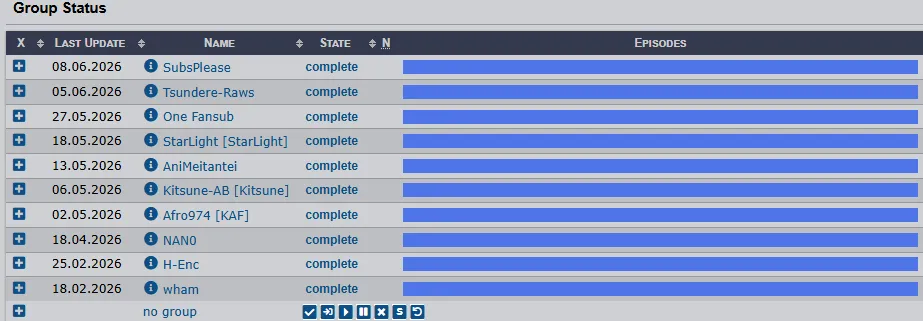
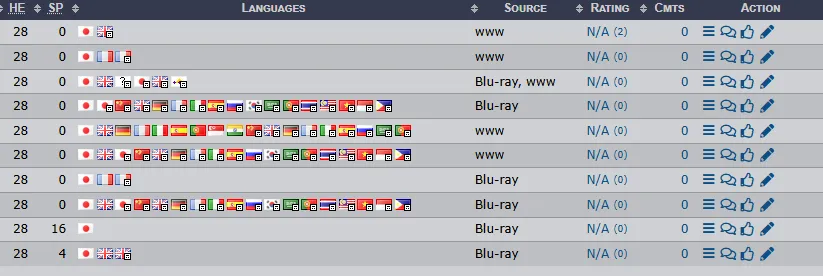
Step 3: Review the Key Data Columns
AniDB packs an incredible amount of information into this single row grid. Pay close attention to these vital columns:
-
Name & State: Ensure the State reads "complete" and the horizontal progress bar is fully filled out. This ensures the group didn't drop the project mid-season.
-
HE / SP: This shows the count of standard episodes (High Episodes) versus Special episodes/OVAs released by that specific team.
-
Languages: Displays a row of small country flags representing the exact audio tracks and subtitle languages multiplexed into the container file.
-
Source: This tells you where the video data came from—the ultimate indicator of visual fidelity.
🔍 Understanding Source Types
The Source column is your best tool for quality control. Here is a quick breakdown of what those database shorthand tags actually mean for your library:
| Source Type | Description | Archival Verdict |
| Blu-ray (BD) | Sourced directly from physical Japanese or Western retail discs. | Maximum Quality. Highest bitrates, uncompressed audio, and includes uncensored scenes or animation fixes. |
| Web-DL / WWW | Captured directly from licensed streaming platforms (Crunchyroll, Netflix, etc.). | Fastest Access. Available immediately during seasonal broadcasts, but features lower bitrates and minor streaming compression artifacts. |
| TV | Recorded live from Japanese television broadcasts. | Legacy / Speed. Typically features low bitrates, broadcast station watermarks, and occasional censorship bars. |
🧠 Pro-Tip: Exploring Individual Group Profiles
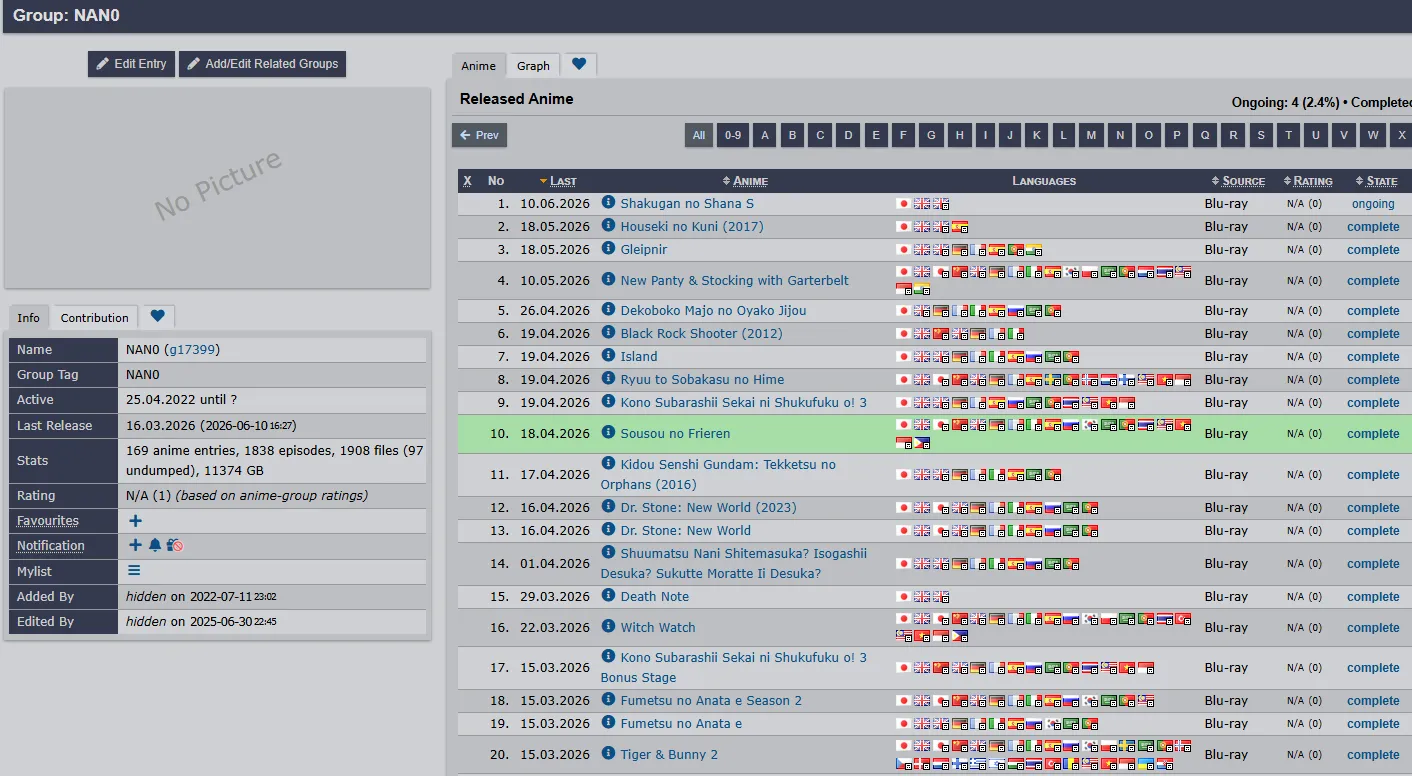
If you click on any group's blue name link inside the Group Status table (such as SubsPlease or Tsundere-Raws), AniDB takes you to their Master Group Profile Page. This profile is an archival goldmine, mapping out:
-
The group's official website links, active Discord hubs, and IRC channels.
-
A complete, searchable index of every other anime that specific group has ever encoded throughout history.
-
Their tracking timeline, allowing you to see if a group is still active or has gone defunct.
By configuring your backend automation software (like Shoko Server) to prioritize the top-tier Blu-ray groups you discover right here on AniDB, your local media folder will instantly transform from a messy pile of random downloads into a hand-curated, studio-grade digital cinema.
Frequently Asked Questions (FAQ)
1. Is AniDB safe to use?
Yes. AniDB is safe to use. It is a legitimate, long-running anime metadata database that does not host or distribute video files. It only provides information such as episode data, staff credits, and release group metadata. However, as with any community-driven database, users should be aware that some advanced tools connected to AniDB are third-party applications, which may have their own security considerations.
2. Is AniDB better than MyAnimeList?
It depends on your use case. AniDB is better suited for users who want precise, file-level anime tracking and advanced metadata management, especially when using local media servers or automation tools. MyAnimeList is better for users who prioritize community features, reviews, recommendations, and social interaction.
3. Can AniDB identify renamed files?
Yes. One of AniDB’s core features is hash-based identification. AniDB does not rely on filenames. Instead, it identifies anime files based on their internal data (file hash). As a result, even if a file is renamed to something random, AniDB-compatible tools can still recognize it correctly as long as the file content remains unchanged.
4. I deleted an anime file from my local drive. Should I remove it from AniDB?
No, you do not need to delete the entry. Instead, you should update the Storage State in your AniDB Mylist. Change the file status from “on HDD” to “deleted”. This keeps your watch history intact while accurately reflecting that the file is no longer stored locally. This approach allows AniDB to function both as a tracking system and a long-term library record.
5. My client scanned a file, but it says "Unrecognized" or "No Match Found". Why?
This happens when you download a brand-new release (e.g., an episode dropped minutes ago) or a very obscure re-encode. If no one in the global community has uploaded that specific file's hash to AniDB yet, the database cannot identify it.
Wait a few hours. Active release groups or early downloaders usually dump new hashes into AniDB automatically shortly after a release. Once someone indexes it, your client will match it on the next library scan.
6. Does AniDB work with Plex or Jellyfin?
Yes, but not directly. AniDB does not integrate into Plex or Jellyfin by default. Instead, it works through third-party tools such as:
-
Shoko (for library management and metadata matching)
-
Community plugins or external sync tools
These tools use AniDB’s hash database to identify files and then feed properly structured metadata into Plex or Jellyfin. So while AniDB itself is not a media server, it acts as a backend database for them.
Conclusion: Your Future-Proof Anime Archive
Building a definitive anime collection bridges passion with technical precision. By moving away from fragile filename matching and embracing the bulletproof logic of AniDB’s Hash Matching, you have elevated your digital archive to a professional standard. Through this guide, you have mastered a complete, unified ecosystem:
-
The Backend: Using AniDB's absolute database structure to track files, not just titles.
-
The Automation: Implementing Shoko Server or Taiga to eliminate manual library organization.
-
The Bridge: Syncing your data so AniDB manages your local files while seamlessly updating your social profiles on MAL and AniList.
-
The Quality Control: Using the Group Status panel to target pristine Blu-ray encodings over highly compressed streaming rips.
The initial learning curve of AniDB is steep, but the reward is complete digital autonomy. Your viewing history is secure, your library is automated, and your collection is future-proof. Fire up your clients, configure your pipelines, and let the hashes do the heavy lifting. Happy archiving!