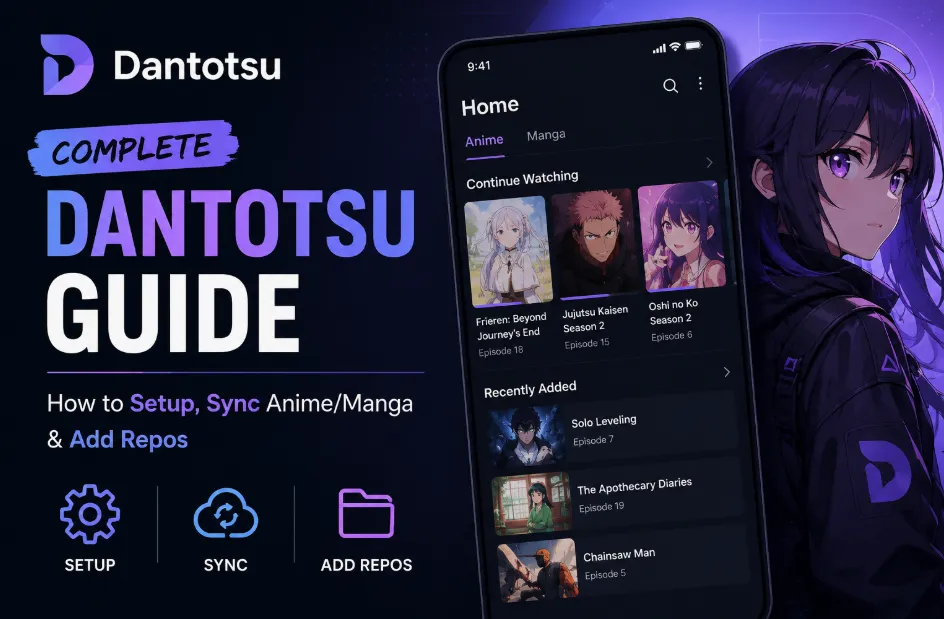
If you're an anime and manga fan, you know the struggle — watching episodes on one platform, reading chapters on another, then manually updating your progress on AniList or MyAnimeList. Before you know it, you're juggling multiple apps just to keep track of what you've seen and read. Dantotsu solves that problem. It's a free, open-source app that combines anime streaming and manga reading into a single, modern interface. Think of it as a more polished alternative to Tachiyomi or Aniyomi. Instead of switching between websites and apps, you install extensions (called "repos") directly within Dantotsu to pull content from public sources like Gogoanime, Zoro, and MangaDex.
What makes Dantotsu truly powerful in 2026 is its sync functionality. Once you connect your AniList, MyAnimeList, or Kitsu account, your watch and read progress updates automatically — no more manual logging or forgotten episodes. This complete guide walks you through everything you need to know: how to set up Dantotsu from scratch, how to sync anime and manga progress with your tracking service, and how to add third-party repos to expand your content sources. Whether you're new to these apps or migrating from Tachiyomi, this guide is clear, actionable, and up-to-date for 2026. Let's get started.
How to Setup Dantotsu?
Before you start, make sure you have a free account with AniList (recommended), MyAnimeList, or Kitsu, and an Android device running 8.0 or higher.
Step 1: Download the APK
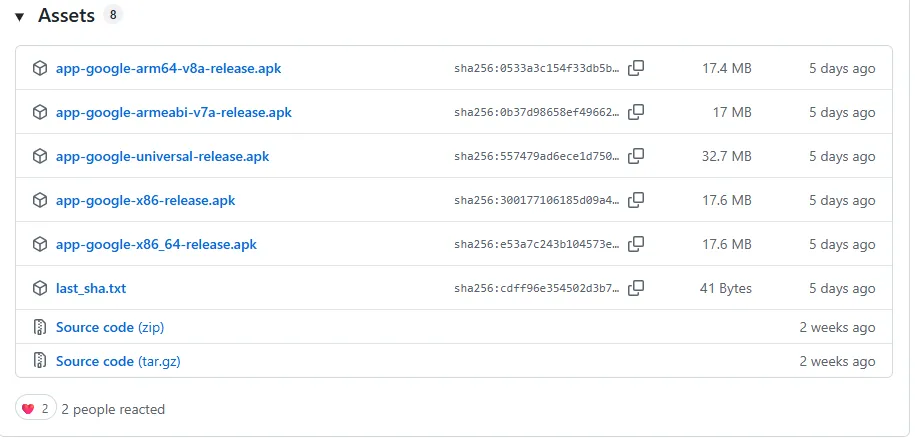
Go to the official Dantotsu GitHub Releases page, Download the latest .apk file — avoid third-party sites for security.
Step 2: Install the app
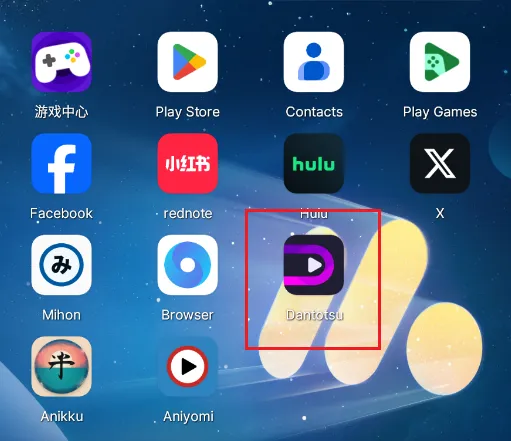
Open the downloaded file, tap "Allow from this source" if prompted, and then tap "Install" and wait for completion.
Step 3: The Mandatory Login
Open the app. You will be greeted with a login screen. Connect your AniList account immediately to unlock the dashboard.
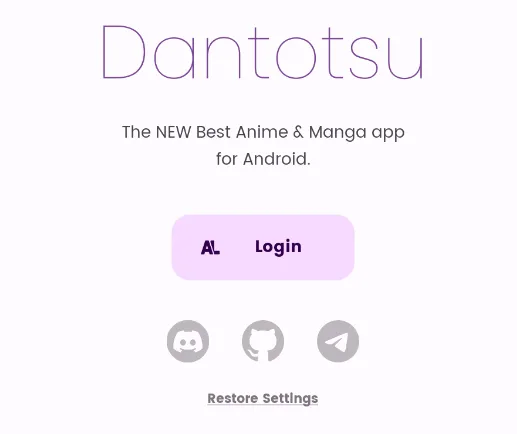
Note: Dantotsu is an "empty shell" by default—it provides the interface, but you must provide the sources via extensions.
How to Add Repos (Extensions)?
Dantotsu needs repos to access content. Repos are extension catalogs that let you install anime sources (like Gogoanime) and manga sources (like MangaDex).
Step 1: Open Settings
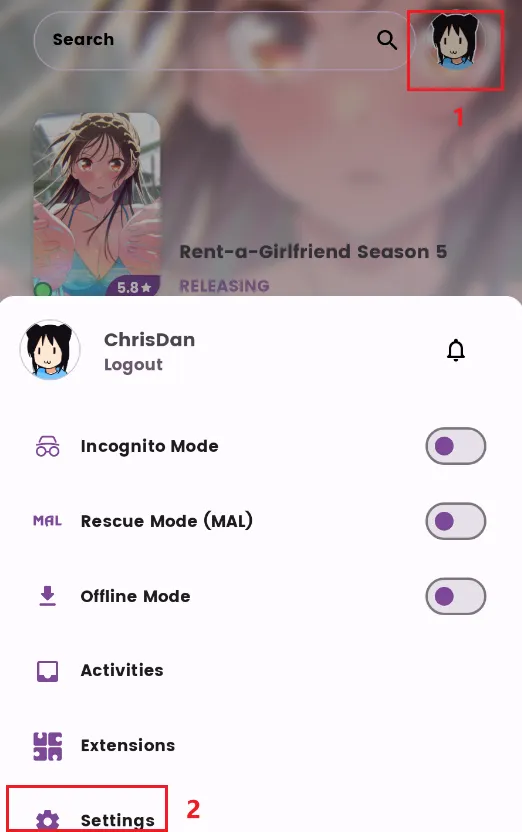
Tap your Profile Avatar (top-right corner) and select Settings.
Step 2: Navigate to Extensions
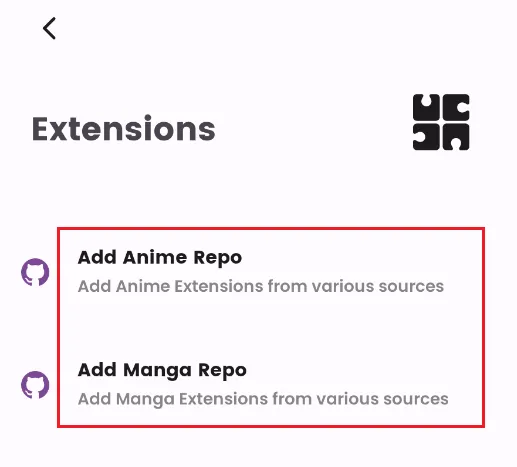
Go to the Extensions menu. You will see options for Add Anime Repo and Add Manga Repo.
Step 3: Add a repo to Dantotsu
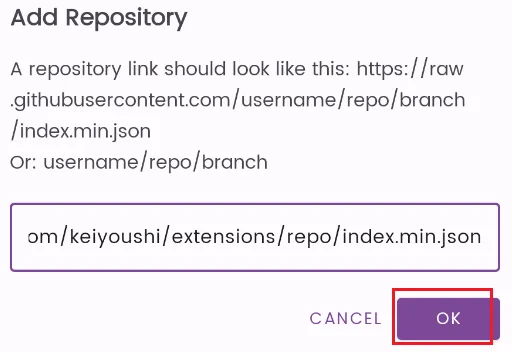
Paste the following Anime or Manga repo, and tap OK to confirm.
Manga Repo: https://raw.githubusercontent.com/keiyoushi/extensions/repo/index.min.json
Anime Repo: https://raw.githubusercontent.com/yuzono/anime-repo/repo/index.min.json
Step 4: Add Extensions
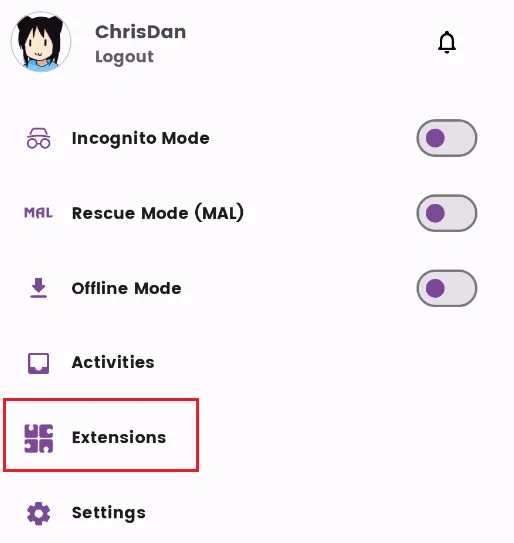
Now that the repository is added, you can browse and install individual anime or manga sources. You should Go back to the main screen, and tap your Profile Avatar (top-right corner) again. This time, directly click the Extensions option (located right above or next to the Settings button).
You will open the Add Extension dashboard. The dashboard is neatly divided into:
-
Installed Anime / Manga
-
Available Anime / Manga (This is where your new sources will appear).
Then, find a source you like (e.g., Animepahe or MangaDex) and click the Download Icon at the end of the row.
How to Start Watching or Reading on Dantotsu?
Once your extensions are set up, accessing content is simple and streamlined. Follow these steps:
Step 1: Search for Content
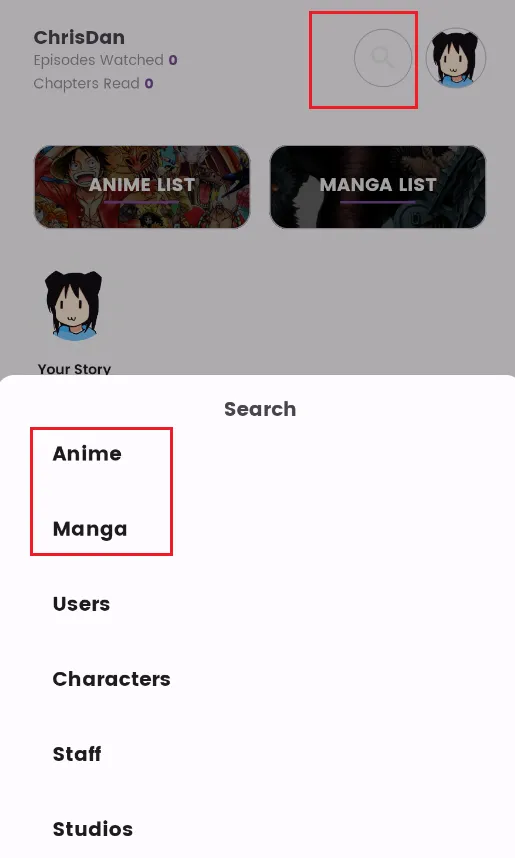
Go to the Search tab (magnifying glass icon) on the main navigation bar and type in the title of the anime or manga you are looking for.
Step 2: Enter the Media Page
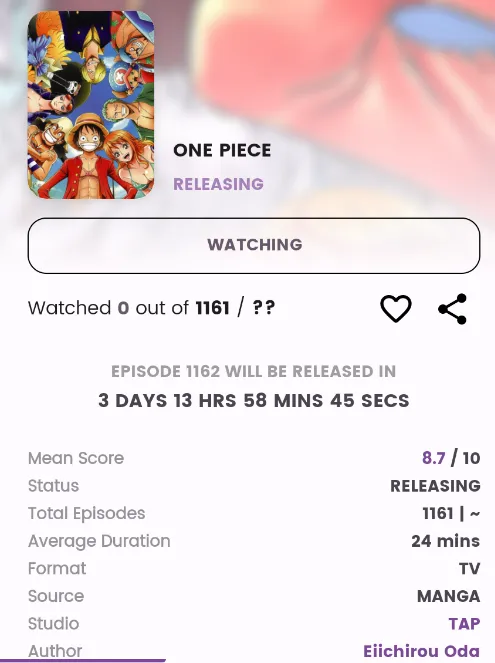
Tap on the search result to open the dedicated page for that specific title. Here you will see the synopsis, rating, and tracking details.
Step 3: Select Your Source
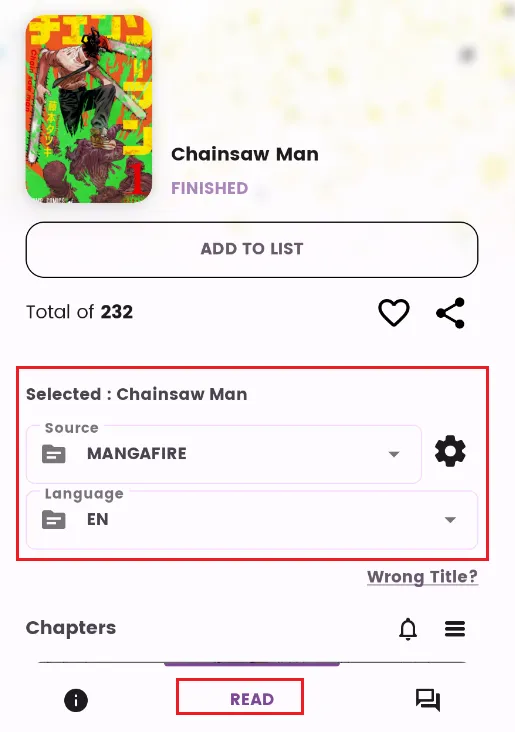
Look at the bottom center of the screen. You will see a large, prominent button labeled "Watch" (for anime) or "Read" (for manga). Upon clicking the button, a pop-up menu will appear. Select your preferred Source (Extension) from the list you installed earlier.
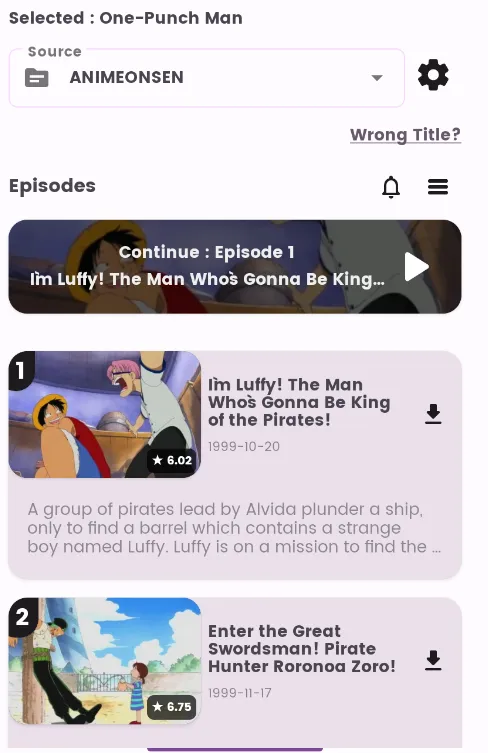
Tap the episode you want to watch and enjoy it.
How to Sync Anime & Manga Progress (Automatic Sync)?
Dantotsu 2026 is built to be a "Zero-Effort" sync tool. Since you logged in with your AniList account during the initial setup, the app handles all tracking in the background without requiring any manual input.
-
For Anime: The app automatically detects when you have watched more than 80-90% of an episode. It then instantly updates your AniList status to "Watching" and increases your episode count.
-
For Manga: Reaching the final page of a chapter automatically triggers the progress update on your profile.
Pro Tip: Because the sync is "invisible," the best way to see your progress is by checking the Home tab. Your recently watched titles will stay at the top, showing exactly which episode you should play next.
The Resource Vault: Recommended Repositories & Extensions
In Dantotsu, adding content is a two-part process: first, you register the "Warehouse" (Repository), and then you browse the "Aisles" (Extensions) to install specific sources.
1. Adding Repositories (The Backend)
Repositories are the databases that provide the list of available extensions. You must add these URLs first.
-
Path: Tap Profile Avatar (top-right) → Settings → Extensions.
-
Action: Copy and paste the URLs below into the Add Anime Repo or Add Manga Repo fields.
| Repository | Recommended URL (Copy & Paste) | Why use it? |
| Keiyoushi | https://raw.githubusercontent.com/keiyoushi/extensions/repo/index.min.json | The Library King. Unbeatable for high-res manga, manhua, and manhwa. |
| Yuzono | https://raw.gitmirror.com/yuzono/anime-repo/repo/index.min.json | The Gold Standard: Specifically optimized for anime video players with fast loading speeds. |
| Kohi-den | https://raw.gitmirror.com/Kohi-den/extensions/repo/index.min.json | The Powerhouse: Features high-bitrate sources and rare niche titles. |
Pro Tip: Ensure there are no extra spaces at the end of the URL when pasting. Even a single hidden space will cause an "Invalid Repository" error.
2. Must-Have Extensions (The Top 5)
After adding the repositories, tap your Profile Avatar (top-right) > Extensions to enter the "Add Extension" page. These five are the most stable and high-performing sources in 2026.
📺 Best for Anime
-
✨ HiAnime: The most stable source in 2026. It features multiple CDN nodes for zero buffering and works perfectly with AniList auto-sync.
-
🚀 AnimePahe: Renowned for its compression technology. You get 1080p quality at a fraction of the data cost—perfect for mobile viewing.
-
🎬 AniWatch: A massive library with excellent subtitle support. If you can’t find an obscure series elsewhere, AniWatch usually has it.
📖 Best for Manga
-
📚 MangaDex: The gold standard for manga reading. Clean, high-quality scans with no ads, perfectly optimized for Dantotsu's reader.
-
🔥 MangaFire: A powerful alternative that often carries titles or chapters that are unavailable on other platforms.
FAQ: Frequently Asked Questions
1. Is Dantotsu free to use?
Yes. Dantotsu is 100% free and open-source. While some third-party sources (extensions) might have their own limitations, the app itself contains no hidden fees or native ads.
2. Does Dantotsu work on iPhone or iOS?
No. Dantotsu is built specifically for Android. As of 2026, there is no official iOS version. iPhone users typically use web-based trackers or alternative apps like Enimax or Paperback.
3. Why does Dantotsu ask me to log in immediately?
Dantotsu is designed as an AniList client first. Logging in immediately unlocks the personalized dashboard, your library, and the "Invisible Sync" feature that tracks your progress across all devices.
4. Is an AniList account mandatory?
While you can technically skip login in some modified versions, the official 2026 build requires an account to function properly. Without it, you lose the ability to track progress, receive recommendations, and save your library.
5. Why are my sources or extensions not working?
This usually happens if:
-
The extension needs an update.
-
The source website changed its domain (e.g., Zoro moving to AniWatch).
-
Crucial: You forgot to click "Trust" on the extension after installing it.
6. Why is the video buffering so slow?
Buffering is almost always a server-side issue from the source (e.g., GogoAnime).
-
Quick Fix: Click the Source button in the player and switch to a different provider or a lower bitrate (e.g., from 1080p to 720p).
7. Can I download anime or manga for offline use?
Yes. Most extensions in Dantotsu support downloading. Look for the Download icon (downward arrow) on the episode or chapter list. Note that downloaded anime is stored within the app's cache/data folder.
8. Is Dantotsu safe?
Yes, the app is safe as long as you download the official APK from their GitHub Releases. Be cautious when adding unknown third-party repositories, as they are managed by external developers.
9. How is Dantotsu different from Mihon or Aniyomi?
-
Mihon: Focuses strictly on Manga.
-
Aniyomi: A versatile but older-style "all-in-one" app.
-
Dantotsu: The modern successor with a superior UI, better gesture controls, and the most advanced AniList/MAL integration available in 2026.
10. Why is AniList sync not updating?
If your progress isn't updating:
-
Ensure you have watched at least 85% of the episode.
-
Check if "Auto-update progress" is toggled ON in your Account settings.
-
Try logging out and back in to refresh your security token.
11. What is the difference between "Stable" and "Alpha/Dev" builds?
As of 2026, there are two main ways to get Dantotsu.
-
Stable builds: Safe and reliable for most users.
-
Alpha/Dev builds: These often include experimental features like "Bulk Download" or "Advanced Subtitle Styling" before they reach the main version.
Recommendation: Stick to the official GitHub releases for daily use, but check the Dantotsu Telegram or Discord for Alpha builds if you want the absolute latest features.
12. My episodes have multiple "English" subtitle tracks. Which one should I choose?
In recent 2026 updates, Dantotsu improved subtitle labeling.
-
Look for tracks labeled [ASS] or [Softsubs] for the best experience (this allows you to change fonts/colors).
-
If you see generic tags like [en], it is usually the default hard-coded track from the source.
Conclusion: The Future of Your Otaku Life
In 2026, we are surrounded by more content than ever, but managing it shouldn't feel like a chore. Dantotsu stands out not just as an app, but as a bridge—connecting the world's largest streaming and reading libraries with the social tracking of AniList.
By following this guide, you’ve moved past the frustration of manual logging and the chaos of switching between dozens of websites. You now have a unified, automated, and sleek dashboard that puts your focus back where it belongs: on the stories you love.
Whether you’re catching the latest seasonal hit on HiAnime or diving into a classic series on MangaDex, Dantotsu ensures that every second you spend watching or reading is accounted for.
Happy Binging!